
Все промпты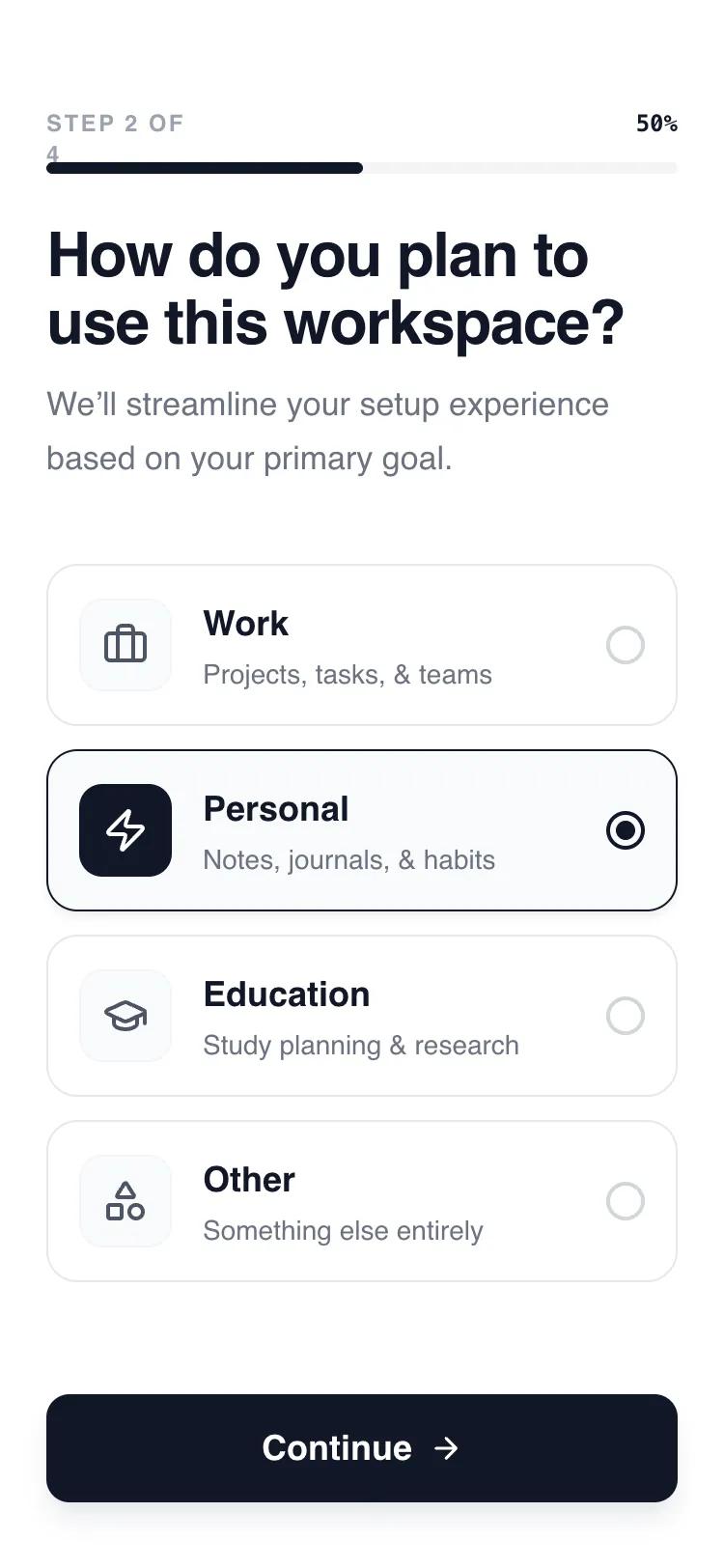 Все промпты
mobile appaccount setuplayoutmultistep workflow
Пошаговый мастер настройки профиля (Account Setup Flow)
UI-компонент для прогрессивного заполнения данных. Экран показывает по одному шагу за раз, снижая когнитивную нагрузку и упрощая онбординг в мобильных приложениях.
Автор: Shirley LouЖивое превью
Зачем вайб-кодеру
Этот флоу нужен, если пользователь должен заполнить много полей при регистрации. Вместо длинной скучной формы он видит аккуратные шаги с прогресс-баром и крупными кнопками. Это держит фокус и повышает конверсию в завершение регистрации.
Закинь этот промпт в v0 или Lovable, чтобы быстро набросать структуру онбординга. В коде уже заложена логика переключения шагов и плавные анимации. Тебе останется только заменить текст, иконки и поля под специфику твоего SaaS-продукта.
Prompt
# Account Setup Flow — Progressive Disclosure Layout

Here is a reference implementation:

~~~html
<!DOCTYPE html>
<html lang="en">
<head>
    <meta charset="UTF-8">
    <meta name="viewport" content="width=device-width, initial-scale=1.0">
    <title>Progressive Account Setup</title>
    <script src="https://cdn.tailwindcss.com"></script>
    <script src="https://code.iconify.design/iconify-icon/1.0.7/iconify-icon.min.js"></script>
    <link href="https://api.fontshare.com/v2/css?f[]=general-sans@700,500,600,400&display=swap" rel="stylesheet">
    <style>
        body {
            font-family: 'General Sans', sans-serif;
            -webkit-font-smoothing: antialiased;
        }

        .step-content {
            transition: all 0.4s cubic-bezier(0.16, 1, 0.3, 1);
        }

        .slide-out {
            opacity: 0;
            transform: translateX(-20px);
        }

        .slide-in {
            opacity: 0;
            transform: translateX(20px);
        }

        .active-step {
            opacity: 1;
            transform: translateX(0);
        }

        input:checked ~ .card-content {
            border-color: #111827;
            background-color: #F9FAFB;
            box-shadow: 0 4px 6px -1px rgba(0, 0, 0, 0.05);
        }
        input:checked ~ .card-content .radio-indicator {
            border-color: #111827;
        }
        input:checked ~ .card-content .radio-dot {
            transform: scale(1);
        }
        input:checked ~ .card-content .icon-box {
            background-color: #111827;
            color: #FFFFFF;
            border-color: #111827;
        }
    </style>
</head>
<body>
    <div class="w-full h-screen flex flex-col bg-white overflow-hidden selection:bg-gray-100">

        <!-- Header: Progress -->
        <header class="shrink-0 pt-14 px-6 pb-6">
            <div class="flex items-end justify-between mb-3">
                <span id="step-counter" class="text-xs font-bold tracking-widest text-gray-400 uppercase">Step 1 of 4</span>
                <span id="step-percentage" class="text-xs font-bold text-gray-900 font-mono">25%</span>
            </div>
            <div class="h-1.5 w-full bg-gray-100 rounded-full overflow-hidden">
                <div id="progress-bar" class="h-full bg-gray-900 w-1/4 rounded-full transition-all duration-700 ease-out"></div>
            </div>
        </header>

        <!-- Dynamic Content Area -->
        <main id="step-container" class="flex-1 flex flex-col px-6 overflow-y-auto scrollbar-hide step-content active-step">
            <!-- Content will be injected by JavaScript -->
        </main>

        <!-- Footer: Action -->
        <footer class="shrink-0 p-6 pb-[34px] bg-white z-10">
            <button id="cta-continue" class="w-full h-14 bg-gray-900 text-white rounded-xl font-semibold text-lg hover:bg-black active:scale-[0.98] transition-all duration-200 flex items-center justify-center gap-2 group shadow-lg shadow-gray-200">
                <span id="cta-text">Continue</span>
                <iconify-icon id="cta-icon" icon="lucide:arrow-right" class="group-hover:translate-x-1 transition-transform duration-300"></iconify-icon>
            </button>
        </footer>
    </div>

    <script>
        const steps = [
            {
                title: "First, let's get to know you",
                desc: "Enter your name so we can personalize your workspace.",
                content: `
                    <div class="flex flex-col gap-6">
                        <div class="flex flex-col gap-2">
                            <label class="text-sm font-semibold text-gray-700 ml-1">Full Name</label>
                            <input type="text" placeholder="e.g. Alex Johnson" class="w-full h-14 px-4 rounded-xl border border-gray-200 focus:border-gray-900 focus:ring-1 focus:ring-gray-900 outline-none transition-all text-lg placeholder:text-gray-300">
                        </div>
                        <div class="flex flex-col gap-2">
                            <label class="text-sm font-semibold text-gray-700 ml-1">Workspace Name</label>
                            <input type="text" placeholder="e.g. My Awesome Team" class="w-full h-14 px-4 rounded-xl border border-gray-200 focus:border-gray-900 focus:ring-1 focus:ring-gray-900 outline-none transition-all text-lg placeholder:text-gray-300">
                        </div>
                    </div>
                `
            },
            {
                title: "How do you plan to use this?",
                desc: "We’ll streamline your setup experience based on your primary goal.",
                content: `
                    <div class="flex flex-col gap-3 pb-8">
                        <label class="group cursor-pointer relative block">
                            <input type="radio" name="usage" class="peer sr-only">
                            <div class="card-content flex items-center p-4 border border-gray-200 rounded-2xl transition-all duration-300 hover:border-gray-400 bg-white">
                                <div class="icon-box w-12 h-12 rounded-xl bg-gray-50 border border-gray-100 flex items-center justify-center shrink-0 mr-4 text-gray-600 transition-colors duration-300">
                                    <iconify-icon icon="lucide:briefcase" class="text-2xl"></iconify-icon>
                                </div>
                                <div class="flex-1">
                                    <h3 class="font-semibold text-gray-900 text-lg">Work</h3>
                                    <p class="text-sm text-gray-500 mt-0.5 font-medium">Projects, tasks, & teams</p>
                                </div>
                                <div class="radio-indicator w-5 h-5 rounded-full border-2 border-gray-300 flex items-center justify-center shrink-0 ml-2 transition-colors duration-300">
                                    <div class="radio-dot w-2.5 h-2.5 rounded-full bg-gray-900 transform scale-0 transition-transform duration-300"></div>
                                </div>
                            </div>
                        </label>
                        <label class="group cursor-pointer relative block">
                            <input type="radio" name="usage" class="peer sr-only" checked>
                            <div class="card-content flex items-center p-4 border border-gray-200 rounded-2xl transition-all duration-300 hover:border-gray-400 bg-white">
                                <div class="icon-box w-12 h-12 rounded-xl bg-gray-50 border border-gray-100 flex items-center justify-center shrink-0 mr-4 text-gray-600 transition-colors duration-300">
                                    <iconify-icon icon="lucide:zap" class="text-2xl"></iconify-icon>
                                </div>
                                <div class="flex-1">
                                    <h3 class="font-semibold text-gray-900 text-lg">Personal</h3>
                                    <p class="text-sm text-gray-500 mt-0.5 font-medium">Notes, journals, & habits</p>
                                </div>
                                <div class="radio-indicator w-5 h-5 rounded-full border-2 border-gray-300 flex items-center justify-center shrink-0 ml-2 transition-colors duration-300">
                                    <div class="radio-dot w-2.5 h-2.5 rounded-full bg-gray-900 transform scale-0 transition-transform duration-300"></div>
                                </div>
                            </div>
                        </label>
                        <label class="group cursor-pointer relative block">
                            <input type="radio" name="usage" class="peer sr-only">
                            <div class="card-content flex items-center p-4 border border-gray-200 rounded-2xl transition-all duration-300 hover:border-gray-400 bg-white">
                                <div class="icon-box w-12 h-12 rounded-xl bg-gray-50 border border-gray-100 flex items-center justify-center shrink-0 mr-4 text-gray-600 transition-colors duration-300">
                                    <iconify-icon icon="lucide:graduation-cap" class="text-2xl"></iconify-icon>
                                </div>
                                <div class="flex-1">
                                    <h3 class="font-semibold text-gray-900 text-lg">Education</h3>
                                    <p class="text-sm text-gray-500 mt-0.5 font-medium">Study & research</p>
                                </div>
                                <div class="radio-indicator w-5 h-5 rounded-full border-2 border-gray-300 flex items-center justify-center shrink-0 ml-2 transition-colors duration-300">
                                    <div class="radio-dot w-2.5 h-2.5 rounded-full bg-gray-900 transform scale-0 transition-transform duration-300"></div>
                                </div>
                            </div>
                        </label>
                    </div>
                `
            },
            {
                title: "How large is your team?",
                desc: "We'll suggest the best collaboration tools for your group.",
                content: `
                    <div class="grid grid-cols-2 gap-3">
                        <button class="h-32 border-2 border-gray-100 rounded-2xl flex flex-col items-center justify-center gap-2 hover:border-gray-900 transition-all bg-white">
                            <span class="text-2xl font-bold">1</span>
                            <span class="text-sm text-gray-500">Only me</span>
                        </button>
                        <button class="h-32 border-2 border-gray-900 rounded-2xl flex flex-col items-center justify-center gap-2 bg-gray-50">
                            <span class="text-2xl font-bold">2-10</span>
                            <span class="text-sm text-gray-500">Small team</span>
                        </button>
                        <button class="h-32 border-2 border-gray-100 rounded-2xl flex flex-col items-center justify-center gap-2 hover:border-gray-900 transition-all bg-white">
                            <span class="text-2xl font-bold">11-50</span>
                            <span class="text-sm text-gray-500">Growing</span>
                        </button>
                        <button class="h-32 border-2 border-gray-100 rounded-2xl flex flex-col items-center justify-center gap-2 hover:border-gray-900 transition-all bg-white">
                            <span class="text-2xl font-bold">50+</span>
                            <span class="text-sm text-gray-500">Enterprise</span>
                        </button>
                    </div>
                `
            },
            {
                title: "You're all set!",
                desc: "Your workspace is ready. Time to bring your ideas to life.",
                content: `
                    <div class="flex flex-col items-center justify-center pt-8 text-center">
                        <div class="w-24 h-24 bg-green-50 rounded-full flex items-center justify-center mb-6 animate-bounce">
                            <iconify-icon icon="lucide:party-popper" class="text-5xl text-green-600"></iconify-icon>
                        </div>
                        <p class="text-gray-600 mb-2">Setting up your dashboard...</p>
                        <div class="flex gap-1">
                             <div class="w-2 h-2 rounded-full bg-gray-200 animate-pulse"></div>
                             <div class="w-2 h-2 rounded-full bg-gray-400 animate-pulse delay-75"></div>
                             <div class="w-2 h-2 rounded-full bg-gray-200 animate-pulse delay-150"></div>
                        </div>
                    </div>
                `
            }
        ];

        let currentStep = 0;

        const container = document.getElementById('step-container');
        const progressBar = document.getElementById('progress-bar');
        const stepCounter = document.getElementById('step-counter');
        const stepPercentage = document.getElementById('step-percentage');
        const ctaBtn = document.getElementById('cta-continue');
        const ctaText = document.getElementById('cta-text');
        const ctaIcon = document.getElementById('cta-icon');

        function renderStep(idx) {
            const step = steps[idx];

            // Update Progress
            const percent = Math.round(((idx + 1) / steps.length) * 100);
            progressBar.style.width = `${percent}%`;
            stepCounter.innerText = `Step ${idx + 1} of ${steps.length}`;
            stepPercentage.innerText = `${percent}%`;

            // Content Change with Animation
            container.classList.add('slide-out');

            setTimeout(() => {
                container.innerHTML = `
                    <div class="mb-8">
                        <h1 class="text-[32px] leading-[1.1] font-semibold text-gray-900 mb-3 tracking-tight">${step.title}</h1>
                        <p class="text-gray-500 text-[17px] leading-relaxed">${step.desc}</p>
                    </div>
                    ${step.content}
                `;

                container.classList.remove('slide-out');
                container.classList.add('slide-in');

                setTimeout(() => {
                    container.classList.remove('slide-in');
                    container.classList.add('active-step');
                }, 50);

                if (idx === steps.length - 1) {
                    ctaText.innerText = "Go to Dashboard";
                    ctaIcon.setAttribute('icon', 'lucide:layout-dashboard');
                }
            }, 400);
        }

        ctaBtn.addEventListener('click', () => {
            if (currentStep < steps.length - 1) {
                currentStep++;
                renderStep(currentStep);
            } else {
                // Final Action
                ctaBtn.innerHTML = '<iconify-icon icon="lucide:loader-2" class="animate-spin text-2xl"></iconify-icon>';
                setTimeout(() => window.location.reload(), 1500);
            }
        });

        // Initial Render
        renderStep(0);
    </script>
</body>
</html>
~~~