Загрузка...
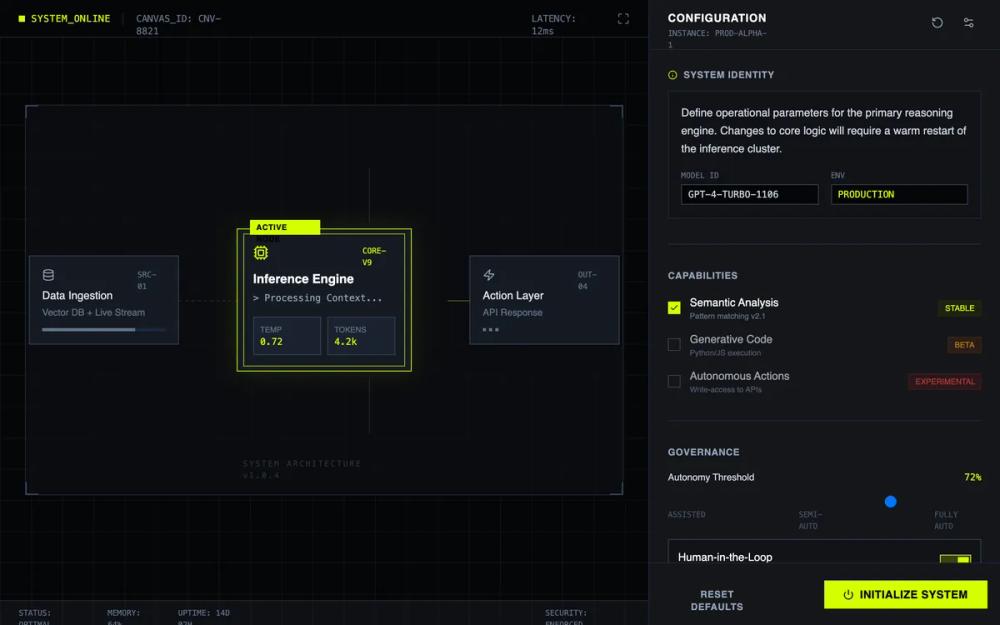
Техническая панель с темным интерфейсом, кислотно-зелеными акцентами и строгой сеткой. Включает канву узлов, инспектор настроек и имитацию терминала.
# AI System Configuration Console

{
  "summary": "A technical 'Operating Console' design system for AI configuration, characterized by high-contrast dark backgrounds, neon acid-green accents, and a rigid grid-based structure that emphasizes function and precision over aesthetics. It utilizes a 65/35 split screen with a visual system canvas on the left and a dense, scrollable control inspector on the right.",
  "style": {
    "description": "The style is 'Industrial/Technical Minimalist'. It uses a strict dark theme (#0f1115) with acid green (#d4ff00) as the primary action and state color. Typography pairings use 'Inter' for UI labels and 'JetBrains Mono' for system data. Borders are sharp (0px radius), and micro-interactions use 'mechanical' snappy transitions rather than soft easing. Design elements include scanlines, corner ticks, and 1px grid overlays.",
    "prompt": "Create a design system with an 'AI Operating Console' aesthetic. \n- **Color Palette**: Primary background #0f1115; Deepest panels #050608; Accent color #d4ff00 (Acid Green); Border colors #2d333b (Slate-800); Text colors #cbd5e1 (Primary) and #64748b (Secondary).\n- **Typography**: Headers and UI labels use 'Inter' (Semi-bold, 600, uppercase, tracking-wider). System values and code use 'JetBrains Mono' (Regular, 400). Small labels should be 10px-12px.\n- **Borders & Shapes**: 1px solid borders everywhere. Border-radius is strictly 0px (sharp corners). \n- **Effects**: Background 40px grid pattern in #2d333b at 20% opacity. Use corner ticks (4x4px L-shapes) on major container corners. \n- **Animations**: Mechanical transitions (linear or fast cubic-bezier). Node pulse animations using an expanding 1px border. Terminal scanlines using a moving 2px horizontal gradient."
  },
  "layout_and_structure": {
    "description": "A horizontal split-screen layout. Left side is a flexible canvas for node-based visualization; right side is a fixed-width inspector for granular configuration and logs.",
    "prompts": [
      {
        "part": "System Canvas (Left 65%)",
        "prompt": "Design a 65% width container with a #050608 background and a 40px grid overlay. Top bar includes a status indicator (SYSTEM_ONLINE in acid green) and system ID. The center area features a node-based architecture diagram: square nodes connected by 1px dashed or solid lines with arrowheads. Each node is a #151b23 box with a 1px border. Active nodes feature a #d4ff00 border and a 'pulse' effect."
      },
      {
        "part": "Inspector Sidebar (Right 35%)",
        "prompt": "Design a 450px fixed-width sidebar on the right using background #14161a and a left border #2d333b. The panel is vertically scrollable. Header (16px high) shows 'CONFIGURATION' in bold uppercase with an instance ID below it. Content sections are separated by 1px horizontal lines and contain structured forms, toggles, and sliders."
      },
      {
        "part": "Settings Sections",
        "prompt": "Create stacked configuration modules. Use 10px monospaced labels for input fields. Capability toggles should show a status badge (e.g., 'Stable' in green, 'Experimental' in red). Inputs use #050608 backgrounds with #2d333b borders. Include a Governance section with a custom range slider."
      },
      {
        "part": "Terminal Output Preview",
        "prompt": "Include a section titled 'Output Simulation' featuring a black box terminal window. Text inside is monospaced 'JetBrains Mono' in #d4ff00, #38bdf8 (blue), and #4ade80 (green) to represent JSON syntax. A 2px horizontal bar (scanline) should animate vertically across the terminal at 4s intervals."
      }
    ]
  },
  "special_ui_components": [
    {
      "component": "Active System Node",
      "description": "A highlighted node in the canvas representing an active process.",
      "prompt": "Create a 224px width node with a #d4ff00 border. Add a tag in the top-left corner with black text on an acid-green background saying 'Active Node'. Content includes an icon, a version ID (mono 10px), and a grid-based metric display at the bottom showing temperature and token counts."
    },
    {
      "component": "Console Range Slider",
      "description": "A brutalist range input for technical adjustments.",
      "prompt": "Design a range slider where the track is a 4px high solid bar in #334155. The thumb (slider head) is a 16px square block of solid #d4ff00 with no rounding. Labels below the slider indicate discrete stages (e.g., Assisted, Semi-Auto, Fully Auto) in 10px uppercase mono text."
    },
    {
      "component": "Action Trigger Button",
      "description": "Primary CTA button with high visibility and hover feedback.",
      "prompt": "Create a button with background #d4ff00 and black bold text. Shape is a sharp rectangle. On hover, apply a translate-y effect of 1px and a #d4ff00 glow (box-shadow: 0 0 15px rgba(212, 255, 0, 0.3)). Include a power icon to the left of the text."
    }
  ],
  "special_notes": "MUST: Maintain 0px border-radius on all elements. Use uppercase monospaced text for all system-generated IDs. Ensure all interactions (hover, toggle) feel 'heavy' and immediate. DO NOT: Use rounded corners, soft shadows, or gradients. Avoid any imagery or photography; stick to abstract SVG icons (lucide/iconify style)."
}