
Все промпты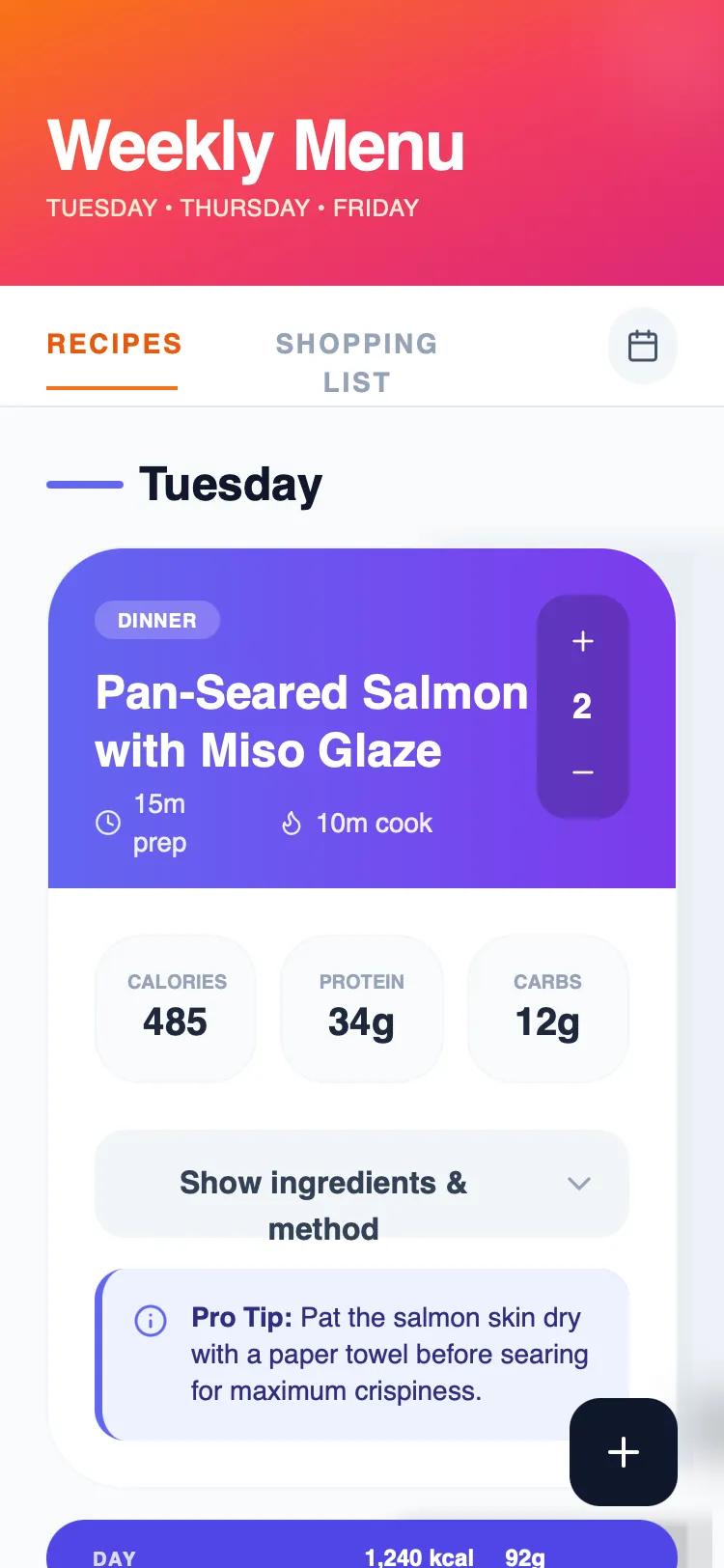 Все промпты
Apple HIG Dark Theme: интерфейс для планировщика еды
Премиальный темный UI в стиле Apple с эффектом Liquid Glass. Включает карточки с высокой плотностью данных, стильные стеклянные панели и семантическую типографику SF Pro для любых lifestyle-проектов.
Автор: Cas van der HovenЖивое превью
Зачем вайб-кодеру
Этот промпт нужен, когда ты собираешь приложение, которое должно выглядеть как нативное ПО от Apple. Он идеально подходит для дашбордов, трекеров привычек или SaaS-сервисов, где важно показать много данных, не превращая экран в кашу. Эффект размытия и прозрачные слои создают ощущение дорогого продукта, который приятно использовать каждый день.
Вставляй этот конфиг в v0 или Lovable, чтобы сразу получить готовый каркас с правильными отступами и цветами. Если твой проект про здоровье или финтех, просто замени контент карточек на свои данные. Используй компоненты вроде вертикального степпера или плавающей кнопки действия (FAB), чтобы добавить интерактивности без написания кастомного CSS с нуля.
Prompt
# Apple HIG Dark Theme Meal Planner

{
  "summary": "A premium Apple-native dark mode UI focused on high-density data visualization and elegant information hierarchy. It utilizes layered glassmorphism, semantic typography, and subtle micro-interactions to create a 'Liquid Glass' aesthetic that feels deeply integrated with modern operating systems.",
  "style": {
    "description": "The style is defined by its deep dark background (#1d1d1f) and sophisticated use of translucent layers. Typography uses SF Pro for high legibility with wide tracking (0.2em) for labels. Colors are strictly semantic: Primary Text (#f5f5f7), Secondary Text (#a1a1a6), and Apple Blue (#0071e3) for focus states. Surfaces use 'Liquid Glass' with backdrop-filter: blur(40px) saturate(180%) and thin 1px white borders at low opacity (10%). Animations are smooth, using a standard cubic-bezier(0.4, 0, 0.2, 1) for transitions.",
    "prompt": "Create a design following Apple's Human Interface Guidelines in Dark Mode. \n\n### Colors\n- Background: #1d1d1f\n- Primary Accent (Blue): #0071e3\n- Text Primary: #f5f5f7\n- Text Secondary: #a1a1a6\n- Text Tertiary: #86868b\n- Borders: rgba(255, 255, 255, 0.08)\n\n### Surfaces (Liquid Glass)\n- Standard Card: rgba(255, 255, 255, 0.07) background, backdrop-filter: blur(40px) saturate(180%), 1px solid rgba(255, 255, 255, 0.1)\n- Elevated Surface: rgba(255, 255, 255, 0.09) background, 1px solid rgba(255, 255, 255, 0.12)\n- Inner Wells: rgba(255, 255, 255, 0.04) background, 1px solid rgba(255, 255, 255, 0.06)\n\n### Typography\n- Headings: SF Pro Display, font-weight: 600, tracking: tight\n- Body: SF Pro Text, font-weight: 400\n- Labels/Captions: Font-size: 10px, uppercase, tracking: 0.2em, font-weight: 600\n\n### Shadows & Depth\n- Card Shadows: 0 4px 24px rgba(0,0,0,0.3)\n- Ambient Glow: Radial gradient at top of page: rgba(0, 113, 227, 0.04) reaching 400px diameter"
  },
  "layout_and_structure": {
    "description": "A vertical-scrolling layout with a fixed header and sticky tab navigation. Content is organized into semantic sections (e.g., days of the week) with nested cards providing high-density information.",
    "prompts": [
      {
        "part": "Header",
        "prompt": "Create a clean header section with a large Title (36px-48px) in SF Pro Display. Below it, include a tertiary text label in all-caps with wide tracking (0.2em). Padding should be generous: pt-16, pb-10."
      },
      {
        "part": "Sticky Tab Navigation",
        "prompt": "Implement a pill-shaped navigation bar using a glass surface (rgba(45, 45, 49, 0.85)) with 30px blur. The bar should contain equal-width buttons. Active states should use a subtle white/10 background overlay. Include an icon button on the right in a glass square."
      },
      {
        "part": "Data Cards",
        "prompt": "Design high-fidelity cards with a border-bottom separator at the header. The header should include a category tag (subtle blue background, blue text), a large title (26px), and a metadata row with icons. Below the header, include a grid of 'Inner Wells' for numeric data (e.g., nutrition, prices), each with a tiny uppercase label and large value."
      },
      {
        "part": "Expandable Details",
        "prompt": "Inside the cards, include a 'Details' toggle button using the 'glass-button' style. On click, expand a section using a cubic-bezier(0.4, 0, 0.2, 1) transition with a max-height animation. Contents should be organized into lists with dot or number indicators in Apple Blue."
      }
    ]
  },
  "special_ui_components": [
    {
      "component": "Vertical Stepper",
      "description": "A compact control for adjusting quantities or values.",
      "prompt": "Create a vertical stepper using an 'inner well' container. Place a '+' glass button at the top, a centered numeric value in the middle (size 16px, bold), and a '-' glass button at the bottom. The entire component should be compact (approx 40px wide)."
    },
    {
      "component": "Glass Pill Summary",
      "description": "A full-width decorative summary bar used to separate sections.",
      "prompt": "A rounded-full pill (height 48px) with rgba(255, 255, 255, 0.06) background. It should justify content between: an uppercase label on the left and a group of metrics on the right. High contrast between primary and tertiary text is essential."
    },
    {
      "component": "Floating Action Button (FAB)",
      "description": "Primary action trigger that follows the user.",
      "prompt": "A 52x52px circle button with a solid Apple Blue (#0071e3) background. Include a strong shadow: 0 4px 16px rgba(0, 113, 227, 0.4). Icon should be white, 20px. Add an active state scale(0.95) effect."
    }
  ]
}