
Все промпты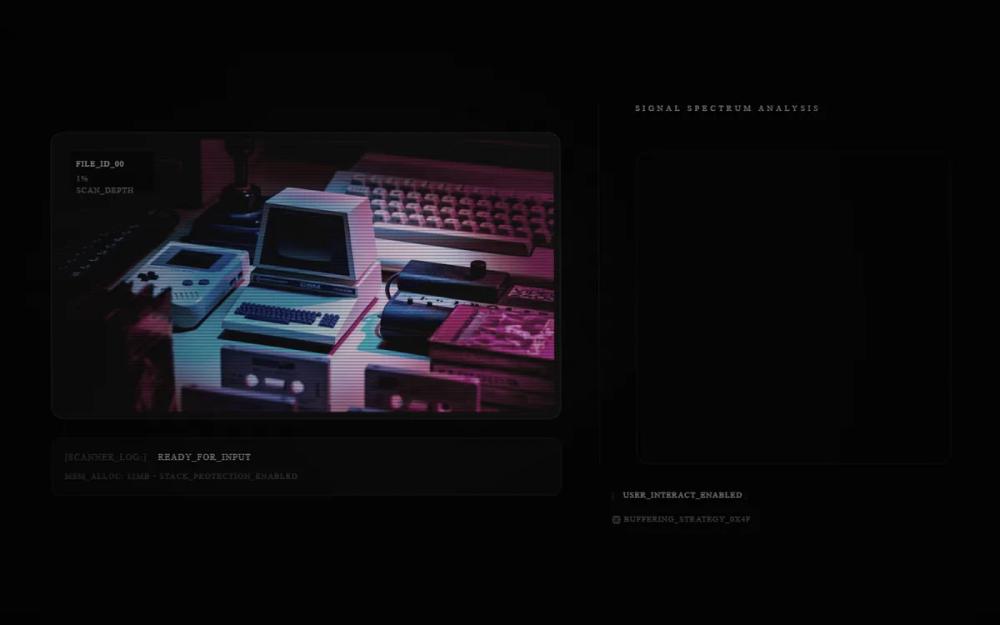 Все промпты
Asymmetrical Digital Signal Scanner
UI-компонент: асимметричный слайдер с цифровым сканером. Меняет макет, добавляет эффект подсветки линий при наведении курсора. Идеально для визуализации данных.
Автор: Blink GuidesЖивое превью
Prompt
# Asymmetrical Digital Signal Scanner

Change to a different layout, remain anything else the same. This looks like an image slider which is super cool looking. Lets adjust the slider bar component as it wasn't mine, so lets remake a new one. Also the text below, maybe adjust it like the user interact text

<specific_variation>Reconfigure the layout into an asymmetrical side-by-side split, placing the image container on the left and a vertical interaction panel on the right. Replace the segmented slider bar with a tall 'Digital Signal Track' consisting of a vertical column of 1px-thin horizontal lines that illuminate and expand outward toward the cursor as the mouse moves up and down. Reposition the instructional text into a dedicated 'System Terminal' box at the bottom right, styled with a blinking underscore cursor and technical prefix like 'SCANNER_LOG:' to match a command-line interface.</specific_variation>

Here is a reference implementation:

~~~html
<!DOCTYPE html>
<html lang="en">
<head>
    <meta charset="UTF-8">
    <meta name="viewport" content="width=device-width, initial-scale=1.0">
    <title>Asymmetrical Digital Signal Scanner</title>
    <script src="https://cdn.tailwindcss.com"></script>
    <script src="https://code.iconify.design/iconify-icon/1.0.7/iconify-icon.min.js"></script>
    <link rel="preconnect" href="https://fonts.googleapis.com">
    <link rel="preconnect" href="https://fonts.gstatic.com" crossorigin>
    <link href="https://fonts.googleapis.com/css2?family=JetBrains+Mono:wght@400;700&family=Space+Grotesk:wght@300;700&display=swap" rel="stylesheet">
    <style>
        :root {
            --bg-color: #050505;
            --accent-color: #ffffff;
            --dither-color: rgba(255, 255, 255, 0.08);
        }

        body {
            font-family: 'Space Grotesk', sans-serif;
            background: var(--bg-color);
            margin: 0;
            overflow: hidden;
        }

        .dither-overlay {
            position: absolute;
            inset: 0;
            background-image: repeating-conic-gradient(rgba(0,0,0,0) 0% 25%, var(--dither-color) 0% 50%) 50% / 2px 2px;
            pointer-events: none;
            z-index: 50;
            mix-blend-mode: overlay;
            animation: dither-shift 0.1s steps(2) infinite;
        }

        @keyframes dither-shift {
            0% { background-position: 0 0; }
            50% { background-position: 1px 1px; }
            100% { background-position: 0 0; }
        }

        .scanlines {
            position: absolute;
            inset: 0;
            background: linear-gradient(to bottom, transparent 50%, rgba(0, 0, 0, 0.2) 50%);
            background-size: 100% 4px;
            pointer-events: none;
            z-index: 51;
        }

        @keyframes glitch-shake {
            0% { transform: translate(0); }
            1% { transform: translate(-2px, 1px) skew(1deg); }
            2% { transform: translate(2px, -1px) skew(-1deg); }
            99% { transform: translate(1px, 2px) skew(0.5deg); }
            100% { transform: translate(0); }
        }

        .animate-glitch {
            animation: glitch-shake 4s infinite;
        }

        .crt-curve {
            background: radial-gradient(circle at center, transparent 0%, rgba(0, 0, 0, 0.4) 100%);
            pointer-events: none;
        }

        .signal-line {
            height: 1px;
            background-color: rgba(255, 255, 255, 0.1);
            width: 40px;
            transition: width 0.3s cubic-bezier(0.16, 1, 0.3, 1), background-color 0.3s ease;
            margin: 3px 0;
        }

        .signal-line.active {
            background-color: white;
            width: 100px;
            box-shadow: 0 0 8px rgba(255, 255, 255, 0.5);
        }

        @keyframes blink {
            0%, 100% { opacity: 1; }
            50% { opacity: 0; }
        }

        .cursor-blink::after {
            content: '_';
            animation: blink 1s step-end infinite;
        }

        .image-container img {
            filter: contrast(1.2) brightness(0.9) grayscale(0.5);
            mix-blend-mode: screen;
            transition: opacity 0.3s ease;
        }
    </style>
</head>
<body>
    <div class="min-h-screen flex items-center justify-center p-6 md:p-12 bg-[#050505] relative overflow-hidden">
        <div class="dither-overlay"></div>
        <div class="scanlines"></div>
        <div class="absolute inset-0 crt-curve z-[52]"></div>

        <main class="max-w-6xl w-full flex flex-col lg:flex-row gap-8 lg:gap-16 items-center relative z-10 animate-glitch">

            <!-- Left Section: Image Display -->
            <div class="w-full lg:w-3/5 flex flex-col gap-6">
                <div class="relative group image-container">
                    <div class="absolute -inset-8 bg-white/5 blur-3xl rounded-full opacity-30"></div>
                    <div class="relative bg-[#111] border border-white/10 p-2 rounded-2xl shadow-2xl overflow-hidden aspect-video flex items-center justify-center">
                        <div class="absolute inset-0 dither-overlay opacity-20 z-10"></div>
                        <img id="main-display-image" src="https://images.unsplash.com/photo-1550745165-9bc0b252726f?w=800&q=80" alt="System Visual" class="w-full h-full object-cover rounded-xl">

                        <div class="absolute top-6 left-6 font-['JetBrains_Mono'] text-[10px] text-white/40 tracking-widest z-20 flex flex-col gap-1 bg-black/40 p-2 backdrop-blur-sm">
                            <span id="image-tag" class="text-white/80">FILE_ID_00</span>
                            <span id="image-percentage">50% LOAD</span>
                        </div>
                    </div>
                </div>

                <!-- System Terminal Section -->
                <div class="hidden lg:block bg-[#0a0a0a] border border-white/5 p-4 rounded-xl font-['JetBrains_Mono'] text-[11px] text-white/40 tracking-widest">
                    <div class="flex items-center gap-3">
                        <span class="text-white/20">[SCANNER_LOG:]</span>
                        <span id="terminal-status" class="cursor-blink text-white/60">READY_FOR_INPUT</span>
                    </div>
                    <div class="mt-2 opacity-50 text-[10px]">
                        <span id="mem-alloc">MEM_ALLOC: 512MB</span> • STACK_PROTECTION_ENABLED
                    </div>
                </div>
            </div>

            <!-- Right Section: Vertical Interaction Panel -->
            <div class="w-full lg:w-2/5 flex flex-col gap-8">
                <div class="relative">
                    <div class="absolute -left-4 top-0 bottom-0 w-px bg-white/5"></div>
                    <div class="pl-8">
                        <h2 class="text-white/60 text-[10px] font-['JetBrains_Mono'] tracking-[0.4em] uppercase mb-12">Signal Spectrum Analysis</h2>

                        <!-- Digital Signal Track -->
                        <div id="signal-track" class="relative h-[400px] w-full bg-[#080808]/50 border border-white/5 rounded-2xl cursor-crosshair overflow-hidden flex flex-col items-start justify-center px-4">
                            <div id="track-lines-container" class="w-full pointer-events-none">
                                <!-- Lines generated via JS -->
                            </div>

                            <!-- Proximity Glow -->
                            <div id="hover-glow" class="absolute left-0 w-full h-32 bg-white/5 blur-2xl opacity-0 transition-opacity pointer-events-none"></div>
                        </div>
                    </div>
                </div>

                <!-- Mobile Terminal / Metadata (Bottom Right style but responsive) -->
                <div class="flex flex-col gap-4 font-['JetBrains_Mono'] text-[10px] text-white/30 uppercase tracking-widest">
                   <div class="flex items-center gap-2">
                        <span class="text-white/10">[</span>
                        <span class="text-white/60">USER_INTERACT_ENABLED</span>
                        <span class="text-white/10">]</span>
                    </div>
                    <div class="flex items-center gap-4">
                        <span class="flex items-center gap-1"><iconify-icon icon="lucide:cpu" class="text-xs"></iconify-icon> BUFFERING_STRATEGY_0x4F</span>
                    </div>
                </div>
            </div>
        </main>
    </div>

    <script>
        const track = document.getElementById('signal-track');
        const container = document.getElementById('track-lines-container');
        const glow = document.getElementById('hover-glow');
        const displayImage = document.getElementById('main-display-image');
        const imageTag = document.getElementById('image-tag');
        const imagePercentage = document.getElementById('image-percentage');
        const memAlloc = document.getElementById('mem-alloc');
        const terminalStatus = document.getElementById('terminal-status');

        const lineCount = 60;
        const lines = [];
        const images = [
            "https://images.unsplash.com/photo-1550745165-9bc0b252726f?w=800&q=80",
            "https://images.unsplash.com/photo-1518770660439-4636190af475?w=800&q=80",
            "https://images.unsplash.com/photo-1485827404703-89b55fcc595e?w=800&q=80",
            "https://images.unsplash.com/photo-1555664424-778a1e5e1b48?w=800&q=80",
            "https://images.unsplash.com/photo-1581092160562-40aa08e78837?w=800&q=80",
            "https://images.unsplash.com/photo-1531297484001-80022131f5a1?w=800&q=80",
            "https://images.unsplash.com/photo-1517077304055-6e89abbf09b0?w=800&q=80",
            "https://images.unsplash.com/photo-1461749280684-dccba630e2f6?w=800&q=80",
            "https://images.unsplash.com/photo-1558346490-a72e53ae2d4f?w=800&q=80",
            "https://images.unsplash.com/photo-1504384308090-c894fdcc538d?w=800&q=80"
        ];

        // Initialize lines
        for (let i = 0; i < lineCount; i++) {
            const line = document.createElement('div');
            line.className = 'signal-line';
            container.appendChild(line);
            lines.push(line);
        }

        function updateUI(percentage, mouseY) {
            // Update Lines with Proximity Effect
            const trackRect = track.getBoundingClientRect();
            const relativeY = mouseY - trackRect.top;

            lines.forEach((line, index) => {
                const lineRect = line.getBoundingClientRect();
                const lineCenter = lineRect.top + lineRect.height / 2 - trackRect.top;
                const distance = Math.abs(relativeY - lineCenter);

                // Intensity based on proximity (within 60px range)
                if (distance < 60) {
                    line.classList.add('active');
                    const scale = 1 + (1 - distance / 60) * 1.5;
                    line.style.width = `${40 * scale}px`;
                    line.style.opacity = (1 - (distance / 60) * 0.5).toString();
                } else {
                    line.classList.remove('active');
                    line.style.width = '40px';
                    line.style.opacity = '0.3';
                }
            });

            // Update Image
            const imageIndex = Math.min(Math.floor(percentage / 10), images.length - 1);
            if (displayImage.src !== images[imageIndex]) {
                displayImage.style.opacity = '0';
                setTimeout(() => {
                    displayImage.src = images[imageIndex];
                    displayImage.style.opacity = '1';
                }, 50);
            }

            // Update Labels
            imageTag.innerText = `FILE_ID_0${imageIndex}`;
            imagePercentage.innerText = `${Math.round(percentage)}% SCAN_DEPTH`;
            memAlloc.innerText = `MEM_ALLOC: ${Math.round(percentage * 10.24)}MB`;
            terminalStatus.innerText = percentage > 90 ? 'SYSTEM_OVERLOAD_WARNING' : `FETCHING_STREAM_0x${imageIndex}F`;

            // Update Glow Position
            glow.style.top = `${relativeY - 64}px`;
            glow.style.opacity = '1';
        }

        track.addEventListener('mousemove', (e) => {
            const rect = track.getBoundingClientRect();
            const y = e.clientY - rect.top;
            const percentage = (y / rect.height) * 100;
            const clampedPercent = Math.max(0, Math.min(100, percentage));

            updateUI(clampedPercent, e.clientY);
        });

        track.addEventListener('mouseleave', () => {
            glow.style.opacity = '0';
            lines.forEach(line => {
                line.classList.remove('active');
                line.style.width = '40px';
                line.style.opacity = '0.1';
            });
            terminalStatus.innerText = 'READY_FOR_INPUT';
        });

        // Initial state
        updateUI(50, track.getBoundingClientRect().top + 200);

        // Periodic Glitch Effect
        setInterval(() => {
            if (Math.random() > 0.98) {
                document.body.style.filter = 'invert(1)';
                setTimeout(() => document.body.style.filter = 'none', 50);
            }
        }, 5000);
    </script>
</body>
</html>
~~~