
Все промпты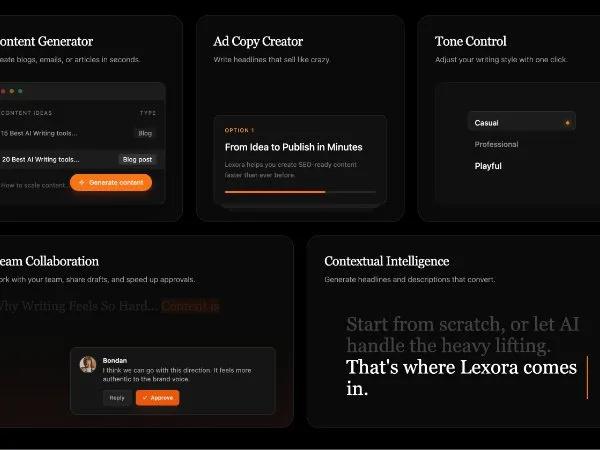 Все промпты
featuresectionresponsivetailwindinteractiveuigrid
AI Writing Features Grid Section
Секция с AI-функциями письма: адаптивная сетка интерактивных карточек для генерации контента, рекламных текстов, контроля тональности и коллаборации.
Prompt
<section class="bg-black pt-32 pb-32 relative" id="features">
  <div class="lg:px-8 max-w-7xl mr-auto ml-auto pr-6 pl-6">
    <div class="mb-20 max-w-2xl">
      <h2 class="text-4xl lg:text-5xl font-serif text-white mb-6">
        Everything you need to
        <br>
            create masterpiece.
      </h2>
      <p class="text-lg text-neutral-400">
        Powerful features wrapped in a beautiful interface, designed to keep
        you in the flow state.
      </p>
    </div>

    <div class="grid grid-cols-1 md:grid-cols-6 gap-6 auto-rows-[minmax(320px,auto)]">
      <!-- Card 1: Content Generator (Top Left) -->
      <div
        class="md:col-span-2 glass-panel rounded-3xl p-8 relative overflow-hidden group flex flex-col border border-white/10 bg-[#0A0A0A] reveal">
        <div class="relative z-10 flex flex-col h-full">
          <h3 class="text-2xl font-normal font-serif text-white mb-2 tracking-tight">
            Content Generator
          </h3>
          <p class="text-sm text-neutral-400 mb-8 font-light">
            Create blogs, emails, or articles in seconds.
          </p>

          <!-- Visual UI -->
          <div class="mt-auto relative rounded-xl border border-white/10 bg-neutral-900/50 overflow-hidden shadow-2xl">
            <div class="flex items-center justify-between px-4 py-3 border-b border-white/5 bg-white/5">
              <div class="flex items-center gap-2">
                <div class="w-2 h-2 rounded-full bg-red-500/50"></div>
                <div class="w-2 h-2 rounded-full bg-yellow-500/50"></div>
                <div class="w-2 h-2 rounded-full bg-green-500/50"></div>
              </div>
            </div>
            <div class="p-4 space-y-3">
              <div class="flex justify-between text-[10px] text-neutral-500 uppercase tracking-widest font-medium">
                <span>Content Ideas</span>
                <span>Type</span>
              </div>
              <div class="flex justify-between items-center text-xs text-neutral-400 py-2 border-b border-white/5">
                <span>15 Best AI Writing tools...</span>
                <span class="px-2 py-0.5 rounded bg-white/5">Blog</span>
              </div>
              <div
                class="flex justify-between items-center text-xs text-white py-2 bg-white/5 -mx-4 px-4 border-l-2 border-orange-500">
                <span>20 Best AI Writing tools...</span>
                <span class="px-2 py-0.5 rounded bg-white/10">
                      Blog post
                    </span>
              </div>
              <div
                class="flex justify-between items-center text-xs text-neutral-400 py-2 border-b border-white/5 opacity-50">
                <span>How to scale content...</span>
                <span class="px-2 py-0.5 rounded bg-white/5">Email</span>
              </div>
            </div>

            <!-- Floating Action Button -->
            <div class="absolute bottom-6 right-6 z-20">
              <button class="flex items-center gap-2 bg-orange-500 hover:bg-orange-400 text-white px-4 py-2 rounded-full text-xs font-medium shadow-lg shadow-orange-900/40 transition-all hover:scale-105 active:scale-95 group-hover:animate-pulse">
                    <svg width="12" height="12" viewBox="0 0 24 24" fill="none" stroke="currentColor" stroke-width="2" class="">
                      <path d="m12 3-1.912 5.813a2 2 0 0 1-1.275 1.275L3 12l5.813 1.912a2 2 0 0 1 1.275 1.275L12 21l1.912-5.813a2 2 0 0 1 1.275-1.275L21 12l-5.813-1.912a2 2 0 0 1-1.275-1.275L12 3Z" class=""></path>
                    </svg>
                    Generate content
                  </button>
            </div>
          </div>
        </div>
        <!-- Glow Effect -->
        <div
          class="absolute top-0 right-0 w-[200px] h-[200px] bg-orange-500/10 blur-[80px] rounded-full pointer-events-none opacity-0 group-hover:opacity-100 transition-opacity duration-500">
        </div>
      </div>

      <!-- Card 2: Ad Copy Creator (Top Middle) -->
      <div
        class="md:col-span-2 glass-panel rounded-3xl p-8 relative overflow-hidden group flex flex-col border border-white/10 bg-[#0A0A0A] reveal delay-100">
        <h3 class="text-2xl font-normal font-serif text-white mb-2 tracking-tight">
          Ad Copy Creator
        </h3>
        <p class="text-sm text-neutral-400 mb-8 font-light">
          Write headlines that sell like crazy.
        </p>

        <!-- Stacked Cards Visual -->
        <div class="relative mt-auto h-48 w-full perspective-near">
          <!-- Background Card -->
          <div
            class="absolute bottom-0 left-4 right-4 h-32 bg-neutral-800 rounded-xl border border-white/5 opacity-40 transform translate-y-4 scale-95 transition-transform duration-500 group-hover:translate-y-6">
          </div>
          <!-- Middle Card -->
          <div
            class="absolute bottom-0 left-2 right-2 h-32 bg-neutral-800 rounded-xl border border-white/5 opacity-70 transform translate-y-2 scale-[0.98] transition-transform duration-500 group-hover:translate-y-3">
          </div>
          <!-- Foreground Card -->
          <div
            class="absolute bottom-0 inset-x-0 h-auto min-h-[140px] bg-[#111] rounded-xl border border-white/10 p-5 shadow-2xl transition-transform duration-500 group-hover:-translate-y-2 z-10 flex flex-col gap-3">
            <div class="text-[10px] text-orange-400 font-medium uppercase tracking-widest">
              Option 1
            </div>
            <h4 class="text-lg font-medium text-white leading-tight">
              From Idea to Publish in Minutes
            </h4>
            <p class="text-xs text-neutral-500 leading-relaxed">
              Lexora helps you create SEO-ready content faster than ever
              before.
            </p>
            <div class="mt-2 h-1 w-full bg-neutral-800 rounded-full overflow-hidden">
              <div class="h-full w-2/3 bg-orange-500 rounded-full"></div>
            </div>
          </div>
        </div>
      </div>

      <!-- Card 3: Tone Control (Top Right) -->
      <div
        class="md:col-span-2 glass-panel rounded-3xl p-8 relative overflow-hidden group flex flex-col border border-white/10 bg-[#0A0A0A] reveal delay-200">
        <h3 class="text-2xl font-normal font-serif text-white mb-2 tracking-tight">
          Tone Control
        </h3>
        <p class="text-sm text-neutral-400 mb-8 font-light">
          Adjust your writing style with one click.
        </p>

        <div
          class="relative flex-1 bg-neutral-900/50 rounded-2xl border border-white/5 p-6 flex items-center justify-center overflow-hidden">
          <!-- Selection UI -->
          <div class="w-full max-w-[200px] space-y-1 relative">
            <!-- Active Indicator Background -->
            <div
              class="absolute left-0 top-0 w-full h-[36px] bg-white/5 rounded-lg border border-white/10 transition-all duration-300 ease-out transform translate-y-0 group-hover:translate-y-[36px]">
            </div>

            <!-- Options -->
            <div class="relative z-10 flex items-center justify-between px-3 h-[36px] cursor-pointer group/item">
              <span class="text-sm font-medium text-white">Casual</span>
              <div
                class="w-1.5 h-1.5 rounded-full bg-orange-500 shadow-[0_0_8px_rgba(249,115,22,0.8)] opacity-100 group-hover:opacity-0 transition-opacity">
              </div>
            </div>
            <div
              class="relative z-10 flex items-center justify-between px-3 h-[36px] cursor-pointer group/item opacity-50 hover:opacity-100 transition-opacity">
              <span class="text-sm font-medium text-white">
                    Professional
                  </span>
              <div
                class="w-1.5 h-1.5 rounded-full bg-orange-500 shadow-[0_0_8px_rgba(249,115,22,0.8)] opacity-0 group-hover:opacity-100 transition-opacity delay-75">
              </div>
            </div>
            <div
              class="relative z-10 flex items-center justify-between px-3 h-[36px] cursor-pointertext-sm font-medium text-white">
              Playful
            </div>
          </div>

          <!-- Decorative -->
          <div
            class="absolute -right-12 top-1/2 -translate-y-1/2 w-24 h-48 bg-gradient-to-l from-black via-transparent to-transparent z-20 pointer-events-none">
          </div>
          <div
            class="absolute right-0 top-0 bottom-0 w-px bg-gradient-to-b from-transparent via-white/10 to-transparent">
          </div>
        </div>
      </div>

      <!-- Card 4: Team Collaboration (Bottom Left, 3 cols) -->
      <div
        class="md:col-span-3 glass-panel rounded-3xl p-8 relative overflow-hidden group flex flex-col justify-between border border-white/10 bg-[#0A0A0A] min-h-[360px] reveal">
        <div class="relative z-10">
          <h3 class="text-2xl font-normal font-serif text-white mb-2 tracking-tight">
            Team Collaboration
          </h3>
          <p class="text-sm text-neutral-400 font-light">
            Work with your team, share drafts, and speed up approvals.
          </p>
        </div>

        <!-- Editor View Background -->
        <div class="absolute inset-0 top-28 px-8 opacity-40 select-none pointer-events-none overflow-hidden">
          <p class="text-2xl font-serif text-neutral-700 leading-relaxed">
            Why Writing Feels So Hard...

            <span class="bg-orange-900/30 text-orange-700/50">
                  Content is
                </span>
          </p>
        </div>

        <!-- Comment Overlay -->
        <div
          class="relative z-20 mt-auto ml-auto w-full max-w-sm bg-[#151515] border border-white/10 rounded-xl p-4 shadow-2xl transform translate-y-2 transition-transform duration-300 group-hover:translate-y-0">
          <div class="flex gap-3 mb-3">
            <div class="w-8 h-8 rounded-full bg-neutral-700 flex-shrink-0 border border-white/10 overflow-hidden">
              <img src="https://i.pravatar.cc/150?u=bondan" alt="User" class="w-full h-full object-cover opacity-80">
            </div>
            <div class="">
              <div class="text-xs font-semibold text-white mb-0.5">
                Bondan
              </div>
              <div class="text-xs text-neutral-400 leading-snug">
                I think we can go with this direction. It feels more
                authentic to the brand voice.
              </div>
            </div>
          </div>
          <div class="flex gap-2 pl-11">
            <button class="px-3 py-1.5 text-[10px] font-medium text-neutral-400 hover:text-white border border-white/10 hover:border-white/20 rounded-md transition-colors bg-white/5">
                  Reply
                </button>
            <button class="px-3 py-1.5 text-[10px] font-medium text-white bg-orange-600 hover:bg-orange-500 rounded-md transition-colors flex items-center gap-1.5 shadow-lg shadow-orange-900/20">
                  <svg width="10" height="10" viewBox="0 0 24 24" fill="none" stroke="currentColor" stroke-width="3" class="">
                    <polyline points="20 6 9 17 4 12" class=""></polyline>
                  </svg>
                  Approve
                </button>
          </div>
        </div>

        <!-- Hover Glow -->
        <div
          class="absolute bottom-0 left-0 w-full h-1/2 bg-gradient-to-t from-orange-900/10 to-transparent pointer-events-none">
        </div>
      </div>

      <!-- Card 5: Smart Editing (Bottom Right, 3 cols) -->
      <div
        class="md:col-span-3 glass-panel rounded-3xl p-8 relative overflow-hidden group flex flex-col border border-white/10 bg-[#0A0A0A] min-h-[360px] reveal delay-100">
        <div class="relative z-10">
          <h3 class="text-2xl font-normal font-serif text-white mb-2 tracking-tight">
            Contextual Intelligence
          </h3>
          <p class="text-sm text-neutral-400 font-light">
            Generate headlines and descriptions that convert.
          </p>
        </div>

        <div class="relative flex-1 flex items-center justify-center mt-8">
          <!-- Text Content -->
          <div class="w-full max-w-md relative">
            <p class="text-3xl md:text-4xl font-serif text-neutral-700 leading-tight">
              Start from scratch, or let AI handle the heavy lifting.
              <span class="relative inline-block text-white">
                    That's where Lexora comes in.
                    <!-- Highlight Background -->
                    <span class="absolute inset-0 bg-orange-500/20 -skew-y-1 -z-10 rounded"></span>
              <!-- Cursor -->
              <span class="absolute -right-0.5 top-0 bottom-0 w-0.5 bg-orange-500 animate-[pulse_1s_infinite]"></span>

              <!-- Tooltip Popover -->
              </span>
            </p>
            <div
              class="absolute bottom-full left-1/2 -translate-x-1/2 mb-3 w-64 opacity-0 scale-95 group-hover:opacity-100 group-hover:scale-100 transition-all duration-300 origin-bottom">
              <div class="bg-[#1a1a1a] border border-white/10 rounded-lg p-3 shadow-xl flex items-center gap-3">
                <div
                  class="w-6 h-6 rounded bg-purple-500/20 text-purple-400 flex items-center justify-center flex-shrink-0">
                  <svg width="12" height="12" viewBox="0 0 24 24" fill="none" stroke="currentColor" stroke-width="2"
                    class="">
                    <path
                      d="m12 3-1.912 5.813a2 2 0 0 1-1.275 1.275L3 12l5.813 1.912a2 2 0 0 1 1.275 1.275L12 21l1.912-5.813a2 2 0 0 1 1.275-1.275L21 12l-5.813-1.912a2 2 0 0 1-1.275-1.275L12 3Z"
                      class=""></path>
                  </svg>
                </div>
                <span class="text-xs font-medium text-neutral-300">
                      This is exactly what Lexora was built for.
                    </span>
              </div>
              <!-- Arrow -->
              <div
                class="absolute top-full left-1/2 -translate-x-1/2 -mt-1.5 border-4 border-transparent border-t-[#1a1a1a]">
              </div>
            </div>

            <p></p>
          </div>
        </div>
      </div>
    </div>
  </div>
</section>