Загрузка...
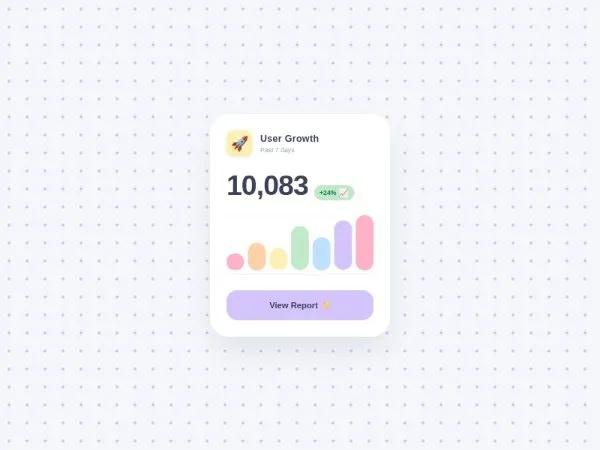
Интерактивная карточка статистики SaaS с анимированными числами, графиком и CTA для дашбордов. Оптимизировано для Tailwind CSS.
<!DOCTYPE html>
<html lang="en">
<head>
    <meta charset="UTF-8">
    <meta name="viewport" content="width=device-width, initial-scale=1.0">
    <title>Colorful Cartoon SaaS Stats Card</title>

    <!-- Google Fonts: Fredoka for a playful, rounded, cartoonish look -->
    <link rel="preconnect" href="https://fonts.googleapis.com">
    <link rel="preconnect" href="https://fonts.gstatic.com" crossorigin>
    <link href="https://fonts.googleapis.com/css2?family=Fredoka:wght@400;500;600;700&display=swap" rel="stylesheet">

    <!-- Tailwind CSS for layout and styling -->
    <script src="https://cdn.tailwindcss.com"></script>
    <script>
        tailwind.config = {
            theme: {
                extend: {
                    fontFamily: {
                        sans: ['Fredoka', 'sans-serif'],
                    },
                    colors: {
                        pastel: {
                            pink: '#FFB2C7',
                            orange: '#FFD1A9',
                            yellow: '#FDF0B5',
                            green: '#C1E8C9',
                            blue: '#BDE0FE',
                            purple: '#D4C4FB',
                            bg: '#F4F6FB',
                            dark: '#3D405B'
                        }
                    }
                }
            }
        }
    </script>

    <style>
        /* Base page styling with playful dotted background */
        body {
            background-color: #F4F6FB;
            background-image: radial-gradient(#D4C4FB 2px, transparent 2px);
            background-size: 24px 24px;
            display: flex;
            align-items: center;
            justify-content: center;
            min-height: 100vh;
            margin: 0;
            overflow: hidden;
            color: #3D405B;
        }

        /* Soft Figma-style drop shadow */
        .figma-shadow {
            box-shadow: 0 32px 64px -12px rgba(61, 64, 91, 0.12);
        }

        /* Bar pop-up animation with spring effect */
        .bar {
            transform-origin: bottom;
            transform: scaleY(0);
            animation: bar-pop 0.8s cubic-bezier(0.34, 1.56, 0.64, 1) forwards;
        }

        @keyframes bar-pop {
            0% { transform: scaleY(0); }
            100% { transform: scaleY(1); }
        }

        /* Staggered animation delays for chart bars */
        .bar-1 { animation-delay: 0.1s; }
        .bar-2 { animation-delay: 0.2s; }
        .bar-3 { animation-delay: 0.3s; }
        .bar-4 { animation-delay: 0.4s; }
        .bar-5 { animation-delay: 0.5s; }
        .bar-6 { animation-delay: 0.6s; }
        .bar-7 { animation-delay: 0.7s; }

        /* Spring bounce animation for CTA button */
        .btn-bounce {
            transition: transform 0.2s cubic-bezier(0.34, 1.56, 0.64, 1), box-shadow 0.2s;
        }
        .btn-bounce:hover {
            transform: scale(1.05) translateY(-2px);
            box-shadow: 0 16px 32px -8px rgba(212, 196, 251, 0.8);
        }
        .btn-bounce:active {
            transform: scale(0.95);
        }

        /* Confetti particle styling */
        .confetti {
            position: fixed;
            pointer-events: none;
            z-index: 9999;
            animation: bang 0.8s cubic-bezier(0.25, 0.46, 0.45, 0.94) forwards;
        }

        @keyframes bang {
            0% {
                transform: translate(0, 0) rotate(0deg) scale(1);
                opacity: 1;
            }
            100% {
                transform: translate(var(--tx), var(--ty)) rotate(var(--rot)) scale(0.5);
                opacity: 0;
            }
        }
    </style>
</head>
<body class="antialiased">

    <!-- Card Container -->
    <main class="w-full max-w-sm bg-white rounded-[40px] p-8 figma-shadow relative z-10 border-[3px] border-white ring-1 ring-gray-100">

        <!-- Header Section -->
        <header class="flex items-center gap-4 mb-8">
            <div class="w-14 h-14 bg-pastel-yellow rounded-2xl flex items-center justify-center text-3xl shadow-sm">
                🚀
            </div>
            <div>
                <h2 class="text-xl font-bold text-pastel-dark tracking-wide">User Growth</h2>
                <p class="text-sm font-medium text-gray-400">Past 7 days</p>
            </div>
        </header>

        <!-- Dynamic Counter Section -->
        <section class="flex items-baseline gap-3 mb-8">
            <h1 id="counter" class="text-6xl font-extrabold text-pastel-dark tracking-tight">0</h1>
            <div class="px-3 py-1.5 bg-pastel-green text-green-700 font-bold text-sm rounded-full flex items-center gap-1 shadow-sm">
                +24% <span class="text-lg leading-none">📈</span>
            </div>
        </section>

        <!-- Bar Chart Section -->
        <section class="flex items-end justify-between h-32 gap-2 mb-8 border-b-2 border-gray-100 pb-2 relative">
            <!-- Background grid lines (optional visual flair) -->
            <div class="absolute inset-0 flex flex-col justify-between pointer-events-none opacity-20">
                <div class="w-full border-t-2 border-dashed border-gray-300"></div>
                <div class="w-full border-t-2 border-dashed border-gray-300"></div>
                <div class="w-full border-t-2 border-dashed border-gray-300"></div>
            </div>

            <!-- Bars -->
            <div class="bar bar-1 w-full bg-pastel-pink rounded-full h-[30%] relative z-10 hover:brightness-95 transition-all"></div>
            <div class="bar bar-2 w-full bg-pastel-orange rounded-full h-[50%] relative z-10 hover:brightness-95 transition-all"></div>
            <div class="bar bar-3 w-full bg-pastel-yellow rounded-full h-[40%] relative z-10 hover:brightness-95 transition-all"></div>
            <div class="bar bar-4 w-full bg-pastel-green rounded-full h-[80%] relative z-10 hover:brightness-95 transition-all"></div>
            <div class="bar bar-5 w-full bg-pastel-blue rounded-full h-[60%] relative z-10 hover:brightness-95 transition-all"></div>
            <div class="bar bar-6 w-full bg-pastel-purple rounded-full h-[90%] relative z-10 hover:brightness-95 transition-all"></div>
            <div class="bar bar-7 w-full bg-pastel-pink rounded-full h-[100%] relative z-10 hover:brightness-95 transition-all"></div>
        </section>

        <!-- CTA Button -->
        <button id="cta-button" class="w-full bg-pastel-purple text-pastel-dark font-bold text-lg py-4 rounded-[24px] btn-bounce border-2 border-transparent hover:border-white select-none">
            View Report ✨
        </button>

    </main>

    <script>
        document.addEventListener('DOMContentLoaded', () => {

            // --- 1. Animated Number Counter ---
            const counterElement = document.getElementById('counter');
            const targetNumber = 14592;
            const animationDuration = 2000; // ms
            const startTime = performance.now();

            function updateCounter(currentTime) {
                const elapsed = currentTime - startTime;
                const progress = Math.min(elapsed / animationDuration, 1);

                // Easing function (easeOutExpo) for smooth deceleration
                const easeProgress = progress === 1 ? 1 : 1 - Math.pow(2, -10 * progress);
                const currentValue = Math.floor(easeProgress * targetNumber);

                counterElement.innerText = currentValue.toLocaleString();

                if (progress < 1) {
                    requestAnimationFrame(updateCounter);
                } else {
                    counterElement.innerText = targetNumber.toLocaleString();
                }
            }
            requestAnimationFrame(updateCounter);


            // --- 2. Confetti Burst Animation ---
            const btn = document.getElementById('cta-button');
            const confettiColors =['#FFB2C7', '#FFD1A9', '#FDF0B5', '#C1E8C9', '#BDE0FE', '#D4C4FB'];

            btn.addEventListener('click', (e) => {
                // Get button center coordinates
                const rect = btn.getBoundingClientRect();
                const btnCenterX = rect.left + rect.width / 2;
                const btnCenterY = rect.top + rect.height / 2;

                // Create 40 confetti particles
                for (let i = 0; i < 40; i++) {
                    createConfettiParticle(btnCenterX, btnCenterY);
                }
            });

            function createConfettiParticle(x, y) {
                const conf = document.createElement('div');
                conf.classList.add('confetti');
                document.body.appendChild(conf);

                // Randomize shape (circle or square)
                const isCircle = Math.random() > 0.5;
                const size = Math.random() * 8 + 6; // 6px to 14px

                conf.style.width = `${size}px`;
                conf.style.height = `${size}px`;
                conf.style.borderRadius = isCircle ? '50%' : '3px';
                conf.style.backgroundColor = confettiColors[Math.floor(Math.random() * confettiColors.length)];

                // Set initial position to center of button
                conf.style.left = `${x}px`;
                conf.style.top = `${y}px`;

                // Calculate random trajectory
                const angle = Math.random() * Math.PI * 2;
                // Favor upward explosion slightly
                const velocity = 80 + Math.random() * 120;

                const tx = Math.cos(angle) * velocity;
                // Subtracting from Y pushes it upwards (browser coordinates)
                const ty = (Math.sin(angle) * velocity) - 80;
                const rot = Math.random() * 360 + 180; // random rotation

                // Pass variables to CSS keyframes
                conf.style.setProperty('--tx', `${tx}px`);
                conf.style.setProperty('--ty', `${ty}px`);
                conf.style.setProperty('--rot', `${rot}deg`);

                // Clean up DOM after animation finishes
                setTimeout(() => {
                    conf.remove();
                }, 800);
            }
        });
    </script>
</body>
</html>