Загрузка...
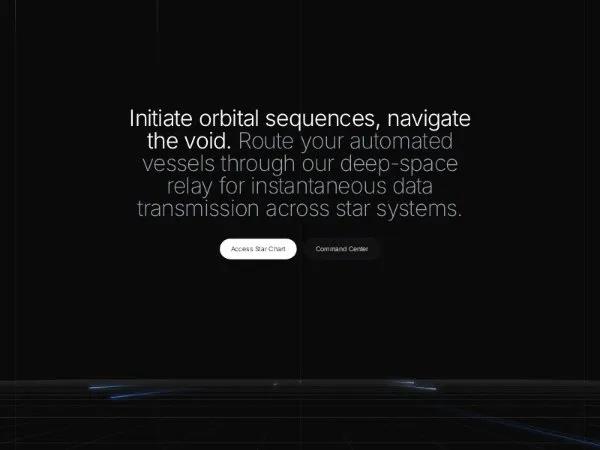
Футуристичный Hero-раздел с 3D-сеткой и анимацией. Идеально для sci-fi дашбордов и лендингов. Интерактивный, адаптивный, на Tailwind CSS.
<div
  class="bg-[#0a0a0a] min-h-screen flex flex-col relative overflow-x-hidden antialiased selection:bg-blue-500/30 selection:text-blue-200 text-white"
  style="font-family: 'Inter', sans-serif;">

  <script src="https://cdn.tailwindcss.com"></script>
  <script src="https://code.iconify.design/iconify-icon/1.0.7/iconify-icon.min.js"></script>
  <link href="https://fonts.googleapis.com/css2?family=Inter:wght@200;300;400&display=swap" rel="stylesheet">

  <!-- Background Vertical Grid Lines with Beam Animation -->
  <div class="fixed inset-0 pointer-events-none flex justify-center z-0 overflow-hidden">
    <div class="w-full max-w-7xl flex justify-between px-8">
      <div class="w-px h-full bg-white/5 relative overflow-hidden">
        <div id="beam-0"
          class="absolute top-0 left-0 w-full h-48 bg-gradient-to-b from-transparent via-white/40 to-transparent"></div>
      </div>
      <div class="w-px h-full bg-white/5 relative overflow-hidden">
        <div id="beam-1"
          class="absolute top-0 left-0 w-full h-64 bg-gradient-to-b from-transparent via-white/30 to-transparent"></div>
      </div>
      <div class="w-px h-full bg-white/5 relative overflow-hidden">
        <div id="beam-2"
          class="absolute top-0 left-0 w-full h-32 bg-gradient-to-b from-transparent via-white/50 to-transparent"></div>
      </div>
      <div class="w-px h-full bg-white/5 relative overflow-hidden">
        <div id="beam-3"
          class="absolute top-0 left-0 w-full h-56 bg-gradient-to-b from-transparent via-white/30 to-transparent"></div>
      </div>
      <div class="w-px h-full bg-white/5 relative overflow-hidden">
        <div id="beam-4"
          class="absolute top-0 left-0 w-full h-40 bg-gradient-to-b from-transparent via-white/40 to-transparent"></div>
      </div>
    </div>
  </div>

  <main class="flex-1 flex flex-col items-center pt-24 sm:pt-32 relative z-10 w-full">

    <div class="w-full max-w-7xl mx-auto px-6 flex flex-col items-center">
      <!-- Hero Typography (Moved down by 100px) -->
      <h1
        class="mt-[100px] text-3xl sm:text-4xl md:text-5xl tracking-tight text-center max-w-3xl mx-auto leading-[1.15]">
        <span class="text-white font-light">Initiate orbital sequences, navigate the void.</span>
        <span class="text-gray-400 font-extralight">Route your automated vessels through our deep-space relay for instantaneous data transmission across star systems.</span>
      </h1>

      <!-- Action Buttons -->
      <div class="mt-10 flex flex-col sm:flex-row gap-4 items-center justify-center w-full">
        <button class="bg-white text-black px-6 py-3 rounded-full text-sm font-light hover:bg-gray-100 transition-colors shadow-sm w-full sm:w-auto">
                    Access Star Chart
                </button>
        <button class="bg-[#111] text-white border border-gray-800 px-6 py-3 rounded-full text-sm font-light shadow-sm hover:bg-gray-900 transition-colors w-full sm:w-auto">
                    Command Center
                </button>
      </div>
    </div>

    <!-- Animated 3D Grid Section (Full Width) -->
    <div class="mt-24 relative w-full h-[45vh] min-h-[300px] flex justify-center items-end overflow-hidden">

      <!-- Canvas for 3D Grid & Data Streams -->
      <canvas id="grid-canvas" class="absolute bottom-0 left-0 w-full h-full"></canvas>

      <!-- Base Fade Line -->
      <div class="absolute bottom-0 left-0 w-full h-px bg-gradient-to-r from-transparent via-gray-800 to-transparent">
      </div>

      <!-- Floating Status Indicator -->
      <div
        class="absolute bottom-6 left-1/2 -translate-x-1/2 bg-[#111] border border-gray-800 rounded-lg shadow-[0_4px_24px_rgba(0,0,0,0.6)] px-3 py-2 flex items-center gap-3 z-20">
        <div class="flex items-center gap-2 text-gray-400">
          <iconify-icon icon="solar:radar-linear" class="text-white text-xs" stroke-width="1.5"></iconify-icon>
          <span class="text-xs font-mono tracking-tight font-extralight">synchronizing feed...</span>
        </div>
        <div class="w-px h-3 bg-gray-800"></div>
        <div class="flex items-center gap-1.5">
          <div
            class="w-5 h-5 rounded-full bg-white text-black flex items-center justify-center text-xs font-light leading-none">
            R</div>
          <span class="text-blue-400 text-sm font-light leading-none">X</span>
        </div>
      </div>

    </div>
  </main>

  <script>
    const canvas = document.getElementById('grid-canvas');
        const ctx = canvas.getContext('2d');

        let cx, cy;
        const focalLength = 300;
        const cameraZ = -100;

        // Camera position variables for mouse interaction
        let cameraX = 0;
        let cameraY = -70;
        let targetCameraX = 0;
        let targetCameraY = -70;

        // Mouse tracking
        window.addEventListener('mousemove', (e) => {
            const mouseX = (e.clientX / window.innerWidth) * 2 - 1;
            const mouseY = (e.clientY / window.innerHeight) * 2 - 1;
            targetCameraX = mouseX * 600;
            targetCameraY = -70 + mouseY * 40;
        });

        function resizeCanvas() {
            const container = canvas.parentElement;
            const width = container.clientWidth;
            const height = container.clientHeight;

            const dpr = window.devicePixelRatio || 1;
            canvas.width = width * dpr;
            canvas.height = height * dpr;
            ctx.scale(dpr, dpr);

            cx = width / 2;
            cy = height * 0.35;
        }

        window.addEventListener('resize', resizeCanvas);
        resizeCanvas();

        function project(x, y, z) {
            const dz = z - cameraZ;
            if (dz <= 0) return null;
            const scale = focalLength / dz;
            return {
                x: cx + (x - cameraX) * scale,
                y: cy + (y - cameraY) * scale
            };
        }

        const gridZMin = 0;
        const gridZMax = 3000;
        const gridXMin = -4000;
        const gridXMax = 4000;
        const spacing = 90;

        let zOffset = 0;
        const speed = 2;

        const streams = [
            { x: -600, z: 500, length: 500, speed: 7, color: '#3b82f6' },
            { x: -200, z: 1200, length: 350, speed: 10, color: '#60a5fa' },
            { x: 300, z: 200, length: 600, speed: 12, color: '#3b82f6' },
            { x: 700, z: 800, length: 450, speed: 8, color: '#93c5fd' },
            { x: 0, z: 1800, length: 700, speed: 14, color: '#3b82f6' },
            { x: -1200, z: 900, length: 400, speed: 9, color: '#60a5fa' },
            { x: 1100, z: 1500, length: 550, speed: 11, color: '#93c5fd' }
        ];

        // Vertical Beams Setup
        const beams = [0, 1, 2, 3, 4].map(id => document.getElementById(`beam-${id}`));
        const beamStates = beams.map(() => ({
            y: Math.random() * -1000,
            speed: 1.5 + Math.random() * 2
        }));

        function animate() {
            const w = canvas.width / (window.devicePixelRatio || 1);
            const h = canvas.height / (window.devicePixelRatio || 1);
            ctx.clearRect(0, 0, w, h);

            // Smooth camera interpolation
            cameraX += (targetCameraX - cameraX) * 0.03;
            cameraY += (targetCameraY - cameraY) * 0.03;

            // Animate Vertical Beams
            beams.forEach((beam, i) => {
                beamStates[i].y += beamStates[i].speed;
                if (beamStates[i].y > window.innerHeight) {
                    beamStates[i].y = -300;
                }
                beam.style.transform = `translateY(${beamStates[i].y}px)`;
            });

            zOffset = (zOffset + speed) % spacing;
            ctx.lineWidth = 1;

            for (let x = gridXMin; x <= gridXMax; x += spacing) {
                const p1 = project(x, 0, gridZMin);
                const p2 = project(x, 0, gridZMax);
                if (p1 && p2) {
                    const grad = ctx.createLinearGradient(p1.x, p1.y, p2.x, p2.y);
                    grad.addColorStop(0, 'rgba(255, 255, 255, 0.15)');
                    grad.addColorStop(1, 'rgba(255, 255, 255, 0)');
                    ctx.strokeStyle = grad;
                    ctx.beginPath();
                    ctx.moveTo(p1.x, p1.y);
                    ctx.lineTo(p2.x, p2.y);
                    ctx.stroke();
                }
            }

            for (let z = gridZMin; z <= gridZMax; z += spacing) {
                const actualZ = z - zOffset;
                if (actualZ < gridZMin) continue;

                const p1 = project(gridXMin, 0, actualZ);
                const p2 = project(gridXMax, 0, actualZ);

                if (p1 && p2) {
                    const alpha = Math.max(0, 1 - (actualZ / gridZMax));
                    ctx.strokeStyle = `rgba(255, 255, 255, ${0.15 * alpha})`;
                    ctx.beginPath();
                    ctx.moveTo(p1.x, p1.y);
                    ctx.lineTo(p2.x, p2.y);
                    ctx.stroke();
                }
            }

            streams.forEach(s => {
                s.z -= s.speed;
                if (s.z < gridZMin - s.length) {
                    s.z = gridZMax;
                }

                const startZ = Math.max(gridZMin, s.z);
                const endZ = Math.min(gridZMax, s.z + s.length);

                if (startZ < endZ) {
                    const p1 = project(s.x, 0, startZ);
                    const p2 = project(s.x, 0, endZ);

                    if (p1 && p2) {
                        const grad = ctx.createLinearGradient(p1.x, p1.y, p2.x, p2.y);
                        grad.addColorStop(0, s.color);
                        grad.addColorStop(1, 'rgba(0, 0, 0, 0)');

                        ctx.beginPath();
                        ctx.moveTo(p1.x, p1.y);
                        ctx.lineTo(p2.x, p2.y);
                        ctx.strokeStyle = grad;
                        ctx.lineWidth = 2;
                        ctx.shadowBlur = 12;
                        ctx.shadowColor = s.color;
                        ctx.stroke();
                        ctx.shadowBlur = 0;
                    }
                }
            });

            requestAnimationFrame(animate);
        }

        animate();
  </script>
</div>