
Все промпты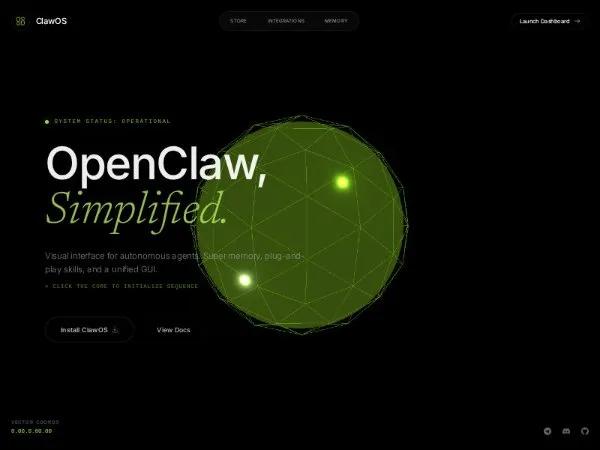 Все промпты
herosectionlandingthreejstailwindanimatedinteractivefullscreen
Interactive 3D Hero for Agent OS Landing
Интерактивный 3D Hero раздел для лендинга Agent OS. WebGL, GSAP анимация текста, CTA. Идеально для AI/OS и dev-tool сайтов.
Prompt
<div class="relative h-screen w-full overflow-hidden bg-black selection:bg-lime-400 selection:text-black"
style="font-family: 'Inter', sans-serif;">
<!-- Scripts & Styles -->
<script src="https://cdn.tailwindcss.com"></script>
<script src="https://code.iconify.design/iconify-icon/1.0.7/iconify-icon.min.js"></script>
<script src="https://cdnjs.cloudflare.com/ajax/libs/gsap/3.12.2/gsap.min.js"></script>
<script type="importmap">
{ "imports": { "three": "https://unpkg.com/three@0.160.0/build/three.module.js", "three/addons/": "https://unpkg.com/three@0.160.0/examples/jsm/" } }
</script>
<style>
@import url('https://fonts.googleapis.com/css2?family=Inter:wght@300;400;500;600&family=Newsreader:ital,wght@0,300;0,400;1,300;1,400&display=swap');
.font-serif {
font-family: 'Newsreader', serif;
}
.glass-panel {
background: rgba(255, 255, 255, 0.03);
backdrop-filter: blur(10px);
border: 1px solid rgba(255, 255, 255, 0.08);
}
.glitch-active {
animation: glitch-anim 0.25s cubic-bezier(0.25, 0.46, 0.45, 0.94) both;
}
@keyframes glitch-anim {
0% {
transform: translate(0);
}
20% {
transform: translate(-2px, 1px) skewX(-2deg);
text-shadow: 2px 0 rgba(163, 230, 53, 0.3);
}
40% {
transform: translate(2px, -1px) skewX(2deg);
text-shadow: -2px 0 rgba(163, 230, 53, 0.3);
}
100% {
transform: translate(0);
}
}
.btn-letter {
display: inline-block;
animation: letter-anim 2s ease-in-out infinite;
}
@keyframes letter-anim {
50% {
text-shadow: 0 0 3px #ffffff88;
color: #fff;
}
}
</style>
<!-- Canvas Background -->
<div class="absolute inset-0 z-0">
<canvas id="webgl-canvas" class="w-full h-full outline-none cursor-grab active:cursor-grabbing"></canvas>
</div>
<!-- UI Overlay -->
<div class="relative z-10 flex flex-col h-full pointer-events-none">
<header class="w-full px-6 py-6 flex justify-between items-center pointer-events-auto opacity-0 nav-item">
<div class="flex items-center gap-3 group cursor-pointer">
<div
class="w-10 h-10 rounded-full border border-white/10 flex items-center justify-center bg-black/50 backdrop-blur-md group-hover:border-lime-400/50 transition-colors duration-300">
<iconify-icon icon="solar:widget-5-linear"
class="text-lime-400 text-xl transition-transform group-hover:rotate-90"></iconify-icon>
</div>
<span class="text-lg font-medium tracking-tight text-white group-hover:text-lime-400 transition-colors">ClawOS</span>
</div>
<nav class="hidden md:flex items-center gap-1 glass-panel p-1 rounded-full">
<a href="#"
class="px-5 py-2 rounded-full hover:bg-white/5 text-zinc-400 hover:text-white transition-colors text-[10px] uppercase tracking-wider">Store</a>
<a href="#"
class="px-5 py-2 rounded-full hover:bg-white/5 text-zinc-400 hover:text-white transition-colors text-[10px] uppercase tracking-wider">Integrations</a>
<a href="#"
class="px-5 py-2 rounded-full hover:bg-white/5 text-zinc-400 hover:text-white transition-colors text-[10px] uppercase tracking-wider">Memory</a>
</nav>
<button class="flex items-center gap-2 px-4 py-2 border border-white/10 rounded-full bg-black/20 backdrop-blur-sm hover:border-lime-400/30 hover:bg-lime-400/10 transition-all">
<span class="text-xs font-medium text-white">Launch Dashboard</span>
<iconify-icon icon="solar:arrow-right-linear" width="16" class="text-lime-400"></iconify-icon>
</button>
</header>
<main class="flex-grow flex flex-col justify-center px-6 md:px-12 lg:px-24">
<div class="max-w-4xl space-y-8">
<div class="hero-reveal flex items-center gap-3 opacity-0">
<span id="status-light" class="h-2 w-2 rounded-full bg-lime-400 shadow-[0_0_15px_rgba(163,230,53,0.6)]"></span>
<p id="status-text" class="text-xs uppercase tracking-[0.2em] text-lime-400/80 font-mono">System Status:
Operational</p>
</div>
<div class="space-y-2">
<h1 class="hero-reveal opacity-0 text-6xl md:text-8xl font-medium tracking-tight text-white leading-[0.9]">
OpenClaw,</h1>
<h1
class="hero-reveal opacity-0 text-6xl md:text-8xl font-serif italic font-light text-lime-300/90 leading-[0.9]">
Simplified.</h1>
</div>
<p class="hero-reveal opacity-0 text-sm md:text-lg text-zinc-400 max-w-xl font-light">
Visual interface for autonomous agents. Super memory, plug-and-play skills, and a unified GUI.
<span class="text-lime-400/70 text-xs block mt-4 font-mono uppercase tracking-widest">> Click the core to initialize sequence</span>
</p>
<div class="hero-reveal opacity-0 flex flex-wrap gap-4 pt-6 pointer-events-auto">
<button class="group relative px-8 py-4 bg-black border border-white/20 rounded-full flex items-center gap-2 overflow-hidden transition-all hover:border-lime-400/50">
<span class="relative z-10 text-sm font-semibold text-white">Install ClawOS</span>
<iconify-icon icon="solar:download-minimalistic-linear" class="relative z-10 text-lime-400"></iconify-icon>
<div class="absolute inset-0 bg-lime-400/5 opacity-0 group-hover:opacity-100 transition-opacity"></div>
</button>
<button class="px-8 py-4 rounded-full border border-white/5 hover:bg-white/5 transition-colors text-sm font-medium text-white">View Docs</button>
</div>
</div>
</main>
<footer class="w-full px-6 pb-8 flex justify-between items-end pointer-events-auto opacity-0 nav-item">
<div class="flex flex-col gap-1">
<span class="text-[10px] uppercase tracking-widest text-zinc-600 font-bold">Vector Coords</span>
<span id="coords" class="text-xs font-mono text-lime-400">0.00.0.00.00</span>
</div>
<div class="flex gap-6 opacity-40">
<iconify-icon icon="simple-icons:telegram"
class="text-white hover:text-lime-400 cursor-pointer transition-colors"></iconify-icon>
<iconify-icon icon="simple-icons:discord"
class="text-white hover:text-lime-400 cursor-pointer transition-colors"></iconify-icon>
<iconify-icon icon="simple-icons:github"
class="text-white hover:text-lime-400 cursor-pointer transition-colors"></iconify-icon>
</div>
</footer>
</div>
<script type="module">
import * as THREE from 'three';
import { EffectComposer } from 'three/addons/postprocessing/EffectComposer.js';
import { RenderPass } from 'three/addons/postprocessing/RenderPass.js';
import { UnrealBloomPass } from 'three/addons/postprocessing/UnrealBloomPass.js';
const scene = new THREE.Scene();
const camera = new THREE.PerspectiveCamera(75, window.innerWidth / window.innerHeight, 0.1, 100);
camera.position.z = 6;
const renderer = new THREE.WebGLRenderer({ canvas: document.querySelector('#webgl-canvas'), antialias: true });
renderer.setSize(window.innerWidth, window.innerHeight);
renderer.setPixelRatio(Math.min(window.devicePixelRatio, 2));
const mainGroup = new THREE.Group();
scene.add(mainGroup);
const sphereCore = new THREE.Mesh(
new THREE.IcosahedronGeometry(2, 10),
new THREE.MeshPhysicalMaterial({ color: 0x000000, emissive: 0xa3e635, emissiveIntensity: 0.1, roughness: 0.2 })
);
mainGroup.add(sphereCore);
const sphereWire = new THREE.Mesh(
new THREE.IcosahedronGeometry(2.2, 2),
new THREE.MeshBasicMaterial({ color: 0xa3e635, wireframe: true, transparent: true, opacity: 0.15 })
);
mainGroup.add(sphereWire);
const light1 = new THREE.PointLight(0xa3e635, 100); light1.position.set(5, 5, 5); scene.add(light1);
const light2 = new THREE.PointLight(0xd9f99d, 50); light2.position.set(-5, -5, 2); scene.add(light2);
const composer = new EffectComposer(renderer);
composer.addPass(new RenderPass(scene, camera));
composer.addPass(new UnrealBloomPass(new THREE.Vector2(window.innerWidth, window.innerHeight), 0.8, 0.4, 0.85));
let mouseX = 0, mouseY = 0;
window.addEventListener('mousemove', (e) => {
mouseX = (e.clientX - window.innerWidth / 2) * 0.001;
mouseY = (e.clientY - window.innerHeight / 2) * 0.001;
document.getElementById('coords').innerText = `${(e.clientX/100).toFixed(2)}.${(e.clientY/100).toFixed(2)}.00`;
});
function animate() {
requestAnimationFrame(animate);
mainGroup.rotation.y += 0.005 + (mouseX * 0.05);
mainGroup.rotation.x += 0.002 + (mouseY * 0.05);
sphereWire.scale.setScalar(1 + Math.sin(Date.now() * 0.002) * 0.05);
composer.render();
}
animate();
window.addEventListener('resize', () => {
camera.aspect = window.innerWidth / window.innerHeight;
camera.updateProjectionMatrix();
renderer.setSize(window.innerWidth, window.innerHeight);
composer.setSize(window.innerWidth, window.innerHeight);
});
window.onload = () => {
const tl = gsap.timeline();
tl.to(".nav-item", { opacity: 1, duration: 1, stagger: 0.2 })
.to(".hero-reveal", { opacity: 1, y: 0, duration: 1, stagger: 0.1 }, "-=0.5");
};
window.addEventListener('click', () => {
gsap.to(sphereCore.scale, { x: 1.5, y: 1.5, z: 1.5, duration: 0.2, yoyo: true, repeat: 1 });
const light = document.getElementById('status-light');
light.style.backgroundColor = '#fff';
setTimeout(() => light.style.backgroundColor = '', 500);
});
</script>
</div>