Загрузка...
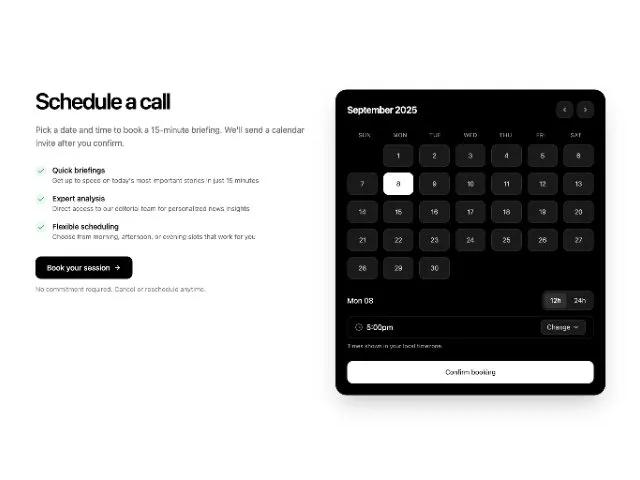
Адаптивная сетка новостных статей с выделенной статьей и кнопкой "Загрузить еще". Идеально для новостных порталов, блогов.
<section class="sm:px-8 max-w-7xl mr-auto ml-auto pr-6 pl-6">
  <div class="py-12 sm:py-16">
    <div class="grid lg:grid-cols-2 gap-12 lg:gap-16 items-start">
      <div class="max-w-3xl">
  <h2 class="sm:text-5xl text-4xl font-semibold text-black tracking-tighter font-playfair" style="">Schedule a call</h2>
  <p class="mt-6 text-lg text-black/60 font-geist" style="">Pick a date and time to book a 15‑minute briefing. We'll send a calendar invite after you confirm.</p>
  <div class="mt-8 space-y-4">
    <div class="flex items-start gap-3">
      <div class="flex-shrink-0 w-6 h-6 rounded-full bg-emerald-500/10 flex items-center justify-center mt-0.5">
        <svg xmlns="http://www.w3.org/2000/svg" width="16" height="16" viewBox="0 0 24 24" fill="none" stroke="currentColor" stroke-width="2" stroke-linecap="round" stroke-linejoin="round" class="text-emerald-600"><path d="M20 6 9 17l-5-5" class=""></path></svg>
      </div>
      <div class="">
        <h3 class="text-base font-medium text-black font-geist" style="">Quick briefings</h3>
        <p class="text-sm text-black/60 font-geist" style="">Get up to speed on today's most important stories in just 15 minutes</p>
      </div>
    </div>
    <div class="flex items-start gap-3">
      <div class="flex-shrink-0 w-6 h-6 rounded-full bg-emerald-500/10 flex items-center justify-center mt-0.5">
        <svg xmlns="http://www.w3.org/2000/svg" width="16" height="16" viewBox="0 0 24 24" fill="none" stroke="currentColor" stroke-width="2" stroke-linecap="round" stroke-linejoin="round" class="text-emerald-600"><path d="M20 6 9 17l-5-5" class=""></path></svg>
      </div>
      <div class="">
        <h3 class="text-base font-medium text-black font-geist" style="">Expert analysis</h3>
        <p class="text-sm text-black/60 font-geist" style="">Direct access to our editorial team for personalized news insights</p>
      </div>
    </div>
    <div class="flex items-start gap-3">
      <div class="flex-shrink-0 w-6 h-6 rounded-full bg-emerald-500/10 flex items-center justify-center mt-0.5">
        <svg xmlns="http://www.w3.org/2000/svg" width="16" height="16" viewBox="0 0 24 24" fill="none" stroke="currentColor" stroke-width="2" stroke-linecap="round" stroke-linejoin="round" class="text-emerald-600"><path d="M20 6 9 17l-5-5" class=""></path></svg>
      </div>
      <div class="">
        <h3 class="text-base font-medium text-black font-geist" style="">Flexible scheduling</h3>
        <p class="text-sm text-black/60 font-geist" style="">Choose from morning, afternoon, or evening slots that work for you</p>
      </div>
    </div>
  </div>
  <div class="mt-8">
    <button class="inline-flex gap-2 hover:bg-black/80 transition-all font-medium text-white font-geist bg-black h-12 rounded-xl pr-6 pl-6 items-center" style="">
      Book your session
      <svg xmlns="http://www.w3.org/2000/svg" width="16" height="16" viewBox="0 0 24 24" fill="none" stroke="currentColor" stroke-width="2" stroke-linecap="round" stroke-linejoin="round" class=""><path d="M5 12h14" class=""></path><path d="m12 5 7 7-7 7" class=""></path></svg>
    </button>
    <p class="mt-3 text-sm text-black/50 font-geist" style="">No commitment required. Cancel or reschedule anytime.</p>
  </div>
</div>

      <div class="">
        <div class="overflow-hidden text-white/80 bg-black border-black/5 border rounded-3xl shadow-2xl">
          <div class="sm:p-6 pt-5 pr-5 pb-5 pl-5">
            <!-- Month header -->
            <div class="flex items-center justify-between">
              <div class="flex items-baseline gap-2">
                <h3 class="text-xl font-semibold tracking-tight font-geist text-white" style="">September 2025</h3>
              </div>
              <div class="flex items-center gap-2">
                <button class="inline-flex h-9 w-9 items-center justify-center rounded-xl bg-white/10 hover:bg-white/20 border border-white/10 text-white/80" aria-label="Previous month" disabled="">
                  <svg xmlns="http://www.w3.org/2000/svg" width="20" height="20" viewBox="0 0 24 24" fill="none" stroke="currentColor" stroke-width="2" stroke-linecap="round" stroke-linejoin="round" data-lucide="chevron-left" class="lucide lucide-chevron-left w-4 h-4"><path d="m15 18-6-6 6-6" class=""></path></svg>
                </button>
                <button class="inline-flex h-9 w-9 items-center justify-center rounded-xl bg-white/10 hover:bg-white/20 border border-white/10 text-white/80" aria-label="Next month" disabled="">
                  <svg xmlns="http://www.w3.org/2000/svg" width="20" height="20" viewBox="0 0 24 24" fill="none" stroke="currentColor" stroke-width="2" stroke-linecap="round" stroke-linejoin="round" data-lucide="chevron-right" class="lucide lucide-chevron-right w-4 h-4"><path d="m9 18 6-6-6-6" class=""></path></svg>
                </button>
              </div>
            </div>

            <!-- Weekdays -->
            <div class="mt-4 grid grid-cols-7 text-xs uppercase tracking-wider text-white/60 font-geist">
              <div class="h-10 flex items-center justify-center" style="">Sun</div>
              <div class="h-10 flex items-center justify-center" style="">Mon</div>
              <div class="h-10 flex items-center justify-center" style="">Tue</div>
              <div class="h-10 flex items-center justify-center" style="">Wed</div>
              <div class="h-10 flex items-center justify-center" style="">Thu</div>
              <div class="h-10 flex items-center justify-center" style="">Fri</div>
              <div class="h-10 flex items-center justify-center" style="">Sat</div>
            </div>

            <!-- Days grid (Sept 2025 starts on Monday) -->
            <div id="calendar-grid" class="grid grid-cols-7 gap-2 sm:gap-3">
              <!-- Leading blank for Sun -->
              <div class="h-12"></div>

              <!-- Days 1-30 -->
              <!-- Row 1 -->
              <button data-day="2025-09-01" class="day-btn inline-flex items-center justify-center h-12 rounded-xl bg-white/10 hover:bg-white/20 border border-white/10 text-white/80 text-sm font-geist" style="">1</button>
              <button data-day="2025-09-02" class="day-btn inline-flex items-center justify-center h-12 rounded-xl bg-white/10 hover:bg-white/20 border border-white/10 text-white/80 text-sm font-geist" style="">2</button>
              <button data-day="2025-09-03" class="day-btn inline-flex items-center justify-center h-12 rounded-xl bg-white/10 hover:bg-white/20 border border-white/10 text-white/80 text-sm font-geist" style="">3</button>
              <button data-day="2025-09-04" class="day-btn inline-flex items-center justify-center h-12 rounded-xl bg-white/10 hover:bg-white/20 border border-white/10 text-white/80 text-sm font-geist" style="">4</button>
              <button data-day="2025-09-05" class="day-btn inline-flex items-center justify-center h-12 rounded-xl bg-white/10 hover:bg-white/20 border border-white/10 text-white/80 text-sm font-geist" style="">5</button>
              <button data-day="2025-09-06" class="day-btn inline-flex items-center justify-center h-12 rounded-xl bg-white/10 hover:bg-white/20 border border-white/10 text-white/80 text-sm font-geist" style="">6</button>

              <!-- Row 2 -->
              <button data-day="2025-09-07" class="day-btn inline-flex items-center justify-center h-12 rounded-xl bg-white/10 hover:bg-white/20 border border-white/10 text-white/80 text-sm font-geist" style="">7</button>
              <button data-day="2025-09-08" class="day-btn inline-flex items-center justify-center h-12 rounded-xl border text-sm font-geist bg-white text-black border-white" aria-pressed="true" style="">8</button>
              <button data-day="2025-09-09" class="day-btn inline-flex items-center justify-center h-12 rounded-xl bg-white/10 hover:bg-white/20 border border-white/10 text-white/80 text-sm font-geist" style="">9</button>
              <button data-day="2025-09-10" class="day-btn inline-flex items-center justify-center h-12 rounded-xl bg-white/10 hover:bg-white/20 border border-white/10 text-white/80 text-sm font-geist" style="">10</button>
              <button data-day="2025-09-11" class="day-btn inline-flex items-center justify-center h-12 rounded-xl bg-white/10 hover:bg-white/20 border border-white/10 text-white/80 text-sm font-geist" style="">11</button>
              <button data-day="2025-09-12" class="day-btn inline-flex items-center justify-center h-12 rounded-xl bg-white/10 hover:bg-white/20 border border-white/10 text-white/80 text-sm font-geist" style="">12</button>
              <button data-day="2025-09-13" class="day-btn inline-flex items-center justify-center h-12 rounded-xl bg-white/10 hover:bg-white/20 border border-white/10 text-white/80 text-sm font-geist" style="">13</button>

              <!-- Row 3 -->
              <button data-day="2025-09-14" class="day-btn inline-flex items-center justify-center h-12 rounded-xl bg-white/10 hover:bg-white/20 border border-white/10 text-white/80 text-sm font-geist" style="">14</button>
              <button data-day="2025-09-15" class="day-btn inline-flex items-center justify-center h-12 rounded-xl bg-white/10 hover:bg-white/20 border border-white/10 text-white/80 text-sm font-geist" style="">15</button>
              <button data-day="2025-09-16" class="day-btn inline-flex items-center justify-center h-12 rounded-xl bg-white/10 hover:bg-white/20 border border-white/10 text-white/80 text-sm font-geist" style="">16</button>
              <button data-day="2025-09-17" class="day-btn inline-flex items-center justify-center h-12 rounded-xl bg-white/10 hover:bg-white/20 border border-white/10 text-white/80 text-sm font-geist" style="">17</button>
              <button data-day="2025-09-18" class="day-btn inline-flex items-center justify-center h-12 rounded-xl bg-white/10 hover:bg-white/20 border border-white/10 text-white/80 text-sm font-geist" style="">18</button>
              <button data-day="2025-09-19" class="day-btn inline-flex items-center justify-center h-12 rounded-xl bg-white/10 hover:bg-white/20 border border-white/10 text-white/80 text-sm font-geist" style="">19</button>
              <button data-day="2025-09-20" class="day-btn inline-flex items-center justify-center h-12 rounded-xl bg-white/10 hover:bg-white/20 border border-white/10 text-white/80 text-sm font-geist" style="">20</button>

              <!-- Row 4 -->
              <button data-day="2025-09-21" class="day-btn inline-flex items-center justify-center h-12 rounded-xl bg-white/10 hover:bg-white/20 border border-white/10 text-white/80 text-sm font-geist" style="">21</button>
              <button data-day="2025-09-22" class="day-btn inline-flex items-center justify-center h-12 rounded-xl bg-white/10 hover:bg-white/20 border border-white/10 text-white/80 text-sm font-geist" style="">22</button>
              <button data-day="2025-09-23" class="day-btn inline-flex items-center justify-center h-12 rounded-xl bg-white/10 hover:bg-white/20 border border-white/10 text-white/80 text-sm font-geist" style="">23</button>
              <button data-day="2025-09-24" class="day-btn inline-flex items-center justify-center h-12 rounded-xl bg-white/10 hover:bg-white/20 border border-white/10 text-white/80 text-sm font-geist" style="">24</button>
              <button data-day="2025-09-25" class="day-btn inline-flex items-center justify-center h-12 rounded-xl bg-white/10 hover:bg-white/20 border border-white/10 text-white/80 text-sm font-geist" style="">25</button>
              <button data-day="2025-09-26" class="day-btn inline-flex items-center justify-center h-12 rounded-xl bg-white/10 hover:bg-white/20 border border-white/10 text-white/80 text-sm font-geist" style="">26</button>
              <button data-day="2025-09-27" class="day-btn inline-flex items-center justify-center h-12 rounded-xl bg-white/10 hover:bg-white/20 border border-white/10 text-white/80 text-sm font-geist" style="">27</button>

              <!-- Row 5 -->
              <button data-day="2025-09-28" class="day-btn inline-flex items-center justify-center h-12 rounded-xl bg-white/10 hover:bg-white/20 border border-white/10 text-white/80 text-sm font-geist" style="">28</button>
              <button data-day="2025-09-29" class="day-btn inline-flex items-center justify-center h-12 rounded-xl bg-white/10 hover:bg-white/20 border border-white/10 text-white/80 text-sm font-geist" style="">29</button>
              <button data-day="2025-09-30" class="day-btn inline-flex items-center justify-center h-12 rounded-xl bg-white/10 hover:bg-white/20 border border-white/10 text-white/80 text-sm font-geist" style="">30</button>
              <!-- Trailing blanks -->
              <div class="h-12"></div>
              <div class="h-12"></div>
              <div class="h-12"></div>
              <div class="h-12"></div>
            </div>

            <!-- Selection + format toggle -->
            <div class="mt-6 flex items-center justify-between">
              <div id="selected-label" class="text-white font-geist text-base" style="">Mon 08</div>
              <div class="inline-flex items-center gap-1 p-1 rounded-xl bg-white/10 border border-white/10">
                <button id="fmt-12" class="timefmt-btn px-3 h-8 rounded-lg text-sm font-geist bg-white/10 text-white" style="">12h</button>
                <button id="fmt-24" class="timefmt-btn px-3 h-8 rounded-lg text-sm font-geist text-white/80 hover:bg-white/10" style="">24h</button>
              </div>
            </div>

            <!-- Time picker (custom) -->
            <div class="mt-3">
              <div class="h-12 rounded-xl border border-white/15 bg-black/40 text-white/80 flex items-center justify-between px-4">
                <div class="flex items-center gap-2">
                  <svg xmlns="http://www.w3.org/2000/svg" width="20" height="20" viewBox="0 0 24 24" fill="none" stroke="currentColor" stroke-width="2" stroke-linecap="round" stroke-linejoin="round" data-lucide="clock" class="lucide lucide-clock w-4 h-4 text-white/60"><path d="M12 6v6l4 2" class=""></path><circle cx="12" cy="12" r="10" class=""></circle></svg>
                  <span id="selected-time" class="font-geist text-white" style="">5:00pm</span>
                </div>
                <div class="relative">
                  <button id="time-dropdown-btn" class="inline-flex items-center gap-1 h-8 px-3 rounded-lg bg-white/10 hover:bg-white/20 border border-white/10 text-sm font-geist" style="">
                    Change
                    <svg xmlns="http://www.w3.org/2000/svg" width="20" height="20" viewBox="0 0 24 24" fill="none" stroke="currentColor" stroke-width="2" stroke-linecap="round" stroke-linejoin="round" data-lucide="chevron-down" class="lucide lucide-chevron-down w-4 h-4"><path d="m6 9 6 6 6-6" class=""></path></svg>
                  </button>
                  <!-- Menu -->
                  <div id="time-menu" class="hidden absolute right-0 mt-2 w-40 rounded-xl border border-white/10 bg-black/90 backdrop-blur p-1 shadow-2xl">
                    <button data-time="09:00" class="time-opt w-full text-left px-3 py-2 rounded-lg text-sm text-white/80 hover:bg-white/10 font-geist" style="">9:00am</button>
                    <button data-time="09:30" class="time-opt w-full text-left px-3 py-2 rounded-lg text-sm text-white/80 hover:bg-white/10 font-geist" style="">9:30am</button>
                    <button data-time="10:00" class="time-opt w-full text-left px-3 py-2 rounded-lg text-sm text-white/80 hover:bg-white/10 font-geist" style="">10:00am</button>
                    <button data-time="14:00" class="time-opt w-full text-left px-3 py-2 rounded-lg text-sm text-white/80 hover:bg-white/10 font-geist" style="">2:00pm</button>
                    <button data-time="17:00" class="time-opt w-full text-left px-3 py-2 rounded-lg text-sm text-white/80 hover:bg-white/10 font-geist" style="">5:00pm</button>
                    <button data-time="17:30" class="time-opt w-full text-left px-3 py-2 rounded-lg text-sm text-white/80 hover:bg-white/10 font-geist" style="">5:30pm</button>
                  </div>
                </div>
              </div>
              <p class="mt-2 text-xs text-white/60 font-geist" style="">Times shown in your local timezone.</p>
            </div>

            <!-- Confirm -->
            <div class="mt-6">
              <button class="w-full inline-flex items-center justify-center h-12 rounded-xl bg-white text-black hover:bg-white font-geist text-sm" style="">
                Confirm booking
              </button>
            </div>
          </div>
        </div>
      </div>
    </div>
  </div>

  <script>
    (function () {
      const grid = document.getElementById('calendar-grid');
      const selectedLabel = document.getElementById('selected-label');
      const fmt12 = document.getElementById('fmt-12');
      const fmt24 = document.getElementById('fmt-24');
      const timeBtn = document.getElementById('time-dropdown-btn');
      const timeMenu = document.getElementById('time-menu');
      const timeText = document.getElementById('selected-time');

      function formatTime(hhmm, is24) {
        const [h, m] = hhmm.split(':').map(Number);
        if (is24) return `${String(h).padStart(2,'0')}:${String(m).padStart(2,'0')}`;
        const ampm = h >= 12 ? 'pm' : 'am';
        const h12 = ((h + 11) % 12) + 1;
        return `${h12}:${String(m).padStart(2,'0')}${ampm}`;
      }

      let is24h = false;
      let currentTime = '17:00';

      // Day selection
      grid?.addEventListener('click', (e) => {
        const btn = e.target.closest('.day-btn');
        if (!btn) return;
        grid.querySelectorAll('.day-btn').forEach(b => {
          b.classList.remove('bg-white','text-black','border-white');
          b.classList.add('bg-white/10','text-white/80','border-white/10');
          b.removeAttribute('aria-pressed');
        });
        btn.classList.remove('bg-white/10','text-white/80','border-white/10');
        btn.classList.add('bg-white','text-black','border-white');
        btn.setAttribute('aria-pressed','true');

        // Update label (weekday abbrev not computed; map by date for this static month)
        const dateStr = btn.getAttribute('data-day'); // 2025-09-DD
        const dd = dateStr?.slice(-2) || '01';
        // Static mapping since September 2025 starts Monday
        const weekdayNames = ['Sun','Mon','Tue','Wed','Thu','Fri','Sat'];
        // Compute weekday quickly with Date (supported)
        const d = new Date(dateStr);
        const wk = weekdayNames[d.getDay()];
        selectedLabel.textContent = `${wk} ${dd}`;
      });

      // Time format toggle
      function setFormat(use24) {
        is24h = use24;
        fmt12.classList.toggle('bg-white/10', !use24);
        fmt12.classList.toggle('text-white', !use24);
        fmt12.classList.toggle('text-white/80', use24);
        fmt24.classList.toggle('bg-white/10', use24);
        fmt24.classList.toggle('text-white', use24);
        fmt24.classList.toggle('text-white/80', !use24);
        timeText.textContent = formatTime(currentTime, is24h);
        // Update menu items
        document.querySelectorAll('#time-menu .time-opt').forEach(opt => {
          const val = opt.getAttribute('data-time');
          opt.textContent = formatTime(val, is24h);
        });
      }
      fmt12?.addEventListener('click', () => setFormat(false));
      fmt24?.addEventListener('click', () => setFormat(true));
      setFormat(false);

      // Time dropdown
      timeBtn?.addEventListener('click', () => {
        timeMenu.classList.toggle('hidden');
      });
      document.addEventListener('click', (e) => {
        if (!timeMenu.contains(e.target) && !timeBtn.contains(e.target)) {
          timeMenu.classList.add('hidden');
        }
      });
      timeMenu?.addEventListener('click', (e) => {
        const opt = e.target.closest('.time-opt');
        if (!opt) return;
        currentTime = opt.getAttribute('data-time') || '17:00';
        timeText.textContent = formatTime(currentTime, is24h);
        timeMenu.classList.add('hidden');
      });
    })();
  </script>
</section>