
Все промпты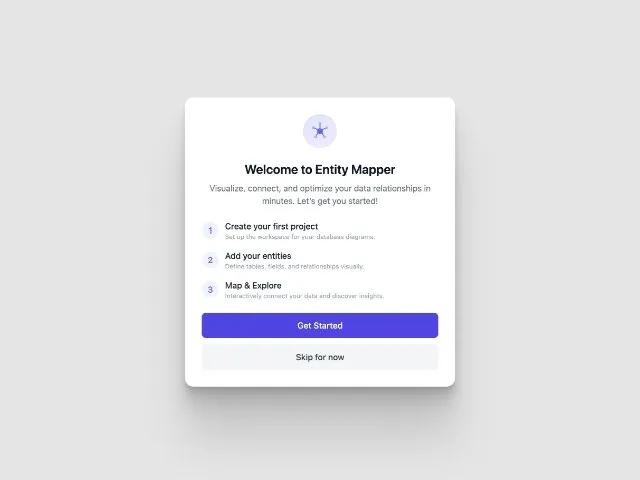 Все промпты
cardonboardingstepsctatailwindresponsivewelcomeui
Onboarding Steps Card with Logo and CTA
Карточка онбординга с логотипом и CTA. Показывает шаги, текст приветствия и кнопки. Идеально для первого запуска, модальных окон, введения в дашборд.
Prompt
<div class="w-full max-w-lg shadow-[0_2.8px_2.2px_rgba(0,_0,_0,_0.034),_0_6.7px_5.3px_rgba(0,_0,_0,_0.048),_0_12.5px_10px_rgba(0,_0,_0,_0.06),_0_22.3px_17.9px_rgba(0,_0,_0,_0.072),_0_41.8px_33.4px_rgba(0,_0,_0,_0.086),_0_100px_80px_rgba(0,_0,_0,_0.12)] transition-all bg-white rounded-2xl px-8 py-8">
<!-- Logo or Illustration -->
<div class="flex justify-center mb-6">
<div class="w-16 h-16 bg-gradient-to-br from-indigo-100 to-purple-100 rounded-full flex items-center justify-center shadow-inner">
<svg class="w-11 h-11" viewBox="0 0 48 48" fill="none">
<!-- Central circle (hub) -->
<circle cx="24" cy="24" r="6" fill="#6366f1" class=""></circle>
<!-- Top node -->
<circle cx="24" cy="8.5" r="3" fill="#a5b4fc" class=""></circle>
<!-- Top-left node -->
<circle cx="10.5" cy="17" r="3" fill="#a5b4fc" class=""></circle>
<!-- Top-right node -->
<circle cx="37.5" cy="17" r="3" fill="#a5b4fc" class=""></circle>
<!-- Bottom-left node -->
<circle cx="15" cy="36" r="3" fill="#a5b4fc" class=""></circle>
<!-- Bottom-right node -->
<circle cx="33" cy="36" r="3" fill="#a5b4fc" class=""></circle>
<!-- Lines connecting nodes to hub -->
<line x1="24" y1="18" x2="24" y2="11.5" stroke="#6366f1" stroke-width="2" class=""></line>
<line x1="21" y1="20.5" x2="12.8" y2="18.8" stroke="#6366f1" stroke-width="2" class=""></line>
<line x1="27" y1="20.5" x2="35.2" y2="18.8" stroke="#6366f1" stroke-width="2" class=""></line>
<line x1="19.5" y1="27" x2="16.6" y2="33.2" stroke="#6366f1" stroke-width="2" class=""></line>
<line x1="28.5" y1="27" x2="31.4" y2="33.2" stroke="#6366f1" stroke-width="2" class=""></line>
<!-- Slight shadow under central node for depth -->
<ellipse cx="24" cy="30.5" rx="7" ry="2" fill="#818cf8" fill-opacity="0.15" class=""></ellipse>
</svg>
</div>
</div>
<!-- Onboarding Content -->
<h2 class="text-2xl font-semibold text-gray-900 text-center mb-2">Welcome to Entity Mapper</h2>
<p class="text-gray-500 text-center mb-6">Visualize, connect, and optimize your data relationships in minutes. Let’s get you started!</p>
<!-- Steps -->
<div class="flex flex-col gap-4 mb-6">
<div class="flex items-center gap-3">
<div class="w-8 h-8 rounded-full bg-indigo-50 flex items-center justify-center text-indigo-500 font-medium">1</div>
<div>
<div class="font-medium text-gray-800">Create your first project</div>
<div class="text-xs text-gray-400">Set up the workspace for your database diagrams.</div>
</div>
</div>
<div class="flex items-center gap-3">
<div class="w-8 h-8 rounded-full bg-indigo-50 flex items-center justify-center text-indigo-500 font-medium">2</div>
<div>
<div class="font-medium text-gray-800">Add your entities</div>
<div class="text-xs text-gray-400">Define tables, fields, and relationships visually.</div>
</div>
</div>
<div class="flex items-center gap-3">
<div class="w-8 h-8 rounded-full bg-indigo-50 flex items-center justify-center text-indigo-500 font-medium">3</div>
<div>
<div class="font-medium text-gray-800">Map & Explore</div>
<div class="text-xs text-gray-400">Interactively connect your data and discover insights.</div>
</div>
</div>
</div>
<!-- Actions -->
<div class="flex flex-col gap-3">
<button class="w-full py-3 bg-indigo-600 text-white rounded-lg font-medium text-base hover:bg-indigo-500 transition">Get Started</button>
<button class="w-full py-3 bg-gray-100 text-gray-700 rounded-lg font-medium text-base hover:bg-gray-200 transition">Skip for now</button>
</div>
</div>