Загрузка...
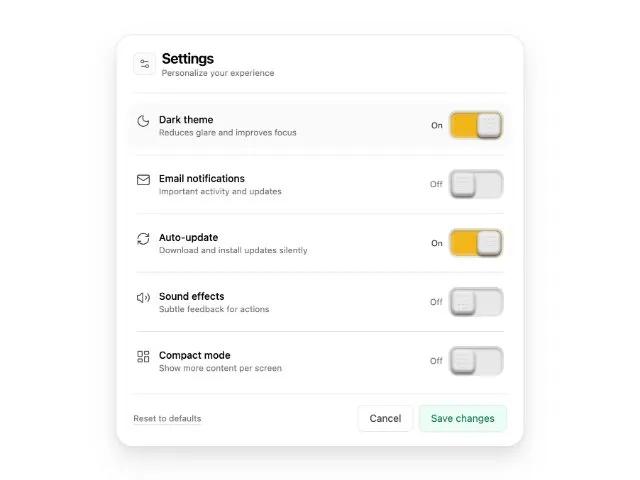
Карточка настроек с переключателями. UI-компонент для управления предпочтениями и кастомизации аккаунта. Адаптивный, интерактивный.
<div class="relative w-full max-w-xl ring-1 ring-black/5 bg-white border-neutral-200 border rounded-3xl pt-2 pr-2 pb-2 pl-2" style="box-shadow:
         0 1px 2px rgba(0,0,0,0.05),
         0 8px 16px rgba(0,0,0,0.06),
         0 20px 40px rgba(0,0,0,0.08);">
    <!-- Header -->
    <div class="flex items-center justify-between rounded-2xl px-4 py-3">
      <div class="flex items-center gap-2">
        <div class="inline-flex h-8 w-8 items-center justify-center rounded-lg border border-neutral-200 bg-neutral-50">
          <svg xmlns="http://www.w3.org/2000/svg" width="24" height="24" viewBox="0 0 24 24" fill="none" stroke="currentColor" stroke-width="1.5" stroke-linecap="round" stroke-linejoin="round" data-lucide="settings-2" class="lucide lucide-settings-2 h-4 w-4 text-neutral-700"><path d="M14 17H5" class=""></path><path d="M19 7h-9" class=""></path><circle cx="17" cy="17" r="3" class=""></circle><circle cx="7" cy="7" r="3" class=""></circle></svg>
        </div>
        <div>
          <h2 class="text-xl tracking-tight font-semibold leading-tight">Settings</h2>
          <p class="text-xs text-neutral-500">Personalize your experience</p>
        </div>
      </div>
    </div>

    <div class="mx-4 mt-2 mb-3 border-t border-neutral-200"></div>

    <!-- Content -->
    <div class="space-y-2 px-2">
      <!-- Row 1 -->
      <div class="grid grid-cols-[1fr_auto] items-center gap-4 rounded-2xl px-3 py-3 transition-colors hover:bg-neutral-50">
        <div class="flex items-start gap-3">
          <div class="mt-0.5">
            <svg xmlns="http://www.w3.org/2000/svg" width="24" height="24" viewBox="0 0 24 24" fill="none" stroke="currentColor" stroke-width="1.5" stroke-linecap="round" stroke-linejoin="round" data-lucide="moon" class="lucide lucide-moon h-5 w-5 text-neutral-700"><path d="M20.985 12.486a9 9 0 1 1-9.473-9.472c.405-.022.617.46.402.803a6 6 0 0 0 8.268 8.268c.344-.215.825-.004.803.401" class=""></path></svg>
          </div>
          <div>
            <div class="text-sm font-medium">Dark theme</div>
            <div class="text-xs text-neutral-500">Reduces glare and improves focus</div>
          </div>
        </div>
        <!-- Toggle (interactive) -->
        <!-- From Uiverse.io by njesenberger -->
        <div class="relative inline-flex items-center gap-2 js-toggle" role="switch" aria-checked="true">
          <span class="js-toggle-label text-xs text-neutral-700 w-7 text-right select-none">On</span>
          <div class="toggle-wrapper rounded-md" style="display:flex;justify-content:center;align-items:center;position:relative;border-radius:.5em;padding:.125em;background-image:linear-gradient(to bottom,#d5d5d5,#e8e8e8);box-shadow:0 1px 1px rgb(255 255 255 / .6);font-size:1.5em;">
            <input class="toggle-checkbox js-toggle-input" type="checkbox" checked="" aria-label="Enable dark theme" style="appearance:none;position:absolute;z-index:1;border-radius:.5em;width:100%;height:100%;font:inherit;opacity:0;cursor:pointer;">
            <div class="toggle-container js-toggle-container rounded" style="display:flex;align-items:center;position:relative;border-radius:.375em;width:3em;height:1.5em;background-color:#f3b519;box-shadow:inset 0 0 .0625em .125em rgb(255 255 255 / .2), inset 0 .0625em .125em rgb(0 0 0 / .4);transition:background-color .4s linear;">
              <div class="toggle-button js-toggle-button" style="display:flex;justify-content:center;align-items:center;position:absolute;left:1.5625em;border-radius:.3125em;width:1.375em;height:1.375em;background-color:#e8e8e8;box-shadow:inset 0 -.0625em .0625em .125em rgb(0 0 0 / .1), inset 0 -.125em .0625em rgb(0 0 0 / .2), inset 0 .1875em .0625em rgb(255 255 255 / .3), 0 .125em .125em rgb(0 0 0 / .5);transition:left .4s;">
                <div class="toggle-button-circles-container" style="display:grid;grid-template-columns:repeat(3,min-content);gap:.125em;position:absolute;margin:0 auto;">
                  <div class="toggle-button-circle" style="border-radius:50%;width:.125em;height:.125em;background-image:radial-gradient(circle at 50% 0,#f5f5f5,#c4c4c4);"></div>
                  <div class="toggle-button-circle" style="border-radius:50%;width:.125em;height:.125em;background-image:radial-gradient(circle at 50% 0,#f5f5f5,#c4c4c4);"></div>
                  <div class="toggle-button-circle" style="border-radius:50%;width:.125em;height:.125em;background-image:radial-gradient(circle at 50% 0,#f5f5f5,#c4c4c4);"></div>
                  <div class="toggle-button-circle" style="border-radius:50%;width:.125em;height:.125em;background-image:radial-gradient(circle at 50% 0,#f5f5f5,#c4c4c4);"></div>
                  <div class="toggle-button-circle" style="border-radius:50%;width:.125em;height:.125em;background-image:radial-gradient(circle at 50% 0,#f5f5f5,#c4c4c4);"></div>
                  <div class="toggle-button-circle" style="border-radius:50%;width:.125em;height:.125em;background-image:radial-gradient(circle at 50% 0,#f5f5f5,#c4c4c4);"></div>
                  <div class="toggle-button-circle" style="border-radius:50%;width:.125em;height:.125em;background-image:radial-gradient(circle at 50% 0,#f5f5f5,#c4c4c4);"></div>
                  <div class="toggle-button-circle" style="border-radius:50%;width:.125em;height:.125em;background-image:radial-gradient(circle at 50% 0,#f5f5f5,#c4c4c4);"></div>
                  <div class="toggle-button-circle" style="border-radius:50%;width:.125em;height:.125em;background-image:radial-gradient(circle at 50% 0,#f5f5f5,#c4c4c4);"></div>
                  <div class="toggle-button-circle" style="border-radius:50%;width:.125em;height:.125em;background-image:radial-gradient(circle at 50% 0,#f5f5f5,#c4c4c4);"></div>
                  <div class="toggle-button-circle" style="border-radius:50%;width:.125em;height:.125em;background-image:radial-gradient(circle at 50% 0,#f5f5f5,#c4c4c4);"></div>
                  <div class="toggle-button-circle" style="border-radius:50%;width:.125em;height:.125em;background-image:radial-gradient(circle at 50% 0,#f5f5f5,#c4c4c4);"></div>
                </div>
              </div>
            </div>
          </div>
        </div>
      </div>

      <div class="mx-3 border-t border-neutral-200"></div>

      <!-- Row 2 -->
      <div class="grid grid-cols-[1fr_auto] items-center gap-4 rounded-2xl px-3 py-3 transition-colors hover:bg-neutral-50">
        <div class="flex items-start gap-3">
          <div class="mt-0.5">
            <svg xmlns="http://www.w3.org/2000/svg" width="24" height="24" viewBox="0 0 24 24" fill="none" stroke="currentColor" stroke-width="1.5" stroke-linecap="round" stroke-linejoin="round" data-lucide="mail" class="lucide lucide-mail h-5 w-5 text-neutral-700"><path d="m22 7-8.991 5.727a2 2 0 0 1-2.009 0L2 7" class=""></path><rect x="2" y="4" width="20" height="16" rx="2" class=""></rect></svg>
          </div>
          <div>
            <div class="text-sm font-medium">Email notifications</div>
            <div class="text-xs text-neutral-500">Important activity and updates</div>
          </div>
        </div>
        <!-- Toggle (interactive) -->
        <!-- From Uiverse.io by njesenberger -->
        <div class="relative inline-flex items-center gap-2 js-toggle" role="switch" aria-checked="false">
          <span class="js-toggle-label text-xs text-neutral-500 w-7 text-right select-none">Off</span>
          <div class="toggle-wrapper rounded-md" style="display:flex;justify-content:center;align-items:center;position:relative;border-radius:.5em;padding:.125em;background-image:linear-gradient(to bottom,#d5d5d5,#e8e8e8);box-shadow:0 1px 1px rgb(255 255 255 / .6);font-size:1.5em;">
            <input class="toggle-checkbox js-toggle-input" type="checkbox" aria-label="Toggle email notifications" style="appearance:none;position:absolute;z-index:1;border-radius:.5em;width:100%;height:100%;font:inherit;opacity:0;cursor:pointer;">
            <div class="toggle-container js-toggle-container rounded" style="display:flex;align-items:center;position:relative;border-radius:.375em;width:3em;height:1.5em;background-color:#e8e8e8;box-shadow:inset 0 0 .0625em .125em rgb(255 255 255 / .2), inset 0 .0625em .125em rgb(0 0 0 / .4);transition:background-color .4s linear;">
              <div class="toggle-button js-toggle-button" style="display:flex;justify-content:center;align-items:center;position:absolute;left:.0625em;border-radius:.3125em;width:1.375em;height:1.375em;background-color:#e8e8e8;box-shadow:inset 0 -.0625em .0625em .125em rgb(0 0 0 / .1), inset 0 -.125em .0625em rgb(0 0 0 / .2), inset 0 .1875em .0625em rgb(255 255 255 / .3), 0 .125em .125em rgb(0 0 0 / .5);transition:left .4s;">
                <div class="toggle-button-circles-container" style="display:grid;grid-template-columns:repeat(3,min-content);gap:.125em;position:absolute;margin:0 auto;">
                  <div style="border-radius:50%;width:.125em;height:.125em;background-image:radial-gradient(circle at 50% 0,#f5f5f5,#c4c4c4);"></div><div style="border-radius:50%;width:.125em;height:.125em;background-image:radial-gradient(circle at 50% 0,#f5f5f5,#c4c4c4);"></div><div style="border-radius:50%;width:.125em;height:.125em;background-image:radial-gradient(circle at 50% 0,#f5f5f5,#c4c4c4);"></div>
                  <div style="border-radius:50%;width:.125em;height:.125em;background-image:radial-gradient(circle at 50% 0,#f5f5f5,#c4c4c4);"></div><div style="border-radius:50%;width:.125em;height:.125em;background-image:radial-gradient(circle at 50% 0,#f5f5f5,#c4c4c4);"></div><div style="border-radius:50%;width:.125em;height:.125em;background-image:radial-gradient(circle at 50% 0,#f5f5f5,#c4c4c4);"></div>
                  <div style="border-radius:50%;width:.125em;height:.125em;background-image:radial-gradient(circle at 50% 0,#f5f5f5,#c4c4c4);"></div><div style="border-radius:50%;width:.125em;height:.125em;background-image:radial-gradient(circle at 50% 0,#f5f5f5,#c4c4c4);"></div><div style="border-radius:50%;width:.125em;height:.125em;background-image:radial-gradient(circle at 50% 0,#f5f5f5,#c4c4c4);"></div>
                  <div style="border-radius:50%;width:.125em;height:.125em;background-image:radial-gradient(circle at 50% 0,#f5f5f5,#c4c4c4);"></div><div style="border-radius:50%;width:.125em;height:.125em;background-image:radial-gradient(circle at 50% 0,#f5f5f5,#c4c4c4);"></div><div style="border-radius:50%;width:.125em;height:.125em;background-image:radial-gradient(circle at 50% 0,#f5f5f5,#c4c4c4);"></div>
                </div>
              </div>
            </div>
          </div>
        </div>
      </div>

      <div class="mx-3 border-t border-neutral-200"></div>

      <!-- Row 3 -->
      <div class="grid grid-cols-[1fr_auto] items-center gap-4 rounded-2xl px-3 py-3 transition-colors hover:bg-neutral-50">
        <div class="flex items-start gap-3">
          <div class="mt-0.5">
            <svg xmlns="http://www.w3.org/2000/svg" width="24" height="24" viewBox="0 0 24 24" fill="none" stroke="currentColor" stroke-width="1.5" stroke-linecap="round" stroke-linejoin="round" data-lucide="refresh-cw" class="lucide lucide-refresh-cw h-5 w-5 text-neutral-700"><path d="M3 12a9 9 0 0 1 9-9 9.75 9.75 0 0 1 6.74 2.74L21 8" class=""></path><path d="M21 3v5h-5" class=""></path><path d="M21 12a9 9 0 0 1-9 9 9.75 9.75 0 0 1-6.74-2.74L3 16" class=""></path><path d="M8 16H3v5" class=""></path></svg>
          </div>
          <div>
            <div class="text-sm font-medium">Auto-update</div>
            <div class="text-xs text-neutral-500">Download and install updates silently</div>
          </div>
        </div>
        <!-- Toggle (interactive) -->
        <!-- From Uiverse.io by njesenberger -->
        <div class="relative inline-flex items-center gap-2 js-toggle" role="switch" aria-checked="true">
          <span class="js-toggle-label text-xs text-neutral-700 w-7 text-right select-none">On</span>
          <div class="toggle-wrapper rounded-md" style="display:flex;justify-content:center;align-items:center;position:relative;border-radius:.5em;padding:.125em;background-image:linear-gradient(to bottom,#d5d5d5,#e8e8e8);box-shadow:0 1px 1px rgb(255 255 255 / .6);font-size:1.5em;">
            <input class="toggle-checkbox js-toggle-input" type="checkbox" checked="" aria-label="Toggle auto-update" style="appearance:none;position:absolute;z-index:1;border-radius:.5em;width:100%;height:100%;font:inherit;opacity:0;cursor:pointer;">
            <div class="toggle-container js-toggle-container rounded" style="display:flex;align-items:center;position:relative;border-radius:.375em;width:3em;height:1.5em;background-color:#f3b519;box-shadow:inset 0 0 .0625em .125em rgb(255 255 255 / .2), inset 0 .0625em .125em rgb(0 0 0 / .4);transition:background-color .4s linear;">
              <div class="toggle-button js-toggle-button" style="display:flex;justify-content:center;align-items:center;position:absolute;left:1.5625em;border-radius:.3125em;width:1.375em;height:1.375em;background-color:#e8e8e8;box-shadow:inset 0 -.0625em .0625em .125em rgb(0 0 0 / .1), inset 0 -.125em .0625em rgb(0 0 0 / .2), inset 0 .1875em .0625em rgb(255 255 255 / .3), 0 .125em .125em rgb(0 0 0 / .5);transition:left .4s;">
                <div style="display:grid;grid-template-columns:repeat(3,min-content);gap:.125em;position:absolute;margin:0 auto;">
                  <div style="border-radius:50%;width:.125em;height:.125em;background-image:radial-gradient(circle at 50% 0,#f5f5f5,#c4c4c4);"></div><div style="border-radius:50%;width:.125em;height:.125em;background-image:radial-gradient(circle at 50% 0,#f5f5f5,#c4c4c4);"></div><div style="border-radius:50%;width:.125em;height:.125em;background-image:radial-gradient(circle at 50% 0,#f5f5f5,#c4c4c4);"></div>
                  <div style="border-radius:50%;width:.125em;height:.125em;background-image:radial-gradient(circle at 50% 0,#f5f5f5,#c4c4c4);"></div><div style="border-radius:50%;width:.125em;height:.125em;background-image:radial-gradient(circle at 50% 0,#f5f5f5,#c4c4c4);"></div><div style="border-radius:50%;width:.125em;height:.125em;background-image:radial-gradient(circle at 50% 0,#f5f5f5,#c4c4c4);"></div>
                  <div style="border-radius:50%;width:.125em;height:.125em;background-image:radial-gradient(circle at 50% 0,#f5f5f5,#c4c4c4);"></div><div style="border-radius:50%;width:.125em;height:.125em;background-image:radial-gradient(circle at 50% 0,#f5f5f5,#c4c4c4);"></div><div style="border-radius:50%;width:.125em;height:.125em;background-image:radial-gradient(circle at 50% 0,#f5f5f5,#c4c4c4);"></div>
                  <div style="border-radius:50%;width:.125em;height:.125em;background-image:radial-gradient(circle at 50% 0,#f5f5f5,#c4c4c4);"></div><div style="border-radius:50%;width:.125em;height:.125em;background-image:radial-gradient(circle at 50% 0,#f5f5f5,#c4c4c4);"></div><div style="border-radius:50%;width:.125em;height:.125em;background-image:radial-gradient(circle at 50% 0,#f5f5f5,#c4c4c4);"></div>
                </div>
              </div>
            </div>
          </div>
        </div>
      </div>

      <div class="mx-3 border-t border-neutral-200"></div>

      <!-- Row 4 -->
      <div class="grid grid-cols-[1fr_auto] items-center gap-4 rounded-2xl px-3 py-3 transition-colors hover:bg-neutral-50">
        <div class="flex items-start gap-3">
          <div class="mt-0.5">
            <svg xmlns="http://www.w3.org/2000/svg" width="24" height="24" viewBox="0 0 24 24" fill="none" stroke="currentColor" stroke-width="1.5" stroke-linecap="round" stroke-linejoin="round" data-lucide="volume-2" class="lucide lucide-volume-2 h-5 w-5 text-neutral-700"><path d="M11 4.702a.705.705 0 0 0-1.203-.498L6.413 7.587A1.4 1.4 0 0 1 5.416 8H3a1 1 0 0 0-1 1v6a1 1 0 0 0 1 1h2.416a1.4 1.4 0 0 1 .997.413l3.383 3.384A.705.705 0 0 0 11 19.298z" class=""></path><path d="M16 9a5 5 0 0 1 0 6" class=""></path><path d="M19.364 18.364a9 9 0 0 0 0-12.728" class=""></path></svg>
          </div>
          <div>
            <div class="text-sm font-medium">Sound effects</div>
            <div class="text-xs text-neutral-500">Subtle feedback for actions</div>
          </div>
        </div>
        <!-- Toggle (interactive) -->
        <!-- From Uiverse.io by njesenberger -->
        <div class="relative inline-flex items-center gap-2 js-toggle" role="switch" aria-checked="false">
          <span class="js-toggle-label text-xs text-neutral-500 w-7 text-right select-none">Off</span>
          <div class="toggle-wrapper rounded-md" style="display:flex;justify-content:center;align-items:center;position:relative;border-radius:.5em;padding:.125em;background-image:linear-gradient(to bottom,#d5d5d5,#e8e8e8);box-shadow:0 1px 1px rgb(255 255 255 / .6);font-size:1.5em;">
            <input class="toggle-checkbox js-toggle-input" type="checkbox" aria-label="Toggle sound effects" style="appearance:none;position:absolute;z-index:1;border-radius:.5em;width:100%;height:100%;font:inherit;opacity:0;cursor:pointer;">
            <div class="toggle-container js-toggle-container rounded" style="display:flex;align-items:center;position:relative;border-radius:.375em;width:3em;height:1.5em;background-color:#e8e8e8;box-shadow:inset 0 0 .0625em .125em rgb(255 255 255 / .2), inset 0 .0625em .125em rgb(0 0 0 / .4);transition:background-color .4s linear;">
              <div class="toggle-button js-toggle-button" style="display:flex;justify-content:center;align-items:center;position:absolute;left:.0625em;border-radius:.3125em;width:1.375em;height:1.375em;background-color:#e8e8e8;box-shadow:inset 0 -.0625em .0625em .125em rgb(0 0 0 / .1), inset 0 -.125em .0625em rgb(0 0 0 / .2), inset 0 .1875em .0625em rgb(255 255 255 / .3), 0 .125em .125em rgb(0 0 0 / .5);transition:left .4s;">
                <div style="display:grid;grid-template-columns:repeat(3,min-content);gap:.125em;position:absolute;margin:0 auto;">
                  <div style="border-radius:50%;width:.125em;height:.125em;background-image:radial-gradient(circle at 50% 0,#f5f5f5,#c4c4c4);"></div><div style="border-radius:50%;width:.125em;height:.125em;background-image:radial-gradient(circle at 50% 0,#f5f5f5,#c4c4c4);"></div><div style="border-radius:50%;width:.125em;height:.125em;background-image:radial-gradient(circle at 50% 0,#f5f5f5,#c4c4c4);"></div>
                  <div style="border-radius:50%;width:.125em;height:.125em;background-image:radial-gradient(circle at 50% 0,#f5f5f5,#c4c4c4);"></div><div style="border-radius:50%;width:.125em;height:.125em;background-image:radial-gradient(circle at 50% 0,#f5f5f5,#c4c4c4);"></div><div style="border-radius:50%;width:.125em;height:.125em;background-image:radial-gradient(circle at 50% 0,#f5f5f5,#c4c4c4);"></div>
                  <div style="border-radius:50%;width:.125em;height:.125em;background-image:radial-gradient(circle at 50% 0,#f5f5f5,#c4c4c4);"></div><div style="border-radius:50%;width:.125em;height:.125em;background-image:radial-gradient(circle at 50% 0,#f5f5f5,#c4c4c4);"></div><div style="border-radius:50%;width:.125em;height:.125em;background-image:radial-gradient(circle at 50% 0,#f5f5f5,#c4c4c4);"></div>
                  <div style="border-radius:50%;width:.125em;height:.125em;background-image:radial-gradient(circle at 50% 0,#f5f5f5,#c4c4c4);"></div><div style="border-radius:50%;width:.125em;height:.125em;background-image:radial-gradient(circle at 50% 0,#f5f5f5,#c4c4c4);"></div><div style="border-radius:50%;width:.125em;height:.125em;background-image:radial-gradient(circle at 50% 0,#f5f5f5,#c4c4c4);"></div>
                </div>
              </div>
            </div>
          </div>
        </div>
      </div>

      <div class="mx-3 border-t border-neutral-200"></div>

      <!-- Row 5 -->
      <div class="grid grid-cols-[1fr_auto] items-center gap-4 rounded-2xl px-3 py-3 transition-colors hover:bg-neutral-50">
        <div class="flex items-start gap-3">
          <div class="mt-0.5">
            <svg xmlns="http://www.w3.org/2000/svg" width="24" height="24" viewBox="0 0 24 24" fill="none" stroke="currentColor" stroke-width="1.5" stroke-linecap="round" stroke-linejoin="round" data-lucide="layout-dashboard" class="lucide lucide-layout-dashboard h-5 w-5 text-neutral-700"><rect width="7" height="9" x="3" y="3" rx="1" class=""></rect><rect width="7" height="5" x="14" y="3" rx="1" class=""></rect><rect width="7" height="9" x="14" y="12" rx="1" class=""></rect><rect width="7" height="5" x="3" y="16" rx="1" class=""></rect></svg>
          </div>
          <div>
            <div class="text-sm font-medium">Compact mode</div>
            <div class="text-xs text-neutral-500">Show more content per screen</div>
          </div>
        </div>
        <!-- Toggle (interactive) -->
        <!-- From Uiverse.io by njesenberger -->
        <div class="relative inline-flex items-center gap-2 js-toggle" role="switch" aria-checked="false">
          <span class="js-toggle-label text-xs text-neutral-500 w-7 text-right select-none">Off</span>
          <div class="toggle-wrapper rounded-md" style="display:flex;justify-content:center;align-items:center;position:relative;border-radius:.5em;padding:.125em;background-image:linear-gradient(to bottom,#d5d5d5,#e8e8e8);box-shadow:0 1px 1px rgb(255 255 255 / .6);font-size:1.5em;">
            <input class="toggle-checkbox js-toggle-input" type="checkbox" aria-label="Toggle compact mode" style="appearance:none;position:absolute;z-index:1;border-radius:.5em;width:100%;height:100%;font:inherit;opacity:0;cursor:pointer;">
            <div class="toggle-container js-toggle-container rounded" style="display:flex;align-items:center;position:relative;border-radius:.375em;width:3em;height:1.5em;background-color:#e8e8e8;box-shadow:inset 0 0 .0625em .125em rgb(255 255 255 / .2), inset 0 .0625em .125em rgb(0 0 0 / .4);transition:background-color .4s linear;">
              <div class="toggle-button js-toggle-button" style="display:flex;justify-content:center;align-items:center;position:absolute;left:.0625em;border-radius:.3125em;width:1.375em;height:1.375em;background-color:#e8e8e8;box-shadow:inset 0 -.0625em .0625em .125em rgb(0 0 0 / .1), inset 0 -.125em .0625em rgb(0 0 0 / .2), inset 0 .1875em .0625em rgb(255 255 255 / .3), 0 .125em .125em rgb(0 0 0 / .5);transition:left .4s;">
                <div style="display:grid;grid-template-columns:repeat(3,min-content);gap:.125em;position:absolute;margin:0 auto;">
                  <div style="border-radius:50%;width:.125em;height:.125em;background-image:radial-gradient(circle at 50% 0,#f5f5f5,#c4c4c4);"></div><div style="border-radius:50%;width:.125em;height:.125em;background-image:radial-gradient(circle at 50% 0,#f5f5f5,#c4c4c4);"></div><div style="border-radius:50%;width:.125em;height:.125em;background-image:radial-gradient(circle at 50% 0,#f5f5f5,#c4c4c4);"></div>
                  <div style="border-radius:50%;width:.125em;height:.125em;background-image:radial-gradient(circle at 50% 0,#f5f5f5,#c4c4c4);"></div><div style="border-radius:50%;width:.125em;height:.125em;background-image:radial-gradient(circle at 50% 0,#f5f5f5,#c4c4c4);"></div><div style="border-radius:50%;width:.125em;height:.125em;background-image:radial-gradient(circle at 50% 0,#f5f5f5,#c4c4c4);"></div>
                  <div style="border-radius:50%;width:.125em;height:.125em;background-image:radial-gradient(circle at 50% 0,#f5f5f5,#c4c4c4);"></div><div style="border-radius:50%;width:.125em;height:.125em;background-image:radial-gradient(circle at 50% 0,#f5f5f5,#c4c4c4);"></div><div style="border-radius:50%;width:.125em;height:.125em;background-image:radial-gradient(circle at 50% 0,#f5f5f5,#c4c4c4);"></div>
                  <div style="border-radius:50%;width:.125em;height:.125em;background-image:radial-gradient(circle at 50% 0,#f5f5f5,#c4c4c4);"></div><div style="border-radius:50%;width:.125em;height:.125em;background-image:radial-gradient(circle at 50% 0,#f5f5f5,#c4c4c4);"></div><div style="border-radius:50%;width:.125em;height:.125em;background-image:radial-gradient(circle at 50% 0,#f5f5f5,#c4c4c4);"></div>
                </div>
              </div>
            </div>
          </div>
        </div>
      </div>
    </div>

    <div class="mx-4 my-3 border-t border-neutral-200"></div>

    <!-- Footer -->
    <div class="flex items-center justify-between gap-2 px-4 pb-3 pt-1">
      <button class="text-xs text-neutral-500 hover:text-neutral-700 underline underline-offset-4 decoration-neutral-300 hover:decoration-neutral-400 transition" type="button">
        Reset to defaults
      </button>
      <div class="flex items-center gap-2">
        <button class="rounded-lg border border-neutral-200 bg-white px-4 py-2 text-sm text-neutral-700 hover:bg-neutral-50 transition focus-visible:outline-none focus-visible:ring-2 focus-visible:ring-black/10">
          Cancel
        </button>
        <button class="rounded-lg border border-emerald-600/15 bg-emerald-50 px-4 py-2 text-sm text-emerald-700 hover:bg-emerald-100 hover:border-emerald-600/25 transition focus-visible:outline-none focus-visible:ring-2 focus-visible:ring-emerald-600/30">
          Save changes
        </button>
      </div>
    </div>
  </div>