
Все промпты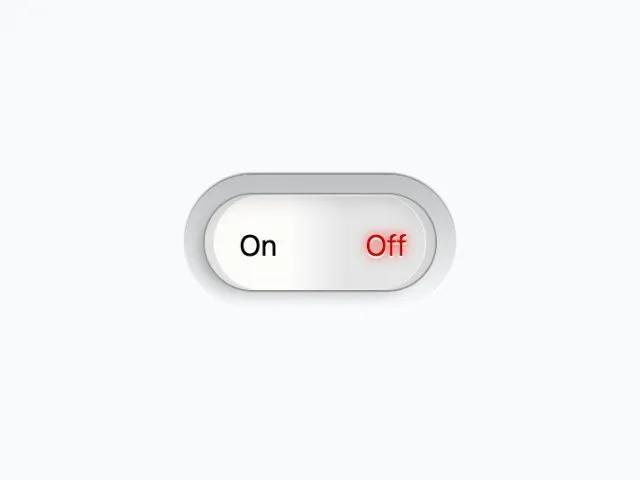 Все промпты
toggleswitchcheckboxhtmlcssinteractivesettings
Simple Toggle Switch Checkbox
Простой переключатель Toggle Switch на основе чекбокса. Идеален для настроек и переключения функций. Легко стилизуется.
Prompt
<html lang="en">
<head>
<meta charset="UTF-8">
<meta name="viewport" content="width=device-width, initial-scale=1.0">
<title>Custom Toggle Switch</title>
<script src="https://cdn.tailwindcss.com"></script>
<script src="https://unpkg.com/lucide@latest/dist/umd/lucide.js"></script>
<link id="all-fonts-link-font-geist" rel="stylesheet"
href="https://fonts.googleapis.com/css2?family=Geist:wght@300;400;500;600;700&display=swap">
<style id="all-fonts-style-font-geist">
.font-geist {
font-family: 'Geist', sans-serif !important;
}
</style>
<link id="all-fonts-link-font-roboto" rel="stylesheet"
href="https://fonts.googleapis.com/css2?family=Roboto:wght@300;400;500;600;700&display=swap">
<style id="all-fonts-style-font-roboto">
.font-roboto {
font-family: 'Roboto', sans-serif !important;
}
</style>
<link id="all-fonts-link-font-montserrat" rel="stylesheet"
href="https://fonts.googleapis.com/css2?family=Montserrat:wght@300;400;500;600;700&display=swap">
<style id="all-fonts-style-font-montserrat">
.font-montserrat {
font-family: 'Montserrat', sans-serif !important;
}
</style>
<link id="all-fonts-link-font-poppins" rel="stylesheet"
href="https://fonts.googleapis.com/css2?family=Poppins:wght@300;400;500;600;700&display=swap">
<style id="all-fonts-style-font-poppins">
.font-poppins {
font-family: 'Poppins', sans-serif !important;
}
</style>
<link id="all-fonts-link-font-playfair" rel="stylesheet"
href="https://fonts.googleapis.com/css2?family=Playfair+Display:wght@400;500;600;700;900&display=swap">
<style id="all-fonts-style-font-playfair">
.font-playfair {
font-family: 'Playfair Display', serif !important;
}
</style>
<link id="all-fonts-link-font-instrument-serif" rel="stylesheet"
href="https://fonts.googleapis.com/css2?family=Instrument+Serif:wght@400;500;600;700&display=swap">
<style id="all-fonts-style-font-instrument-serif">
.font-instrument-serif {
font-family: 'Instrument Serif', serif !important;
}
</style>
<link id="all-fonts-link-font-merriweather" rel="stylesheet"
href="https://fonts.googleapis.com/css2?family=Merriweather:wght@300;400;700;900&display=swap">
<style id="all-fonts-style-font-merriweather">
.font-merriweather {
font-family: 'Merriweather', serif !important;
}
</style>
<link id="all-fonts-link-font-bricolage" rel="stylesheet"
href="https://fonts.googleapis.com/css2?family=Bricolage+Grotesque:wght@300;400;500;600;700&display=swap">
<style id="all-fonts-style-font-bricolage">
.font-bricolage {
font-family: 'Bricolage Grotesque', sans-serif !important;
}
</style>
<link id="all-fonts-link-font-jakarta" rel="stylesheet"
href="https://fonts.googleapis.com/css2?family=Plus+Jakarta+Sans:wght@300;400;500;600;700;800&display=swap">
<style id="all-fonts-style-font-jakarta">
.font-jakarta {
font-family: 'Plus Jakarta Sans', sans-serif !important;
}
</style>
<link id="all-fonts-link-font-manrope" rel="stylesheet"
href="https://fonts.googleapis.com/css2?family=Manrope:wght@300;400;500;600;700;800&display=swap">
<style id="all-fonts-style-font-manrope">
.font-manrope {
font-family: 'Manrope', sans-serif !important;
}
</style>
<link id="all-fonts-link-font-space-grotesk" rel="stylesheet"
href="https://fonts.googleapis.com/css2?family=Space+Grotesk:wght@300;400;500;600;700&display=swap">
<style id="all-fonts-style-font-space-grotesk">
.font-space-grotesk {
font-family: 'Space Grotesk', sans-serif !important;
}
</style>
<link id="all-fonts-link-font-work-sans" rel="stylesheet"
href="https://fonts.googleapis.com/css2?family=Work+Sans:wght@300;400;500;600;700;800&display=swap">
<style id="all-fonts-style-font-work-sans">
.font-work-sans {
font-family: 'Work Sans', sans-serif !important;
}
</style>
<link id="all-fonts-link-font-pt-serif" rel="stylesheet"
href="https://fonts.googleapis.com/css2?family=PT+Serif:wght@400;700&display=swap">
<style id="all-fonts-style-font-pt-serif">
.font-pt-serif {
font-family: 'PT Serif', serif !important;
}
</style>
<link id="all-fonts-link-font-geist-mono" rel="stylesheet"
href="https://fonts.googleapis.com/css2?family=Geist+Mono:wght@300;400;500;600;700&display=swap">
<style id="all-fonts-style-font-geist-mono">
.font-geist-mono {
font-family: 'Geist Mono', monospace !important;
}
</style>
<link id="all-fonts-link-font-space-mono" rel="stylesheet"
href="https://fonts.googleapis.com/css2?family=Space+Mono:wght@400;700&display=swap">
<style id="all-fonts-style-font-space-mono">
.font-space-mono {
font-family: 'Space Mono', monospace !important;
}
</style>
<link id="all-fonts-link-font-quicksand" rel="stylesheet"
href="https://fonts.googleapis.com/css2?family=Quicksand:wght@300;400;500;600;700&display=swap">
<style id="all-fonts-style-font-quicksand">
.font-quicksand {
font-family: 'Quicksand', sans-serif !important;
}
</style>
<link id="all-fonts-link-font-nunito" rel="stylesheet"
href="https://fonts.googleapis.com/css2?family=Nunito:wght@300;400;500;600;700;800&display=swap">
<style id="all-fonts-style-font-nunito">
.font-nunito {
font-family: 'Nunito', sans-serif !important;
}
</style>
</head>
<body class="min-h-screen flex items-center justify-center bg-gray-50 pt-4 pr-4 pb-4 pl-4">
<div class="fx-block">
<div class="toggle">
<div class="">
<input type="checkbox" id="toggles" class="">
<div data-unchecked="On" data-checked="Off" class="">
</div>
</div>
</div>
</div>
<style>
/* From Uiverse.io by JaydipPrajapati1910 */
.toggle>div {
position: relative;
padding: 10px;
width: 150px;
height: 75px;
border-radius: 50px;
box-shadow: 0 -1px 1px 0 rgba(0, 0, 0, .5), 0px 1px 1px 0 rgba(255, 255, 255, 1);
background: rgb(189, 191, 193);
background: linear-gradient(to bottom, rgba(189, 191, 193, 1) 0%, rgba(249, 251, 254, 1) 100%);
}
.toggle>div>input[type=checkbox] {
position: absolute;
opacity: 0;
top: -3px;
left: 17px;
width: 130px;
height: 55px;
z-index: 5;
}
.toggle>div>input[type=checkbox]~div {
width: 130px;
height: 55px;
border-radius: 50px;
border: 1px solid #979797;
box-shadow: inset 5px 0 0 0 rgba(0, 0, 0, .1), inset -5px 0 0 0 rgba(0, 0, 0, .1), inset -6px 0 0 0 rgba(255, 255, 255, .5), inset -4px 6px 11px -5px rgba(0, 0, 0, .2), inset 1px 1px 0 0 rgba(255, 255, 255, 1), -6px 4px 11px -7px rgba(0, 0, 0, .5);
background: rgb(253, 252, 251);
background: linear-gradient(to right, rgba(253, 252, 251, 1) 37%, rgba(229, 229, 229, 1) 61%);
}
.toggle>div>input[type=checkbox]:checked~div {
box-shadow: inset -5px 0 0 0 rgba(0, 0, 0, .1), inset 5px 0 0 0 rgba(0, 0, 0, .1), inset 6px 0 0 0 rgba(255, 255, 255, .5), inset -4px 6px 11px -5px rgba(0, 0, 0, .2), inset 1px 1px 0 0 rgba(255, 255, 255, 1), -6px 4px 11px -7px rgba(0, 0, 0, .5);
background: rgb(229, 229, 229);
background: linear-gradient(to right, rgba(229, 229, 229, 1) 39%, rgba(253, 252, 251, 1) 63%);
}
.toggle>div>input[type=checkbox]~div:before {
content: attr(data-unchecked);
display: block;
position: absolute;
border-radius: 10px;
top: 27px;
left: 30px;
}
.toggle>div>input[type=checkbox]~div:after {
content: attr(data-checked);
color: #df0000;
text-shadow: 0 1px 0 #fff, 0px 0 7px #df0000;
filter: dropshadow(color=#df0000, offx=0, offy=0);
display: block;
position: absolute;
border-radius: 10px;
top: 27px;
left: 100px;
}
.toggle>div>input[type=checkbox]:checked~div:before {
color: #119400;
text-shadow: 0 1px 0 #fff, 0px 0 7px #007a08;
filter: dropshadow(color=#007a08, offx=0, offy=0);
}
.toggle>div>input[type=checkbox]:checked~div:after {
color: #000;
text-shadow: none;
filter: dropshadow(none);
}
</style>
<script>
lucide.createIcons();
</script>
</body>
</html>