Загрузка...
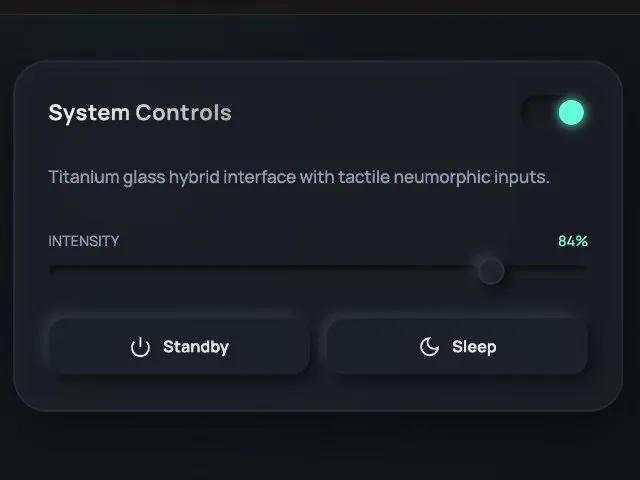
UI-карты с эффектом стекла и неоморфизма для дашборда. Аналитика, управление системой, интерактивные элементы. Адаптивный дизайн.
<!DOCTYPE html>
<html lang="en">

<head>
    <meta charset="UTF-8">
    <meta name="viewport" content="width=device-width, initial-scale=1.0">
    <title>Titanium & Glass Neumorphism</title>
    <link rel="preconnect" href="https://fonts.googleapis.com">
    <link rel="preconnect" href="https://fonts.gstatic.com" crossorigin>
    <link href="https://fonts.googleapis.com/css2?family=Manrope:wght@300;500;700&display=swap" rel="stylesheet">

    <style>
        :root {
            /* Palette */
            --bg-body: #121418;
            --titanium-base: rgba(30, 34, 40, 0.6);
            --titanium-border: rgba(255, 255, 255, 0.08);
            --titanium-inner: rgba(255, 255, 255, 0.02);
            --neon-accent: #64ffda;
            --text-main: #e0e6ed;
            --text-muted: #8b9bb4;

            /* Neumorph Light */
            --neu-light-bg: #e0e5ec;
            --neu-shadow-light: #ffffff;
            --neu-shadow-dark: #a3b1c6;
        }

        * {
            box-sizing: border-box;
            margin: 0;
            padding: 0;
        }

        body {
            background-color: var(--bg-body);
            background-image:
                radial-gradient(circle at 10% 20%, rgba(100, 255, 218, 0.03) 0%, transparent 40%),
                radial-gradient(circle at 90% 80%, rgba(70, 90, 255, 0.03) 0%, transparent 40%);
            font-family: 'Manrope', sans-serif;
            color: var(--text-main);
            min-height: 100vh;
            display: flex;
            justify-content: center;
            align-items: center;
            overflow-x: hidden;
        }

        /* --- Layout --- */
        .container {
            display: grid;
            grid-template-columns: repeat(auto-fit, minmax(320px, 1fr));
            gap: 40px;
            width: 100%;
            max-width: 1200px;
            padding: 40px;
        }

        /* --- The Titanium Glass Card --- */
        .card {
            position: relative;
            background: var(--titanium-base);
            backdrop-filter: blur(20px);
            -webkit-backdrop-filter: blur(20px);
            border-radius: 30px;
            border: 1px solid var(--titanium-border);
            padding: 30px;
            display: flex;
            flex-direction: column;
            gap: 20px;

            /* The Hybrid Shadow: Deep Drop + Soft Inner Glow */
            box-shadow:
                0 20px 50px rgba(0, 0, 0, 0.5),
                inset 0 0 0 1px rgba(255, 255, 255, 0.03),
                inset 0 1px 20px rgba(255, 255, 255, 0.02);

            transition: transform 0.4s cubic-bezier(0.175, 0.885, 0.32, 1.275), box-shadow 0.4s ease;
            overflow: hidden;
        }

        .card::before {
            content: '';
            position: absolute;
            top: 0;
            left: 0;
            right: 0;
            bottom: 0;
            background: radial-gradient(800px circle at var(--mouse-x) var(--mouse-y), rgba(255, 255, 255, 0.04), transparent 40%);
            opacity: 0;
            transition: opacity 0.5s;
            pointer-events: none;
            z-index: 0;
        }

        .card:hover::before {
            opacity: 1;
        }

        .card:hover {
            transform: translateY(-8px);
            box-shadow:
                0 30px 60px rgba(0, 0, 0, 0.6),
                inset 0 0 0 1px rgba(255, 255, 255, 0.08),
                inset 0 1px 30px rgba(255, 255, 255, 0.04);
            border-color: rgba(255, 255, 255, 0.15);
        }

        .card-header {
            display: flex;
            justify-content: space-between;
            align-items: center;
            margin-bottom: 10px;
            z-index: 1;
        }

        .card-title {
            font-size: 1.2rem;
            font-weight: 700;
            letter-spacing: 0.5px;
            background: linear-gradient(135deg, #fff 0%, #a5a5a5 100%);
            -webkit-background-clip: text;
            -webkit-text-fill-color: transparent;
        }

        /* --- Element: Soft Light Neumorph Button (Hybrid) --- */
        /* Places a soft clay/light object on the dark glass */
        .neu-button {
            position: relative;
            background: var(--neu-light-bg);
            color: #4a5568;
            border: none;
            padding: 14px 24px;
            border-radius: 16px;
            font-weight: 600;
            font-size: 0.9rem;
            cursor: pointer;
            z-index: 1;
            display: flex;
            align-items: center;
            justify-content: center;
            gap: 10px;
            transition: all 0.2s ease;

            /* The Classic Neumorph Shadow */
            box-shadow:
                6px 6px 12px #0a0b0d,
                -6px -6px 12px rgba(255, 255, 255, 0.05);
        }

        .neu-button:hover {
            transform: translateY(-2px);
            color: #2d3748;
            box-shadow:
                8px 8px 16px #0a0b0d,
                -8px -8px 16px rgba(255, 255, 255, 0.08);
        }

        .neu-button:active {
            transform: translateY(1px);
            box-shadow:
                inset 4px 4px 8px #bec3c9,
                inset -4px -4px 8px #ffffff;
        }

        .neu-button.dark-mode {
            background: #1e2228;
            color: var(--text-main);
            box-shadow:
                5px 5px 10px #0e1013,
                -5px -5px 10px #2e343d;
        }

        .neu-button.dark-mode:active {
            box-shadow:
                inset 5px 5px 10px #0e1013,
                inset -5px -5px 10px #2e343d;
        }

        /* --- Element: Titanium Slider --- */
        .slider-container {
            z-index: 1;
            margin-top: 15px;
        }

        .range-slider {
            -webkit-appearance: none;
            width: 100%;
            background: transparent;
        }

        .range-slider::-webkit-slider-runnable-track {
            width: 100%;
            height: 12px;
            border-radius: 10px;
            /* Inset groove */
            background: #16181c;
            box-shadow: inset 2px 2px 5px #0a0b0d, inset -2px -2px 5px #22262e;
            border: 1px solid rgba(255, 255, 255, 0.02);
        }

        .range-slider::-webkit-slider-thumb {
            -webkit-appearance: none;
            height: 24px;
            width: 24px;
            border-radius: 50%;
            background: linear-gradient(145deg, #23272e, #1d2127);
            margin-top: -7px;
            cursor: pointer;
            /* Soft Lifted Thumb */
            box-shadow:
                5px 5px 10px #0a0b0d,
                -5px -5px 10px #2e343d,
                inset 0 0 2px rgba(255, 255, 255, 0.2);
            transition: transform 0.1s;
            border: 1px solid rgba(255, 255, 255, 0.05);
        }

        .range-slider:active::-webkit-slider-thumb {
            transform: scale(0.95);
            background: var(--neon-accent);
            box-shadow: 0 0 15px var(--neon-accent);
        }

        /* --- Element: Floating Widget (Weather/Status) --- */
        .widget-row {
            display: flex;
            align-items: center;
            justify-content: space-between;
            z-index: 1;
        }

        .status-pill {
            padding: 8px 16px;
            border-radius: 50px;
            font-size: 0.8rem;
            font-weight: 600;
            letter-spacing: 1px;
            text-transform: uppercase;

            /* Glass on Glass */
            background: rgba(255, 255, 255, 0.03);
            border: 1px solid rgba(255, 255, 255, 0.05);
            box-shadow: 0 4px 10px rgba(0, 0, 0, 0.2);
            color: var(--neon-accent);
            display: flex;
            align-items: center;
            gap: 8px;
        }

        .status-dot {
            width: 8px;
            height: 8px;
            background-color: var(--neon-accent);
            border-radius: 50%;
            box-shadow: 0 0 10px var(--neon-accent);
            animation: pulse 2s infinite;
        }

        /* --- Element: Toggle Switch --- */
        .toggle-switch {
            position: relative;
            width: 60px;
            height: 30px;
            z-index: 1;
        }

        .toggle-input {
            opacity: 0;
            width: 0;
            height: 0;
        }

        .toggle-label {
            position: absolute;
            cursor: pointer;
            top: 0;
            left: 0;
            right: 0;
            bottom: 0;
            background: #16181c;
            border-radius: 30px;
            box-shadow: inset 2px 2px 5px #0a0b0d, inset -2px -2px 5px #22262e;
            transition: 0.3s;
        }

        .toggle-label:before {
            position: absolute;
            content: "";
            height: 22px;
            width: 22px;
            left: 4px;
            bottom: 4px;
            background: linear-gradient(145deg, #e0e5ec, #c8cfd8);
            border-radius: 50%;
            transition: 0.3s;
            box-shadow: 2px 2px 5px rgba(0, 0, 0, 0.3);
        }

        .toggle-input:checked+.toggle-label:before {
            transform: translateX(30px);
            background: var(--neon-accent);
            box-shadow: 0 0 10px var(--neon-accent);
        }

        /* --- Text Styling --- */
        p {
            font-size: 0.95rem;
            line-height: 1.6;
            color: var(--text-muted);
            z-index: 1;
        }

        .metrics {
            display: flex;
            gap: 20px;
            margin-top: 10px;
            z-index: 1;
        }

        .metric-item {
            text-align: center;
            flex: 1;
            background: rgba(255, 255, 255, 0.02);
            padding: 15px;
            border-radius: 12px;
            border: 1px solid rgba(255, 255, 255, 0.03);
        }

        .metric-value {
            font-size: 1.5rem;
            font-weight: 700;
            color: #fff;
            display: block;
        }

        .metric-label {
            font-size: 0.75rem;
            text-transform: uppercase;
            letter-spacing: 1px;
            color: var(--text-muted);
        }

        /* --- Animation --- */
        @keyframes pulse {
            0% {
                opacity: 1;
                box-shadow: 0 0 0 0 rgba(100, 255, 218, 0.4);
            }

            70% {
                opacity: 0.7;
                box-shadow: 0 0 0 6px rgba(100, 255, 218, 0);
            }

            100% {
                opacity: 1;
                box-shadow: 0 0 0 0 rgba(100, 255, 218, 0);
            }
        }

        /* SVG Icons */
        .icon {
            width: 20px;
            height: 20px;
            stroke-width: 2;
            fill: none;
            stroke: currentColor;
        }
    </style>
</head>

<body>

    <div class="container">

        <!-- Card 1: Control Panel (Hybrid Inputs) -->
        <div class="card" id="card1">
            <div class="card-header">
                <span class="card-title">System Controls</span>
                <div class="toggle-switch">
                    <input type="checkbox" class="toggle-input" id="switch" checked>
                    <label class="toggle-label" for="switch"></label>
                </div>
            </div>
            <p>Titanium glass hybrid interface with tactile neumorphic inputs.</p>

            <div class="slider-container">
                <div class="card-header" style="margin-bottom: 5px;">
                    <span style="font-size: 0.8rem; color: var(--text-muted);">INTENSITY</span>
                    <span style="font-size: 0.8rem; color: var(--neon-accent);">84%</span>
                </div>
                <input type="range" min="1" max="100" value="84" class="range-slider">
            </div>

            <div style="display: flex; gap: 15px; margin-top: 10px;">
                <button class="neu-button dark-mode" style="flex:1;">
                    <svg class="icon" viewBox="0 0 24 24"><path d="M18.36 6.64a9 9 0 1 1-12.73 0"></path><line x1="12" y1="2" x2="12" y2="12"></line></svg>
                    Standby
                </button>
                <button class="neu-button dark-mode" style="flex:1;">
                    <svg class="icon" viewBox="0 0 24 24"><path d="M21 12.79A9 9 0 1 1 11.21 3 7 7 0 0 0 21 12.79z"></path></svg>
                    Sleep
                </button>
            </div>
        </div>

        <!-- Card 2: Analytics (Data Visualization) -->
        <div class="card" id="card2">
            <div class="card-header">
                <span class="card-title">Core Metrics</span>
                <div class="status-pill">
                    <div class="status-dot"></div>
                    Online
                </div>
            </div>

            <div class="metrics">
                <div class="metric-item">
                    <span class="metric-value">24ms</span>
                    <span class="metric-label">Latency</span>
                </div>
                <div class="metric-item">
                    <span class="metric-value">98.2%</span>
                    <span class="metric-label">Uptime</span>
                </div>
                <div class="metric-item">
                    <span class="metric-value">4.2TB</span>
                    <span class="metric-label">Data</span>
                </div>
            </div>

            <!-- Soft Light Button standing out against dark glass -->
            <button class="neu-button" style="margin-top: 10px;">
                Download Report
                <svg class="icon" viewBox="0 0 24 24"><path d="M21 15v4a2 2 0 0 1-2 2H5a2 2 0 0 1-2-2v-4"></path><polyline points="7 10 12 15 17 10"></polyline><line x1="12" y1="15" x2="12" y2="3"></line></svg>
            </button>
        </div>

    </div>

    <script>
        // Mouse Tracking Effect for Reflective Glass
        const cards = document.querySelectorAll('.card');

        document.addEventListener('mousemove', (e) => {
            cards.forEach(card => {
                const rect = card.getBoundingClientRect();
                const x = e.clientX - rect.left;
                const y = e.clientY - rect.top;

                // Update CSS variables for the spotlight gradient
                card.style.setProperty('--mouse-x', `${x}px`);
                card.style.setProperty('--mouse-y', `${y}px`);
            });
        });

        // Simple interactivity for range slider visual update (optional)
        const range = document.querySelector('.range-slider');
        const rangeValue = range.previousElementSibling.lastElementChild;

        range.addEventListener('input', (e) => {
            rangeValue.innerText = e.target.value + '%';
        });
    </script>
</body>

</html>