Загрузка...
Адаптивный раздел с двумя колонками: изображения и текст с CTA. Отлично подходит для маркетинговых и продуктовых страниц.
<section class="sm:py-32 overflow-hidden font-geist bg-white py-24 relative">
  <div class="lg:px-8 max-w-7xl mr-auto ml-auto pr-6 pl-6">

    <!-- Row 1: Image Left, Text Right -->
    <div class="grid grid-cols-1 lg:grid-cols-2 gap-x-12 gap-y-16 items-center">
      <!-- Vertical Image Container -->
      <div class="relative w-full max-w-xl lg:max-w-none mx-auto animate-on-scroll"
        style="animation: fadeSlideIn 1s ease-out 0.2s both;">
        <div
          class="relative aspect-[3/4] overflow-hidden rounded-[2.5rem] bg-gray-100 shadow-2xl ring-1 ring-gray-900/10">
          <img src="https://hoirqrkdgbmvpwutwuwj.supabase.co/storage/v1/object/public/assets/assets/2d0955c0-6e31-4496-8978-8fd9bb8b9c2e_1600w.png" alt="Intelligent Learning AI" class="w-full h-full object-cover absolute top-0 right-0 bottom-0 left-0">
          <!-- Subtle overlay for better integration -->
          <div
            class="bg-gradient-to-tr from-indigo-500/10 to-transparent mix-blend-multiply absolute top-0 right-0 bottom-0 left-0">
          </div>
        </div>
        <!-- Decorative blob behind -->
        <div class="absolute -top-12 -left-12 -z-10 h-[300px] w-[300px] bg-blue-50/50 rounded-full blur-3xl"></div>
      </div>

      <!-- Text Content -->
      <div class="lg:pl-10 animate-on-scroll" style="animation: fadeSlideIn 1s ease-out 0.4s both">
        <h2 class="leading-7 text-base font-semibold text-indigo-600 tracking-tight">Nahtlose Integration</h2>
        <p class="sm:text-4xl text-3xl font-semibold text-gray-900 tracking-tight mt-2">Sofort einsatzbereit in jeder
          Moodle App. </p>
        <p class="leading-8 text-lg text-gray-600 mt-6">Nach Aktivierung des Alphabees KI-Tutors in der Moodle Instanz
          im gewünschten Kurs, erscheint er automatisch als Chat-Widget in der Moodle Mobile App. Es ist keine
          zusätzliche App oder Software nötig. Der Tutor ist nahtlos in das E-Learning integriert und steht Lernenden
          direkt im Kurs zur Verfügung.</p>
        <div class="mt-8 flex flex-col sm:flex-row gap-4">
          <div class="flex items-center gap-3">
            <div class="flex h-10 w-10 items-center justify-center rounded-lg bg-indigo-600/10">
              <svg xmlns="http://www.w3.org/2000/svg" width="20" height="20" viewBox="0 0 24 24" fill="none"
                stroke="currentColor" stroke-width="2" stroke-linecap="round" stroke-linejoin="round"
                class="lucide lucide-zap text-indigo-600">
                <polygon points="13 2 3 14 12 14 11 22 21 10 12 10 13 2" class=""></polygon>
              </svg>
            </div>
            <span class="text-sm font-medium text-gray-900">Adaptives Verhalten</span>
          </div>
          <div class="flex items-center gap-3">
            <div class="flex h-10 w-10 items-center justify-center rounded-lg bg-indigo-600/10">
              <svg xmlns="http://www.w3.org/2000/svg" width="20" height="20" viewBox="0 0 24 24" fill="none"
                stroke="currentColor" stroke-width="2" stroke-linecap="round" stroke-linejoin="round"
                class="lucide lucide-globe text-indigo-600">
                <circle cx="12" cy="12" r="10" class=""></circle>
                <line x1="2" x2="22" y1="12" y2="12" class=""></line>
                <path d="M12 2a15.3 15.3 0 0 1 4 10 15.3 15.3 0 0 1-4 10 15.3 15.3 0 0 1-4-10 15.3 15.3 0 0 1 4-10z"
                  class=""></path>
              </svg>
            </div>
            <span class="text-sm font-medium text-gray-900">80+ Sprachen</span>
          </div>
        </div>
      </div>
    </div>

    <!-- Row 2: Text Left, Image Right -->
    <div class="grid grid-cols-1 lg:grid-cols-2 sm:mt-32 mt-24 gap-x-12 gap-y-16 items-center">
      <!-- Text Content (Order changes on mobile to keep text flowing naturally, but structurally placed here) -->
      <div class="lg:pr-10 lg:order-1 order-2 animate-on-scroll" style="animation: fadeSlideIn 1s ease-out 0.2s both">
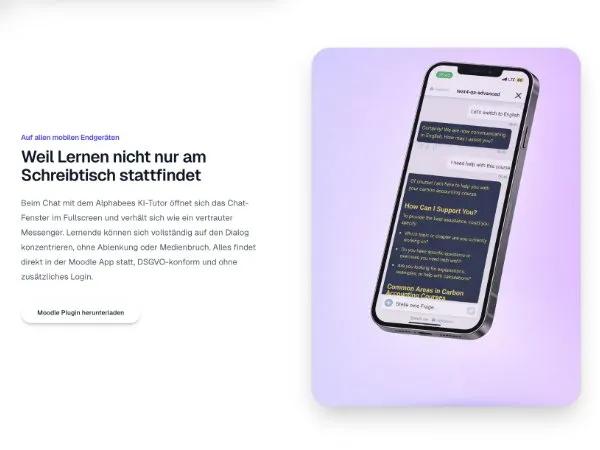
        <h2 class="leading-7 text-base font-semibold text-indigo-600 tracking-tight">Auf allen mobilen Endgeräten</h2>
        <p class="sm:text-4xl text-3xl font-semibold text-gray-900 tracking-tight mt-2">Weil Lernen nicht nur am
          Schreibtisch stattfindet</p>
        <p class="leading-8 text-lg text-gray-600 mt-6">Beim Chat mit dem Alphabees KI-Tutor öffnet sich das
          Chat-Fenster im Fullscreen und verhält sich wie ein vertrauter Messenger. Lernende können sich vollständig auf
          den Dialog konzentrieren, ohne Ablenkung oder Medienbruch. Alles findet direkt in der Moodle App statt,
          DSGVO-konform und ohne zusätzliches Login.</p>
        <div class="mt-10">
          <button class="inline-flex hover:bg-white/10 transition-all duration-300 ease-out cursor-pointer hover:shadow-[0px_0px_0px_1px_rgba(0,0,0,0.06),0px_20px_40px_-5px_rgba(15,23,42,0.2),0px_10px_10px_-5px_rgba(0,0,0,0.04)] hover:scale-105 active:scale-95 text-sm font-medium text-gray-900 font-geist bg-white/10 w-[260px] border-white/20 border rounded-full pt-3 pr-5 pb-3 pl-5 shadow-[0px_0px_0px_1px_rgba(0,0,0,0.06),0px_1px_1px_-0.5px_rgba(0,0,0,0.06),0px_3px_3px_-1.5px_rgba(0,0,0,0.06),_0px_6px_6px_-3px_rgba(15,23,42,0.18),0px_12px_12px_-6px_rgba(0,0,0,0.06)] backdrop-blur-md gap-x-2 gap-y-x-2 items-center justify-center" onclick="window.location.href='https://moodle.org/plugins/block_alphabees'" role="button">Moodle Plugin herunterladen</button>
        </div>
      </div>

      <!-- Vertical Image Container -->
      <div class="relative w-full max-w-xl lg:max-w-none mx-auto lg:order-2 order-1 animate-on-scroll"
        style="animation: fadeSlideIn 1s ease-out 0.4s both;">
        <div
          class="relative aspect-[3/4] overflow-hidden rounded-[2.5rem] bg-gray-100 shadow-2xl ring-1 ring-gray-900/10">
          <img src="https://hoirqrkdgbmvpwutwuwj.supabase.co/storage/v1/object/public/assets/assets/3ab09fe9-5aaf-48cb-8d55-b00438b2ad95_1600w.png" alt="Seamless Moodle Integration" class="w-full h-full object-cover absolute top-0 right-0 bottom-0 left-0">
          <!-- Subtle overlay -->
          <div
            class="bg-gradient-to-bl from-purple-500/10 to-transparent mix-blend-multiply absolute top-0 right-0 bottom-0 left-0">
          </div>
        </div>
        <!-- Decorative blob behind -->
        <div class="absolute -bottom-12 -right-12 -z-10 h-[300px] w-[300px] bg-indigo-50/50 rounded-full blur-3xl">
        </div>
      </div>
    </div>

  </div>
</section>