
Все промпты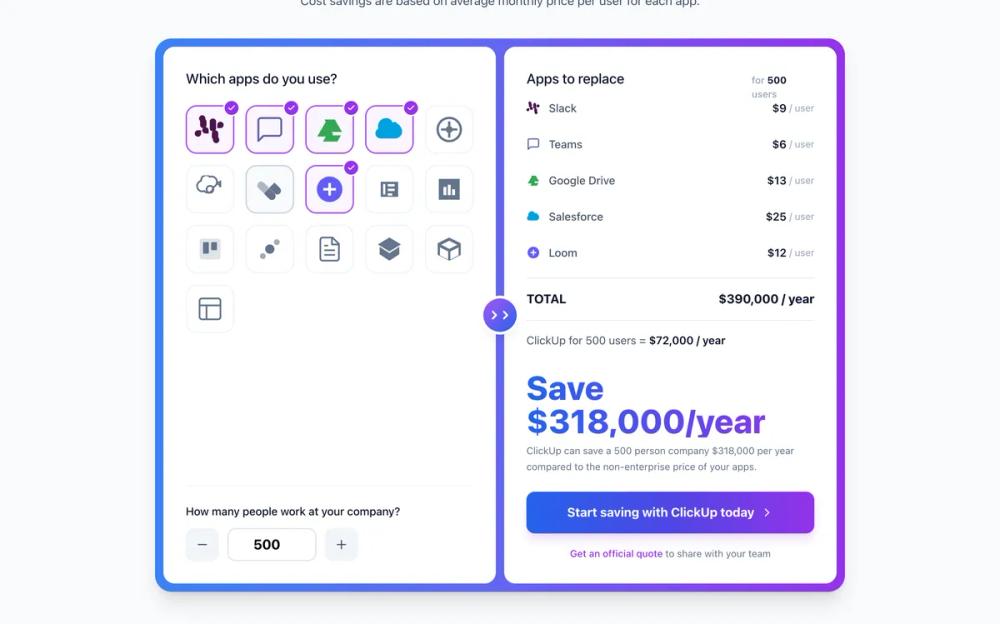 Все промпты
ui componentlanding pagepricing
ClickUp Pricing Calculator
UI компонент: калькулятор цен ClickUp. Интерактивный выбор приложений, ввод пользователей, расчет стоимости. Помогает сравнить затраты.
Автор: Zhou JasonЖивое превью
Prompt
# ClickUp Pricing Calculator

You are given a task to integrate an existing React component in the codebase

~~~/README.md
# ClickUp Cost Calculator Component

A high-fidelity cost savings calculator that compares spending on multiple SaaS tools versus consolidating with ClickUp.

## Features
- **Interactive App Grid**: Select from 20+ common SaaS tools (Slack, Jira, Asana, etc.)
- **Dynamic Cost Calculation**: Real-time updates based on user count and selected apps
- **Visual Feedback**: Gradient accents, hover effects, and responsive layout
- **Custom Icons**: High-quality SVG icons for major brands

## Props
| Prop | Type | Description |
|------|------|-------------|
| `className` | `string` | Optional CSS classes to override styles |

## Usage
```tsx
import { ClickUpCostCalculator } from '@/sd-components/7442a078-e1c9-437e-87ce-a7715cbd1439';

function PricingPage() {
  return (
    <div className="py-20">
      <ClickUpCostCalculator />
    </div>
  );
}
```
~~~

~~~/src/App.tsx
import React from 'react';
import { ClickUpCostCalculator } from './Component';

export default function App() {
  return (
    <div className="min-h-screen w-full flex items-center justify-center bg-slate-50 p-4 md:p-10">
      <ClickUpCostCalculator />
    </div>
  );
}
~~~

~~~/src/Component.tsx
import React, { useState, useMemo } from 'react';
import {
  Check,
  Plus,
  Minus,
  ChevronRight,
  MessageSquare,
  HardDrive,
  Cloud,
  Video,
  Trello,
  FileText,
  Layout,
  Database,
  Briefcase,
  Slack,
  Table
} from 'lucide-react';
import { cn } from '@/lib/utils'; // Assuming generic utility, but I will inline clsx logic if needed since I don't know if lib/utils exists. actually I'll just use template literals or inline logic.

// --- Icons & Data ---

const CustomIcons = {
  Slack: (props: any) => (
    <svg viewBox="0 0 24 24" fill="none" xmlns="http://www.w3.org/2000/svg" {...props}>
      <path d="M5.042 15.123a2.52 2.52 0 0 1-2.52 2.52 2.52 2.52 0 0 1-2.52-2.52 2.52 2.52 0 0 1 2.52-2.52h2.52v2.52Zm.84-2.52a2.52 2.52 0 0 1 2.52-2.52 2.52 2.52 0 0 1 2.52 2.52v2.52h-2.52a2.52 2.52 0 0 1-2.52-2.52Zm0-6.72a2.52 2.52 0 0 1-2.52-2.52 2.52 2.52 0 0 1 2.52-2.52 2.52 2.52 0 0 1 2.52 2.52v2.52h-2.52Zm3.36 2.52a2.52 2.52 0 0 1-2.52 2.52 2.52 2.52 0 0 1-2.52-2.52V5.882a2.52 2.52 0 0 1 2.52-2.52 2.52 2.52 0 0 1 2.52 2.52v2.52Zm8.4 0a2.52 2.52 0 0 1 2.52-2.52 2.52 2.52 0 0 1 2.52 2.52 2.52 2.52 0 0 1-2.52 2.52h-2.52V8.402Zm-.84 2.52a2.52 2.52 0 0 1-2.52 2.52 2.52 2.52 0 0 1-2.52-2.52V5.882a2.52 2.52 0 0 1 2.52-2.52 2.52 2.52 0 0 1 2.52 2.52v5.04Zm0 6.72a2.52 2.52 0 0 1 2.52 2.52 2.52 2.52 0 0 1-2.52 2.52 2.52 2.52 0 0 1-2.52-2.52v-2.52h2.52Zm-3.36-2.52a2.52 2.52 0 0 1 2.52-2.52 2.52 2.52 0 0 1 2.52 2.52v2.52a2.52 2.52 0 0 1-2.52 2.52 2.52 2.52 0 0 1-2.52-2.52v-2.52Z" fill="currentColor"/>
    </svg>
  ),
  GoogleDrive: (props: any) => (
    <svg viewBox="0 0 24 24" fill="none" xmlns="http://www.w3.org/2000/svg" {...props}>
      <path d="M7.94 4.14h8.12l5.65 9.77H13.6L7.94 4.14zM14.63 15.65L9 5.86 2.29 17.5h11.33l1.01-1.85zM9.54 16.58l-2.84 4.92h11.33l2.84-4.92H9.54z" fill="currentColor"/>
    </svg>
  ),
  Salesforce: (props: any) => (
    <svg viewBox="0 0 24 24" fill="none" xmlns="http://www.w3.org/2000/svg" {...props}>
      <path d="M16.5 6c-.8 0-1.5.2-2.1.6C13.8 4.5 11.8 3 9.5 3 5.9 3 3 5.9 3 9.5c0 .6.1 1.2.2 1.8C1.9 12.1 1 13.5 1 15c0 2.2 1.8 4 4 4h11.5c3 0 5.5-2.5 5.5-5.5S19.5 8 16.5 6z" fill="currentColor"/>
    </svg>
  ),
  Hubspot: (props: any) => (
    <svg viewBox="0 0 24 24" fill="none" xmlns="http://www.w3.org/2000/svg" {...props}>
      <circle cx="12" cy="12" r="10" stroke="currentColor" strokeWidth="2"/>
      <circle cx="12" cy="12" r="3" fill="currentColor"/>
      <path d="M12 15v4" stroke="currentColor" strokeWidth="2"/>
      <path d="M15 12h4" stroke="currentColor" strokeWidth="2"/>
      <path d="M12 9V5" stroke="currentColor" strokeWidth="2"/>
      <path d="M9 12H5" stroke="currentColor" strokeWidth="2"/>
    </svg>
  ),
  OpenAI: (props: any) => (
    <svg viewBox="0 0 24 24" fill="none" xmlns="http://www.w3.org/2000/svg" {...props}>
      <path d="M20.9 10.2c-.3-1.6-1.5-2.9-3-3.4.4-1.6-.1-3.3-1.2-4.5-1.3-1.3-3.2-1.7-4.8-1-1.2-1.4-3.2-1.9-4.9-1.1-1.8.8-2.9 2.6-2.7 4.5C2.6 5.1 1.4 6.4 1 8c-.4 1.6.1 3.3 1.2 4.5 1.3 1.3 3.2 1.7 4.8 1 1.2 1.4 3.2 1.9 4.9 1.1 1.8-.8 2.9-2.6 2.7-4.5 1.7-.4 2.9-1.7 3.3-3.3l3-1.4zM12 15c-1.7 0-3-1.3-3-3s1.3-3 3-3 3 1.3 3 3-1.3 3-3 3z" stroke="currentColor" strokeWidth="1.5"/>
    </svg>
  ),
  Jira: (props: any) => (
    <svg viewBox="0 0 24 24" fill="none" xmlns="http://www.w3.org/2000/svg" {...props}>
      <path d="M11.5 11l-4.2-4.2c-1.2-1.2-3.1-1.2-4.2 0s-1.2 3.1 0 4.2l4.2 4.2 4.2-4.2z" fill="currentColor" fillOpacity="0.5"/>
      <path d="M11.5 19.5L7.3 15.3l4.2-4.2 4.2 4.2c1.2 1.2 1.2 3.1 0 4.2-1.1 1.2-3.1 1.2-4.2 0z" fill="currentColor"/>
      <path d="M19.9 11l-4.2-4.2-4.2 4.2 4.2 4.2c1.2 1.2 3.1 1.2 4.2 0 1.2-1.1 1.2-3 0-4.2z" fill="currentColor"/>
    </svg>
  ),
  Loom: (props: any) => (
    <svg viewBox="0 0 24 24" fill="none" xmlns="http://www.w3.org/2000/svg" {...props}>
       <circle cx="12" cy="12" r="10" fill="currentColor"/>
       <path d="M12 7v10M7 12h10" stroke="#fff" strokeWidth="2"/>
    </svg>
  ),
  Notion: (props: any) => (
    <svg viewBox="0 0 24 24" fill="none" xmlns="http://www.w3.org/2000/svg" {...props}>
      <path d="M4.5 5.5v13h15v-13h-15zm2 2h2v9h-2v-9zm4 0h6v2h-6v-2zm0 4h6v2h-6v-2zm0 4h4v2h-4v-2z" fill="currentColor"/>
    </svg>
  ),
  Monday: (props: any) => (
    <svg viewBox="0 0 24 24" fill="none" xmlns="http://www.w3.org/2000/svg" {...props}>
      <path d="M3 3h18v18H3V3zm4 14h2.5v-7h-2.5v7zm3.75 0h2.5V8h-2.5v9zm3.75 0h2.5v-5h-2.5v5z" fill="currentColor"/>
    </svg>
  ),
  Trello: (props: any) => (
    <svg viewBox="0 0 24 24" fill="none" xmlns="http://www.w3.org/2000/svg" {...props}>
      <rect x="3" y="3" width="18" height="18" rx="2" fill="currentColor" fillOpacity="0.2"/>
      <rect x="6" y="6" width="5" height="10" rx="1" fill="currentColor"/>
      <rect x="13" y="6" width="5" height="7" rx="1" fill="currentColor"/>
    </svg>
  ),
  Asana: (props: any) => (
    <svg viewBox="0 0 24 24" fill="none" xmlns="http://www.w3.org/2000/svg" {...props}>
      <circle cx="12" cy="12" r="4" fill="currentColor"/>
      <circle cx="18" cy="6" r="2.5" fill="currentColor" fillOpacity="0.6"/>
      <circle cx="6" cy="18" r="2.5" fill="currentColor" fillOpacity="0.6"/>
    </svg>
  ),
  Airtable: (props: any) => (
    <svg viewBox="0 0 24 24" fill="none" xmlns="http://www.w3.org/2000/svg" {...props}>
      <path d="M12 2L2 8l10 6 10-6-10-6zm0 13.5L3.5 10v6.5l8.5 5.5 8.5-5.5V10L12 15.5z" fill="currentColor"/>
    </svg>
  ),
  Linear: (props: any) => (
    <svg viewBox="0 0 24 24" fill="none" xmlns="http://www.w3.org/2000/svg" {...props}>
      <path d="M12 2L2 7v10l10 5 10-5V7L12 2zm0 2.8l7 3.5-7 3.5-7-3.5 7-3.5zm-8 5.7l7 3.5v7l-7-3.5v-7zm9 10.5v-7l7-3.5v7l-7 3.5z" fill="currentColor"/>
    </svg>
  ),
  ClickUp: (props: any) => (
    <svg viewBox="0 0 24 24" fill="none" xmlns="http://www.w3.org/2000/svg" {...props}>
        <path d="M3 13.5l1.5-3 7.5-4.5 7.5 4.5 1.5 3-9-3-9 3z" fill="currentColor"/>
        <path d="M12 22l-9-5 1.5-3 7.5 3 7.5-3 1.5 3-9 5z" fill="currentColor"/>
    </svg>
  ),
  Generic: (props: any) => (
     <svg viewBox="0 0 24 24" fill="none" xmlns="http://www.w3.org/2000/svg" {...props}>
      <rect x="2" y="2" width="20" height="20" rx="4" fill="currentColor" fillOpacity="0.2"/>
      <path d="M12 7v10M7 12h10" stroke="currentColor" strokeWidth="2"/>
    </svg>
  )
};

// Define app data
const APPS = [
  { id: 'slack', name: 'Slack', cost: 9, icon: CustomIcons.Slack, color: '#4A154B' },
  { id: 'teams', name: 'Teams', cost: 6, icon: MessageSquare, color: '#6264A7' },
  { id: 'drive', name: 'Google Drive', cost: 13, icon: CustomIcons.GoogleDrive, color: '#34A853' },
  { id: 'salesforce', name: 'Salesforce', cost: 25, icon: CustomIcons.Salesforce, color: '#00A1E0' },
  { id: 'hubspot', name: 'HubSpot', cost: 18, icon: CustomIcons.Hubspot, color: '#FF7A59' },
  { id: 'openai', name: 'ChatGPT', cost: 20, icon: CustomIcons.OpenAI, color: '#10A37F' },
  { id: 'jira', name: 'Jira', cost: 8, icon: CustomIcons.Jira, color: '#0052CC' },
  { id: 'loom', name: 'Loom', cost: 12, icon: CustomIcons.Loom, color: '#625DF5' },
  { id: 'notion', name: 'Notion', cost: 10, icon: CustomIcons.Notion, color: '#000000' },
  { id: 'monday', name: 'Monday', cost: 16, icon: CustomIcons.Monday, color: '#F65F5C' },
  { id: 'trello', name: 'Trello', cost: 5, icon: CustomIcons.Trello, color: '#0079BF' },
  { id: 'asana', name: 'Asana', cost: 11, icon: CustomIcons.Asana, color: '#F06A6A' },
  { id: 'smartsheet', name: 'Smartsheet', cost: 7, icon: FileText, color: '#1F4F9A' },
  { id: 'airtable', name: 'Airtable', cost: 20, icon: CustomIcons.Airtable, color: '#FCB400' },
  { id: 'linear', name: 'Linear', cost: 8, icon: CustomIcons.Linear, color: '#5E6AD2' },
  { id: 'confluence', name: 'Confluence', cost: 5, icon: Layout, color: '#172B4D' },
  { id: 'clickup', name: 'ClickUp', cost: 0, icon: CustomIcons.ClickUp, color: '#7B2CBF' } // Cost is handled separately
];

interface ClickUpCostCalculatorProps {
  className?: string;
}

export function ClickUpCostCalculator({ className }: ClickUpCostCalculatorProps) {
  const [selectedApps, setSelectedApps] = useState<string[]>(['slack', 'drive', 'salesforce', 'loom']);
  const [userCount, setUserCount] = useState<number>(500);

  const toggleApp = (id: string) => {
    setSelectedApps(prev =>
      prev.includes(id) ? prev.filter(appId => appId !== id) : [...prev, id]
    );
  };

  const handleUserCountChange = (delta: number) => {
    setUserCount(prev => Math.max(1, prev + delta));
  };

  const handleUserCountInput = (e: React.ChangeEvent<HTMLInputElement>) => {
    const val = parseInt(e.target.value) || 0;
    setUserCount(val);
  };

  const selectedAppsData = useMemo(() =>
    APPS.filter(app => selectedApps.includes(app.id)),
  [selectedApps]);

  const totalAppCost = useMemo(() =>
    selectedAppsData.reduce((acc, app) => acc + app.cost, 0) * userCount * 12,
  [selectedAppsData, userCount]);

  const clickUpCostPerUser = 12; // Monthly
  const clickUpTotalCost = clickUpCostPerUser * userCount * 12;
  const savings = totalAppCost - clickUpTotalCost;

  return (
    <section className={cn("w-full max-w-5xl mx-auto p-4 font-sans", className)}>
      <div className="text-center mb-10">
        <h2 className="text-4xl md:text-5xl font-bold tracking-tight mb-3 text-slate-900">
          Cut Costs with ClickUp
        </h2>
        <p className="text-slate-600 text-lg">
          Cost savings are based on average monthly price per user for each app.
        </p>
      </div>

      <div className="relative rounded-3xl p-2 md:p-3 bg-gradient-to-r from-blue-500 via-indigo-500 to-purple-600 shadow-xl">
        <div className="flex flex-col md:flex-row gap-2 md:gap-3 bg-transparent">

          {/* Left Panel: App Selection */}
          <div className="flex-1 bg-white rounded-2xl p-6 md:p-8 flex flex-col min-h-[500px]">
            <h3 className="text-xl font-medium text-slate-900 mb-6">Which apps do you use?</h3>

            <div className="grid grid-cols-4 sm:grid-cols-5 gap-3 md:gap-4 mb-auto">
              {APPS.slice(0, 20).filter(a => a.id !== 'clickup').map((app) => {
                const isSelected = selectedApps.includes(app.id);
                const Icon = app.icon;
                return (
                  <button
                    key={app.id}
                    onClick={() => toggleApp(app.id)}
                    className={cn(
                      "group relative aspect-square flex items-center justify-center rounded-2xl border-2 transition-all duration-200 ease-out p-3",
                      isSelected
                        ? "border-purple-500 bg-purple-50 shadow-sm"
                        : "border-slate-100 hover:border-slate-300 bg-white hover:bg-slate-50"
                    )}
                    aria-label={`Select ${app.name}`}
                  >
                    {/* Checkmark badge */}
                    {isSelected && (
                      <div className="absolute -top-2 -right-2 w-5 h-5 bg-purple-600 rounded-full flex items-center justify-center text-white ring-2 ring-white z-10 shadow-sm">
                        <Check size={12} strokeWidth={3} />
                      </div>
                    )}

                    {/* Icon */}
                    <div
                      className={cn(
                        "w-full h-full flex items-center justify-center transition-transform duration-200",
                         isSelected ? "scale-110" : "group-hover:scale-110"
                      )}
                      style={{ color: isSelected ? app.color : '#64748b' }} // Color when selected, gray when not
                    >
                      <Icon className="w-8 h-8 md:w-10 md:h-10" strokeWidth={1.5} />
                    </div>
                  </button>
                );
              })}
            </div>

            <div className="mt-8 pt-6 border-t border-slate-100">
              <label className="block text-slate-900 font-medium mb-3">
                How many people work at your company?
              </label>
              <div className="flex items-center gap-3">
                <button
                  onClick={() => handleUserCountChange(-10)}
                  className="w-12 h-12 flex items-center justify-center rounded-xl bg-slate-100 hover:bg-slate-200 text-slate-600 transition-colors"
                >
                  <Minus size={20} />
                </button>
                <div className="relative">
                  <input
                    type="number"
                    value={userCount}
                    onChange={handleUserCountInput}
                    className="w-32 h-12 text-center text-xl font-bold bg-white border-2 border-slate-200 rounded-xl focus:border-purple-500 focus:outline-none transition-all"
                  />
                </div>
                <button
                  onClick={() => handleUserCountChange(10)}
                  className="w-12 h-12 flex items-center justify-center rounded-xl bg-slate-100 hover:bg-slate-200 text-slate-600 transition-colors"
                >
                  <Plus size={20} />
                </button>
              </div>
            </div>
          </div>

          {/* Divider Circle */}
          <div className="absolute top-1/2 left-1/2 -translate-x-1/2 -translate-y-1/2 z-20 hidden md:flex">
             <div className="w-12 h-12 rounded-full bg-gradient-to-br from-purple-500 to-blue-600 flex items-center justify-center shadow-lg ring-4 ring-white">
                <div className="text-white">
                  <div className="flex -space-x-1">
                    <ChevronRight size={20} strokeWidth={3} />
                    <ChevronRight size={20} strokeWidth={3} />
                  </div>
                </div>
             </div>
          </div>

          {/* Right Panel: Savings Calculation */}
          <div className="flex-1 bg-white rounded-2xl p-6 md:p-8 flex flex-col justify-between min-h-[500px]">
            <div>
              <div className="flex justify-between items-baseline mb-2">
                 <h3 className="text-xl font-medium text-slate-900">Apps to replace</h3>
                 <span className="text-sm text-slate-400 font-medium">for <span className="text-slate-900 font-bold">{userCount}</span> users</span>
              </div>

              <div className="space-y-4 mb-8">
                {selectedAppsData.length === 0 ? (
                  <div className="text-slate-400 italic py-4">Select apps to see potential savings...</div>
                ) : (
                  <div className="space-y-3">
                    {selectedAppsData.map(app => (
                      <div key={app.id} className="flex items-center justify-between text-slate-600 group hover:bg-slate-50 p-2 -mx-2 rounded-lg transition-colors">
                        <div className="flex items-center gap-3">
                           {/* Small Icon */}
                           <div style={{ color: app.color }}><app.icon className="w-5 h-5" /></div>
                           <span className="font-medium">{app.name}</span>
                        </div>
                        <div className="flex items-center gap-1">
                          <span className="font-semibold text-slate-900">${app.cost}</span>
                          <span className="text-sm text-slate-400">/ user</span>
                        </div>
                      </div>
                    ))}
                  </div>
                )}

                <div className="border-b border-slate-200 my-4" />

                <div className="flex items-center justify-between font-bold text-lg text-slate-900">
                  <span>TOTAL</span>
                  <span>${totalAppCost.toLocaleString()} / year</span>
                </div>

                <div className="border-b border-dotted border-slate-300 my-4" />

                <div className="text-slate-600">
                  ClickUp for {userCount} users = <span className="font-semibold text-slate-900">${clickUpTotalCost.toLocaleString()} / year</span>
                </div>
              </div>
            </div>

            <div className="mt-auto">
              <div className="mb-6">
                <h4 className="text-4xl md:text-5xl font-extrabold text-transparent bg-clip-text bg-gradient-to-r from-blue-600 to-purple-600 mb-2">
                  Save ${Math.max(0, savings).toLocaleString()}/year
                </h4>
                <p className="text-slate-500 text-sm leading-relaxed">
                  ClickUp can save a {userCount} person company ${Math.max(0, savings).toLocaleString()} per year compared to the non-enterprise price of your apps.
                </p>
              </div>

              <button className="w-full py-4 px-6 rounded-xl bg-gradient-to-r from-blue-600 via-indigo-600 to-purple-600 text-white font-bold text-lg shadow-lg shadow-purple-200 hover:shadow-xl hover:shadow-purple-300 hover:scale-[1.02] transition-all duration-200 flex items-center justify-center gap-2 group">
                Start saving with ClickUp today
                <ChevronRight className="w-5 h-5 group-hover:translate-x-1 transition-transform" />
              </button>

              <div className="mt-4 text-center">
                 <a href="#" className="text-sm text-purple-600 hover:text-purple-700 font-medium hover:underline">
                    Get an official quote
                 </a>
                 <span className="text-sm text-slate-500"> to share with your team</span>
              </div>
            </div>
          </div>
        </div>
      </div>
    </section>
  );
}

export default ClickUpCostCalculator;
~~~

Implementation Guidelines

1. Analyze the component structure, styling, animation implementations
2. Review the component's arguments and state
3. Think through what is the best place to adopt this component/style into the design we are doing
4. Then adopt the component/design to our current system

Help me integrate this into my design