
Все промпты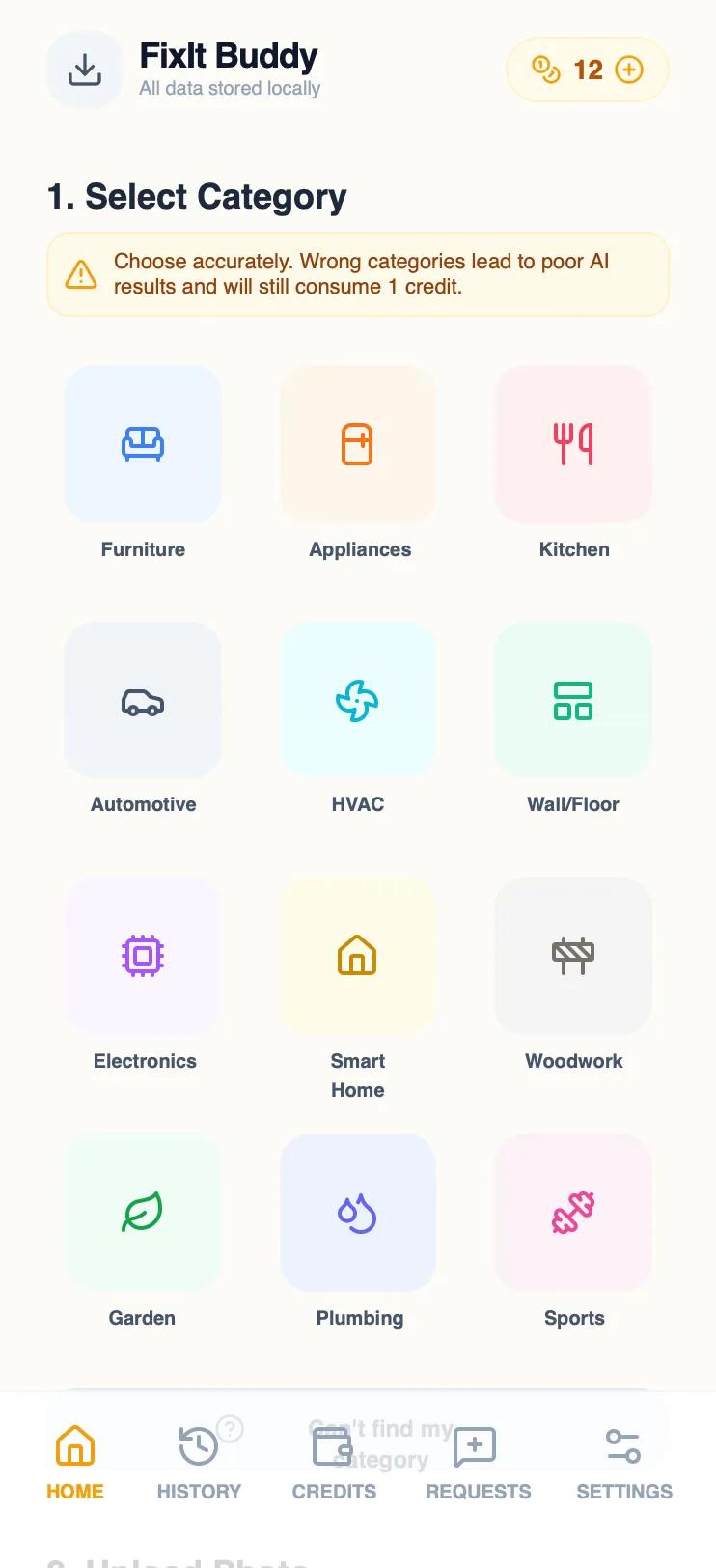 Все промпты
FixIt Buddy - Category Selection
UI компонент выбора категории товара для мобильного приложения. Обязательный выбор перед загрузкой фото, включает опцию "Не могу найти" и предупреждение о последствиях.
Автор: Aquarious WorkmanЖивое превью
Prompt
# FixIt Buddy - Category Selection

Update home screen with 12 product categories (add Kitchen Appliances, Automotive, HVAC, Smart Home, Garden & Outdoor, Sports Equipment to existing 6). Make category selection MANDATORY before photo upload. Add 'Can't find my category' option that triggers a popup explaining app limitations and inviting users to email/comment requests. The popup warns that selecting wrong category will result in charges and poor AI results. Reorganize layout: categories grid takes priority above hero photo button. Show prominent warning message about category accuracy. Keep playful amber aesthetic. Update all page navigation to include 'Export' button in header for downloading fixes, conversations, and history as local files. Add note in Settings about Apple Pay credit system and mention that no data is stored on servers.

Here is a reference implementation:

~~~html
<!DOCTYPE html>
<html lang="en">
<head>
    <meta charset="UTF-8">
    <meta name="viewport" content="width=device-width, initial-scale=1.0">
    <title>FixIt Buddy</title>
    <meta name="view-transition" content="same-origin">
    <script src="https://cdn.tailwindcss.com"></script>
    <script src="https://code.iconify.design/iconify-icon/1.0.7/iconify-icon.min.js"></script>
    <link rel="preconnect" href="https://fonts.googleapis.com">
    <link rel="preconnect" href="https://fonts.gstatic.com" crossorigin>
    <link href="https://fonts.googleapis.com/css2?family=Outfit:wght@400;500;600;700&display=swap" rel="stylesheet">
    <style>
        body {
            font-family: 'Outfit', sans-serif;
            -webkit-tap-highlight-color: transparent;
            user-select: none;
        }
        .glass-card {
            background: rgba(255, 255, 255, 0.8);
            backdrop-filter: blur(10px);
            border: 1px solid rgba(255, 255, 255, 0.3);
        }
        .squircle {
            border-radius: 32px;
        }
        .tab-active {
            color: #f59e0b;
        }
        .category-selected {
            border-color: #f59e0b !important;
            background-color: #fffbeb !important;
            transform: scale(1.05);
            box-shadow: 0 10px 15px -3px rgba(245, 158, 11, 0.2);
        }
        @view-transition { navigation: auto; }
        ::view-transition-old(root), ::view-transition-new(root) {
            animation-duration: 0.4s;
            animation-timing-function: cubic-bezier(0.4, 0, 0.2, 1);
        }
        ::view-transition-old(root) { animation-name: fade-out; }
        ::view-transition-new(root) { animation-name: fade-in; }
        @keyframes fade-out { from { opacity: 1; transform: scale(1); } to { opacity: 0; transform: scale(0.98); } }
        @keyframes fade-in { from { opacity: 0; transform: scale(1.02); } to { opacity: 1; transform: scale(1); } }

        header { view-transition-name: header; }
        nav { view-transition-name: footer; }

        .modal-overlay {
            background: rgba(0, 0, 0, 0.4);
            backdrop-filter: blur(4px);
        }
    </style>
</head>
<body>
    <div class="flex flex-col min-h-screen bg-[#FDFCF8] text-slate-800">

        <!-- Status Bar & Header -->
        <header class="sticky top-0 z-50 px-6 pt-4 pb-2 flex items-center justify-between bg-[#FDFCF8]/90 backdrop-blur-md">
            <div class="flex items-center gap-2">
                <button id="header-export-btn" class="w-10 h-10 bg-slate-100 rounded-2xl flex items-center justify-center hover:bg-slate-200 transition-colors">
                    <iconify-icon icon="lucide:download" class="text-slate-600 text-xl"></iconify-icon>
                </button>
                <div class="flex flex-col">
                    <h1 class="text-lg font-bold tracking-tight text-slate-900 leading-none">FixIt Buddy</h1>
                    <span class="text-[10px] text-slate-400 font-medium">All data stored locally</span>
                </div>
            </div>

            <!-- Credit Pill -->
            <div class="flex items-center bg-amber-50 border border-amber-100 px-3 py-1.5 rounded-full">
                <iconify-icon icon="lucide:coins" class="text-amber-500 mr-1.5"></iconify-icon>
                <span class="text-sm font-semibold text-amber-700">12</span>
                <a id="add-credits-link" href="#" class="ml-2 text-amber-500 flex items-center justify-center">
                    <iconify-icon icon="lucide:plus-circle"></iconify-icon>
                </a>
            </div>
        </header>

        <!-- Main Content Area -->
        <main class="flex-1 px-6 pt-2 pb-24 overflow-y-auto">

            <!-- Step 1: Category Selection -->
            <section class="mt-4">
                <div class="mb-4">
                    <h3 class="text-lg font-bold">1. Select Category</h3>
                    <div class="flex items-center gap-2 mt-1 p-2 bg-amber-50 border border-amber-100 rounded-xl">
                        <iconify-icon icon="lucide:alert-triangle" class="text-amber-500 text-lg flex-shrink-0"></iconify-icon>
                        <p class="text-[11px] text-amber-800 leading-tight">
                            Choose accurately. Wrong categories lead to poor AI results and will still consume 1 credit.
                        </p>
                    </div>
                </div>

                <div class="grid grid-cols-3 gap-3">
                    <!-- Categories -->
                    <button onclick="selectCategory(this, 'Furniture')" class="cat-btn flex flex-col items-center p-2 rounded-2xl border border-transparent transition-all">
                        <div class="w-full aspect-square bg-blue-50 rounded-2xl flex items-center justify-center text-blue-500 mb-1.5">
                            <iconify-icon icon="lucide:sofa" class="text-2xl"></iconify-icon>
                        </div>
                        <span class="text-[10px] font-bold text-slate-600">Furniture</span>
                    </button>

                    <button onclick="selectCategory(this, 'Appliances')" class="cat-btn flex flex-col items-center p-2 rounded-2xl border border-transparent transition-all">
                        <div class="w-full aspect-square bg-orange-50 rounded-2xl flex items-center justify-center text-orange-500 mb-1.5">
                            <iconify-icon icon="lucide:refrigerator" class="text-2xl"></iconify-icon>
                        </div>
                        <span class="text-[10px] font-bold text-slate-600">Appliances</span>
                    </button>

                    <button onclick="selectCategory(this, 'Kitchen')" class="cat-btn flex flex-col items-center p-2 rounded-2xl border border-transparent transition-all">
                        <div class="w-full aspect-square bg-rose-50 rounded-2xl flex items-center justify-center text-rose-500 mb-1.5">
                            <iconify-icon icon="lucide:utensils" class="text-2xl"></iconify-icon>
                        </div>
                        <span class="text-[10px] font-bold text-slate-600">Kitchen</span>
                    </button>

                    <button onclick="selectCategory(this, 'Automotive')" class="cat-btn flex flex-col items-center p-2 rounded-2xl border border-transparent transition-all">
                        <div class="w-full aspect-square bg-slate-100 rounded-2xl flex items-center justify-center text-slate-600 mb-1.5">
                            <iconify-icon icon="lucide:car" class="text-2xl"></iconify-icon>
                        </div>
                        <span class="text-[10px] font-bold text-slate-600">Automotive</span>
                    </button>

                    <button onclick="selectCategory(this, 'HVAC')" class="cat-btn flex flex-col items-center p-2 rounded-2xl border border-transparent transition-all">
                        <div class="w-full aspect-square bg-cyan-50 rounded-2xl flex items-center justify-center text-cyan-500 mb-1.5">
                            <iconify-icon icon="lucide:fan" class="text-2xl"></iconify-icon>
                        </div>
                        <span class="text-[10px] font-bold text-slate-600">HVAC</span>
                    </button>

                    <button onclick="selectCategory(this, 'Wall/Floors')" class="cat-btn flex flex-col items-center p-2 rounded-2xl border border-transparent transition-all">
                        <div class="w-full aspect-square bg-emerald-50 rounded-2xl flex items-center justify-center text-emerald-500 mb-1.5">
                            <iconify-icon icon="lucide:layout-panel-top" class="text-2xl"></iconify-icon>
                        </div>
                        <span class="text-[10px] font-bold text-slate-600">Wall/Floor</span>
                    </button>

                    <button onclick="selectCategory(this, 'Electronics')" class="cat-btn flex flex-col items-center p-2 rounded-2xl border border-transparent transition-all">
                        <div class="w-full aspect-square bg-purple-50 rounded-2xl flex items-center justify-center text-purple-500 mb-1.5">
                            <iconify-icon icon="lucide:cpu" class="text-2xl"></iconify-icon>
                        </div>
                        <span class="text-[10px] font-bold text-slate-600">Electronics</span>
                    </button>

                    <button onclick="selectCategory(this, 'Smart Home')" class="cat-btn flex flex-col items-center p-2 rounded-2xl border border-transparent transition-all">
                        <div class="w-full aspect-square bg-yellow-50 rounded-2xl flex items-center justify-center text-yellow-600 mb-1.5">
                            <iconify-icon icon="lucide:home" class="text-2xl"></iconify-icon>
                        </div>
                        <span class="text-[10px] font-bold text-slate-600">Smart Home</span>
                    </button>

                    <button onclick="selectCategory(this, 'Woodwork')" class="cat-btn flex flex-col items-center p-2 rounded-2xl border border-transparent transition-all">
                        <div class="w-full aspect-square bg-stone-100 rounded-2xl flex items-center justify-center text-stone-500 mb-1.5">
                            <iconify-icon icon="lucide:construction" class="text-2xl"></iconify-icon>
                        </div>
                        <span class="text-[10px] font-bold text-slate-600">Woodwork</span>
                    </button>

                    <button onclick="selectCategory(this, 'Garden')" class="cat-btn flex flex-col items-center p-2 rounded-2xl border border-transparent transition-all">
                        <div class="w-full aspect-square bg-green-50 rounded-2xl flex items-center justify-center text-green-600 mb-1.5">
                            <iconify-icon icon="lucide:leaf" class="text-2xl"></iconify-icon>
                        </div>
                        <span class="text-[10px] font-bold text-slate-600">Garden</span>
                    </button>

                    <button onclick="selectCategory(this, 'Plumbing')" class="cat-btn flex flex-col items-center p-2 rounded-2xl border border-transparent transition-all">
                        <div class="w-full aspect-square bg-indigo-50 rounded-2xl flex items-center justify-center text-indigo-500 mb-1.5">
                            <iconify-icon icon="lucide:droplets" class="text-2xl"></iconify-icon>
                        </div>
                        <span class="text-[10px] font-bold text-slate-600">Plumbing</span>
                    </button>

                    <button onclick="selectCategory(this, 'Sports')" class="cat-btn flex flex-col items-center p-2 rounded-2xl border border-transparent transition-all">
                        <div class="w-full aspect-square bg-pink-50 rounded-2xl flex items-center justify-center text-pink-500 mb-1.5">
                            <iconify-icon icon="lucide:dumbbell" class="text-2xl"></iconify-icon>
                        </div>
                        <span class="text-[10px] font-bold text-slate-600">Sports</span>
                    </button>

                    <!-- The "Can't Find" Button -->
                    <button onclick="showUnsupportedModal()" class="col-span-3 flex items-center justify-center gap-2 p-3 bg-slate-100 rounded-2xl border border-slate-200 mt-2">
                        <iconify-icon icon="lucide:help-circle" class="text-slate-500"></iconify-icon>
                        <span class="text-xs font-bold text-slate-600">Can't find my category</span>
                    </button>
                </div>
            </section>

            <!-- Step 2: Hero Action -->
            <section class="mt-10">
                <h3 class="text-lg font-bold mb-4">2. Upload Photo</h3>
                <div id="upload-hero" class="relative bg-slate-200 squircle p-8 shadow-inner flex flex-col items-center text-center overflow-hidden transition-all duration-300 opacity-60 grayscale cursor-not-allowed">
                    <div class="w-20 h-20 bg-white/20 backdrop-blur-md rounded-full flex items-center justify-center mb-4 border-4 border-white/30">
                        <iconify-icon icon="lucide:camera" class="text-white text-3xl"></iconify-icon>
                    </div>

                    <h2 class="text-xl font-bold text-white mb-1">What's broken?</h2>
                    <p id="upload-hint" class="text-white/80 text-[11px] mb-6 max-w-[200px]">Please select a category above first to unlock photo upload.</p>

                    <button id="troubleshoot-btn" disabled class="w-full bg-white text-slate-400 py-4 rounded-2xl font-bold text-lg shadow-md transition-all flex items-center justify-center gap-2">
                        Start Troubleshooting
                    </button>
                </div>
            </section>

            <!-- Recent Fixes -->
            <section class="mt-10 mb-6">
                <div class="flex items-center justify-between mb-4">
                    <h3 class="text-lg font-bold">Recent Fixes</h3>
                    <a id="history-link-shortcut" href="#" class="text-slate-400 text-sm">History</a>
                </div>

                <div class="space-y-3">
                    <a id="recent-fix-1" href="#" class="flex items-center p-3 bg-white border border-slate-100 rounded-2xl shadow-sm">
                        <div class="w-12 h-12 bg-slate-100 rounded-xl mr-4 flex items-center justify-center">
                            <iconify-icon icon="lucide:lamp" class="text-slate-400 text-xl"></iconify-icon>
                        </div>
                        <div class="flex-1">
                            <h4 class="text-sm font-bold text-slate-800">Living Room Lamp</h4>
                            <div class="flex items-center text-[10px] text-emerald-500 font-semibold uppercase tracking-wider">
                                <iconify-icon icon="lucide:check-circle" class="mr-1"></iconify-icon>
                                Fixed Successfully
                            </div>
                        </div>
                        <iconify-icon icon="lucide:chevron-right" class="text-slate-300"></iconify-icon>
                    </a>
                </div>
            </section>

        </main>

        <!-- Bottom Navigation Bar -->
        <nav class="fixed bottom-0 left-0 right-0 bg-white/80 backdrop-blur-xl border-t border-slate-100 px-6 py-4 flex items-center justify-between pb-8 z-40">
            <a id="nav-home" href="#" class="flex flex-col items-center gap-1 tab-active">
                <iconify-icon icon="lucide:home" class="text-2xl"></iconify-icon>
                <span class="text-[10px] font-bold uppercase">Home</span>
            </a>
            <a id="nav-history-link" href="#" class="flex flex-col items-center gap-1 text-slate-400">
                <iconify-icon icon="lucide:history" class="text-2xl"></iconify-icon>
                <span class="text-[10px] font-bold uppercase">History</span>
            </a>
            <a id="nav-credits-link" href="#" class="flex flex-col items-center gap-1 text-slate-400">
                <iconify-icon icon="lucide:wallet" class="text-2xl"></iconify-icon>
                <span class="text-[10px] font-bold uppercase">Credits</span>
            </a>
            <a id="nav-category-request-link" href="https://draft-734225ce-3d2e-47a8-aee3-142afe931f30.preview.superdesign.dev" class="flex flex-col items-center gap-1 text-slate-400">
                <iconify-icon icon="lucide:message-square-plus" class="text-2xl"></iconify-icon>
                <span class="text-[10px] font-bold uppercase">Requests</span>
            </a>
            <a id="nav-settings-link" href="#" class="flex flex-col items-center gap-1 text-slate-400">
                <iconify-icon icon="lucide:settings-2" class="text-2xl"></iconify-icon>
                <span class="text-[10px] font-bold uppercase">Settings</span>
            </a>
        </nav>

        <!-- Modal: Unsupported Category -->
        <div id="unsupported-modal" class="hidden fixed inset-0 z-[100] flex items-center justify-center p-6">
            <div class="modal-overlay absolute inset-0"></div>
            <div class="relative bg-white w-full max-w-sm rounded-[32px] p-8 shadow-2xl overflow-hidden animate-in fade-in zoom-in duration-300">
                <div class="w-16 h-16 bg-red-50 text-red-500 rounded-full flex items-center justify-center mb-6">
                    <iconify-icon icon="lucide:alert-circle" class="text-3xl"></iconify-icon>
                </div>
                <h4 class="text-xl font-bold text-slate-900 mb-3">Category Not Supported</h4>
                <p class="text-slate-500 text-sm mb-6 leading-relaxed">
                    We currently only work with the listed categories. If you select the wrong one, you will still be charged and the AI may return poor or dangerous information.
                </p>
                <div class="space-y-3">
                    <a id="modal-category-request-link" href="https://draft-734225ce-3d2e-47a8-aee3-142afe931f30.preview.superdesign.dev" class="w-full block text-center py-3 bg-amber-400 text-white font-bold rounded-2xl shadow-md shadow-amber-200">
                        Request New Category
                    </a>
                    <button onclick="hideUnsupportedModal()" class="w-full py-3 bg-slate-100 text-slate-600 font-bold rounded-2xl">
                        Got it
                    </button>
                </div>
            </div>
        </div>

        <!-- Visual decoration -->
        <div class="fixed inset-0 pointer-events-none opacity-[0.03] mix-blend-multiply">
            <svg viewBox="0 0 200 200" xmlns='http://www.w3.org/2000/svg'>
                <filter id='noiseFilter'>
                    <feTurbulence type='fractalNoise' baseFrequency='0.65' numOctaves='3' stitchTiles='stitch'/>
                </filter>
                <rect width='100%' height='100%' filter='url(#noiseFilter)'/>
            </svg>
        </div>

    </div>

    <script>
        let selectedCategoryName = null;

        function selectCategory(el, name) {
            // Remove previous selection
            document.querySelectorAll('.cat-btn').forEach(btn => btn.classList.remove('category-selected'));

            // Add new selection
            el.classList.add('category-selected');
            selectedCategoryName = name;

            // Unlock Hero
            const hero = document.getElementById('upload-hero');
            const btn = document.getElementById('troubleshoot-btn');
            const hint = document.getElementById('upload-hint');

            hero.classList.remove('bg-slate-200', 'grayscale', 'opacity-60', 'cursor-not-allowed');
            hero.classList.add('bg-amber-400', 'shadow-2xl', 'shadow-amber-200');

            btn.disabled = false;
            btn.classList.remove('text-slate-400');
            btn.classList.add('text-amber-600');

            hint.innerText = `Great! Snap a photo of your ${name} issue.`;
            hint.classList.replace('text-white/80', 'text-amber-50');
        }

        function showUnsupportedModal() {
            document.getElementById('unsupported-modal').classList.remove('hidden');
        }

        function hideUnsupportedModal() {
            document.getElementById('unsupported-modal').classList.add('hidden');
        }

        // Mock Export Function
        document.getElementById('header-export-btn').addEventListener('click', () => {
            alert('Preparing export... Your fix guides, conversation history, and data will be saved to your local files. No data is stored on our servers.');
        });

        // Mock troubleshooting trigger
        document.getElementById('troubleshoot-btn').addEventListener('click', () => {
            if(selectedCategoryName) {
                alert('Opening camera for ' + selectedCategoryName + ' troubleshooting...');
            }
        });
    </script>
</body>
</html>
~~~