Загрузка...
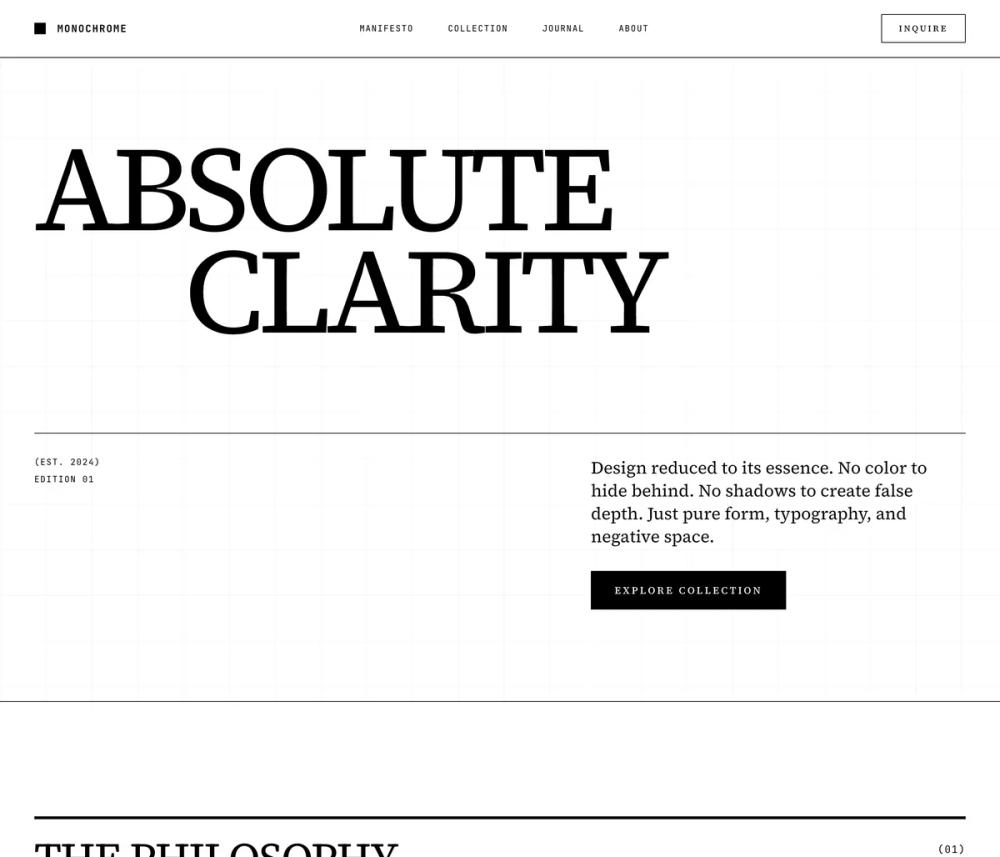
Минималистичный монохромный стиль для UI. Идеально для создания чистого и современного дизайна.
# Monochrome

<design-system>

# Design Style: Minimalist Monochrome

## Design Philosophy

### Core Principle

**Reduction to Essence.** Minimalist Monochrome strips design down to its most fundamental elements: black, white, and typography. There are no accent colors to hide behind, no gradients to soften edges, no shadows to create false depth. Every design decision must stand on its own merit. This is design as discipline—where restraint becomes the ultimate form of expression.

### Visual Vibe

**Emotional Keywords**: Austere, Authoritative, Timeless, Editorial, Intellectual, Dramatic, Refined, Stark, Confident, Uncompromising

This is the visual language of:

- High-end fashion editorials (Vogue, Harper's Bazaar covers)

- Architectural monographs and museum catalogs

- Luxury brand identities (Chanel, Celine, Bottega Veneta)

- Award-winning book design and fine typography

- Gallery exhibition materials

The design commands respect through its confidence. It doesn't need color to be interesting—it uses scale, contrast, rhythm, and negative space to create visual drama.

### What This Design Is NOT

- ❌ Colorful or playful

- ❌ Soft, rounded, or friendly

- ❌ Gradient-based or with accent colors

- ❌ Shadow-heavy or "elevated"

- ❌ Generic or template-like

- ❌ Busy or cluttered

- ❌ Similar to "Minimalist Modern" (no blue accents, no gradients, no rounded corners)

### The DNA of Minimalist Monochrome

1. Pure Black & White Palette

No grays for primary elements—use true black (#000000) and true white (#FFFFFF). Gray is reserved only for secondary text and borders. The stark contrast creates immediate visual impact and forces deliberate hierarchy decisions.

2. Serif Typography as Hero

Unlike modern sans-serif minimalism, this style embraces classical serif typefaces. The serif adds sophistication, editorial weight, and timeless elegance. Typography isn't just content—it's the primary visual element.

3. Oversized Type Scale

Headlines don't just inform—they dominate. Expect 8xl, 9xl, and custom larger sizes. Words become graphic elements. Single words or short phrases can fill entire viewport widths.

4. Line-Based Visual System

Instead of filled shapes, shadows, or backgrounds, this design uses lines: hairlines, thick rules, borders, underlines, strikethroughs. Lines create structure without mass.

5. Sharp Geometric Precision

Zero border radius everywhere. Perfect 90-degree corners. Precise alignments. The geometry is architectural—think Bauhaus meets editorial print design.

6. Dramatic Negative Space

Whitespace isn't empty—it's active. Generous margins and padding create breathing room that makes the black elements more impactful. The page breathes.

7. Inversion for Emphasis

Instead of accent colors, use color inversion (black background, white text) to highlight important elements. This creates drama without breaking the monochrome rule.

### Differentiation from Minimalist Modern

| Aspect | Minimalist Modern | Minimalist Monochrome |

|--------|-------------------|----------------------|

| Colors | Blue accent + gradients | Pure black & white only |

| Typography | Sans-serif (Inter) | Serif (Playfair Display) |

| Corners | Rounded (lg, xl, 2xl) | Sharp (0px everywhere) |

| Depth | Shadows, glows, elevation | Flat, 2D, no shadows |

| Visual elements | Gradient fills, colored icons | Lines, borders, typography |

| Vibe | Contemporary tech | Editorial luxury |

| Personality | Confident & approachable | Austere & commanding |

---

## Design Token System

### Colors (Strictly Monochrome)

~~~

background: #FFFFFF (Pure white)

foreground: #000000 (Pure black)

muted: #F5F5F5 (Off-white for subtle backgrounds)

mutedForeground: #525252 (Dark gray for secondary text)

accent: #000000 (Black IS the accent)

accentForeground: #FFFFFF (White on black)

border: #000000 (Black borders)

borderLight: #E5E5E5 (Light gray for subtle dividers)

card: #FFFFFF (White cards)

cardForeground: #000000 (Black text)

ring: #000000 (Black focus rings)
~~~

**Rule**: No other colors. Ever. The palette is absolute.

### Typography

**Font Stack**:

- **Display/Headlines**: `"Playfair Display", Georgia, serif` - Elegant, high-contrast serif with beautiful italics

- **Body**: `"Source Serif 4", Georgia, serif` - Highly readable serif for long-form text

- **Mono/Labels**: `"JetBrains Mono", monospace` - For dates, metadata, technical details

**Type Scale** (Dramatic range):

~~~

xs: 0.75rem (12px) - Fine print, metadata

sm: 0.875rem (14px) - Captions, labels

base: 1rem (16px) - Body text minimum

lg: 1.125rem (18px) - Body text preferred

xl: 1.25rem (20px) - Lead paragraphs

2xl: 1.5rem (24px) - Section intros

3xl: 2rem (32px) - Subheadings

4xl: 2.5rem (40px) - Section titles

5xl: 3.5rem (56px) - Page titles

6xl: 4.5rem (72px) - Hero subheadings

7xl: 6rem (96px) - Hero headlines

8xl: 8rem (128px) - Display headlines

9xl: 10rem (160px) - Oversized statements
~~~

**Tracking & Leading**:

- Headlines: `tracking-tight` (-0.025em) or `tracking-tighter` (-0.05em)

- Body: `tracking-normal` (0)

- Small caps/Labels: `tracking-widest` (0.1em)

- Line heights: `leading-none` (1) for display, `leading-relaxed` (1.625) for body

### Border Radius

~~~

ALL VALUES: 0px
~~~

No exceptions. Every element has sharp, 90-degree corners. This is non-negotiable and defines the style's architectural character.

### Borders & Lines

~~~

hairline: 1px solid #E5E5E5 (Subtle dividers)

thin: 1px solid #000000 (Standard borders)

medium: 2px solid #000000 (Emphasis borders)

thick: 4px solid #000000 (Heavy rules, section dividers)

ultra: 8px solid #000000 (Maximum impact)
~~~

**Usage**:

- Horizontal rules between sections (thick or ultra)

- Vertical dividers between columns (thin)

- Card borders (thin or medium)

- Underlines for links (thin, on hover)

### Shadows

~~~

NONE
~~~

This design has zero drop shadows. Depth is created through:

- Color inversion (black/white swap)

- Border weight variation

- Scale contrast

- Negative space

### Textures & Patterns

**CRITICAL**: These textures are REQUIRED to prevent flat design. Apply strategically across sections.

**Primary Pattern: Horizontal Lines (Global)**

~~~css

background-image: repeating-linear-gradient(

0deg,

transparent,

transparent 1px,

#000 1px,

#000 2px

);

background-size: 100% 4px;

opacity: 0.015;
~~~

**Secondary Pattern: Grid (for editorial sections like Product Detail)**

~~~css

background-image:

linear-gradient(#00000008 1px, transparent 1px),

linear-gradient(90deg, #00000008 1px, transparent 1px);

background-size: 40px 40px;

opacity: 0.015;
~~~

**Diagonal Lines (for process/timeline sections)**

~~~css

background-image: repeating-linear-gradient(

45deg,

transparent,

transparent 40px,

#00000008 40px,

#00000008 42px

);

opacity: 0.01;
~~~

**Noise Texture (global, for paper-like quality)**

~~~css

background-image: url("data:image/svg+xml,%3Csvg viewBox='0 0 256 256' xmlns='[http://www.w3.org/2000/svg'><filter](http://www.w3.org/2000/svg'%3E%3Cfilter) id='noise'%3E%3CfeTurbulence type='fractalNoise' baseFrequency='0.8' numOctaves='4' stitchTiles='stitch'/%3E%3C/filter%3E%3Crect width='100%25' height='100%25' filter='url(%23noise)'/%3E%3C/svg%3E");

opacity: 0.02;
~~~

**Inverted Section Textures**

For dark backgrounds (Stats, Final CTA), use white-based textures:

~~~css

/* Vertical lines for Stats */

background-image: repeating-linear-gradient(

90deg,

transparent,

transparent 1px,

#fff 1px,

#fff 2px

);

background-size: 4px 100%;

opacity: 0.03;

/* Radial gradient for Final CTA */

background-image: radial-gradient(

circle at top center,

#ffffff,

transparent 70%

);

opacity: 0.05;
~~~

---

## Component Stylings

### Buttons

**Primary Button**:

~~~

- Background: #000000 (black)

- Text: #FFFFFF (white)

- Border: none

- Padding: px-8 py-4 (generous)

- Font: uppercase, tracking-widest, font-medium, text-sm

- Hover: Invert to white bg, black text, black border

- Transition: Instant (no easing, 0ms or 100ms max)
~~~

**Secondary/Outline Button**:

~~~

- Background: transparent

- Text: #000000

- Border: 2px solid #000000

- Hover: Fill black, text white
~~~

**Ghost Button**:

~~~

- Background: transparent

- Text: #000000

- Border: none

- Text decoration: underline on hover

- Style: Looks like a text link
~~~

**Button Shape**: Always rectangular, never rounded. Consider adding a small arrow (→) for CTAs.

### Cards/Containers

**Standard Card**:

~~~

- Background: #FFFFFF

- Border: 1px solid #000000

- Padding: p-6 or p-8

- No shadow, no radius
~~~

**Inverted Card** (for emphasis):

~~~

- Background: #000000

- Text: #FFFFFF

- Border: none

- Use sparingly for highlighted content
~~~

**Borderless Card**:

~~~

- No border, no background

- Content separated by generous whitespace

- Use horizontal rules above/below if needed
~~~

### Inputs

**Text Input**:

~~~

- Background: #FFFFFF

- Border: 2px solid #000000 (bottom only, or full)

- No radius

- Placeholder: #525252 italic

- Focus: Border thickens to 3px or 4px

- No colored focus ring—just border change
~~~

**Textarea**: Same as input, with visible resize handle.

---

## Layout Strategy

### Container

~~~

max-width: max-w-6xl (72rem / 1152px)

padding: px-6 md:px-8 lg:px-12
~~~

### Section Spacing

~~~

Vertical padding: py-24 md:py-32 lg:py-40

Between sections: Thick horizontal rule (4px or 8px black)
~~~

### Grid System

- Use CSS Grid for precise control

- 12-column base grid for flexibility

- Strong alignment to vertical rhythm

---

## Effects & Animation

**Motion Philosophy**: **Minimal and Instant**

This design favors stillness and instant state changes. When animation exists, it's:

- **Instant**: 0-100ms transitions maximum

- **Binary**: Sharp on/off states, not gradual

- **Purposeful**: Only for state changes (hover, focus)

**Hover Effects** (Applied):

- **Cards/Features**: Full color inversion (bg, text, borders) with 100ms transition

- **Buttons**: Color inversion with transition-none for instant feedback

- **Blog Images**: Border thickens (2px → 4px), image scales 105% and removes grayscale (300ms)

- **Links**: Underline appearance (instant)

- **Testimonials**: Quote mark opacity increases, bottom border thickens

**Focus States** (Accessibility Required):

- **Buttons**: 3px solid outline with 3px offset

- **Inputs**: Border thickens from 2px to 4px (bottom only)

- **Links**: Border appears/thickens

- **Interactive elements**: 3px solid outline with 2px offset

- All outlines use `focus-visible` to avoid mouse click outlines

**Specific Implementations**:

~~~tsx

// Feature card hover

className="group bg-[var(--background)] p-8 transition-colors duration-100 hover:bg-[var(--foreground)] hover:text-[var(--background)]"

// Blog image hover

className="border-2 transition-all duration-100 group-hover:border-[4px]"

className="grayscale transition-all duration-300 group-hover:scale-105 group-hover:grayscale-0"

// Testimonial hover

className="group-hover:opacity-20 transition-opacity duration-100" // quote mark

className="transition-all duration-100 group-hover:border-t-[3px]" // border
~~~

**No**:

- Bouncy animations

- Floating elements

- Parallax scrolling

- Slow easing functions

- Gradient animations

---

## Iconography

**Style**: Outlined, thin strokes (strokeWidth: 1 or 1.5)

**Usage**:

- Icons inside circles with black stroke, white fill

- Or standalone with no container

- Size: Consistent 20px or 24px

- Color: Always black (#000000)

**Lucide Icons Settings**:

~~~tsx

<Icon size={20} strokeWidth={1.5} className="text-black" />
~~~

---

## Responsive Strategy

**Mobile Adaptations**:

- Maintain sharp corners and black/white palette

- Reduce oversized headlines (9xl → 5xl on mobile)

- Stack columns vertically

- Borders become full-width horizontal rules

- Generous vertical spacing maintained

**Key Principle**: The monochrome drama must survive on mobile. Don't default to generic mobile patterns.

---

## Accessibility

**Contrast**: Pure black on white exceeds WCAG AAA requirements (21:1 ratio).

**Focus States** (REQUIRED for all interactive elements):

~~~

Buttons & Primary Interactive Elements:

- Outline: 3px solid #000000

- Outline-offset: 3px

- Use focus-visible to prevent mouse click outlines

Text Inputs:

- Border thickens from 2px to 4px on focus

- Bottom border only

- No outline (border change is sufficient)

Links in Navigation:

- Border appears/thickens on focus-visible

- Consistent with hover state

Secondary Interactive Elements (social icons, FAQ buttons):

- Outline: 3px solid #000000

- Outline-offset: 2px
~~~

**Implementation**:

~~~tsx

// Button focus

focus-visible:outline focus-visible:outline-3 focus-visible:outline-[var(--foreground)] focus-visible:outline-offset-3

// Input focus

focus:border-b-[4px] focus:outline-none focus-visible:border-b-[4px]

// Link focus

focus-visible:border-[var(--foreground)] focus-visible:outline-none
~~~

**Skip Links**: Visible, black button at top of page.

**Touch Targets**: Minimum 44px×44px for all interactive elements on mobile.

---

## Bold Choices (Non-Negotiable)

 1. **Oversized Hero Typography**: At least one word in 8xl or larger (9xl on desktop)

 2. **Hero Decorative Elements**: Thick rule with small bordered square for visual punctuation

 3. **Inverted Stats Section**: Black background, white text, with subtle vertical line texture

 4. **No Accent Colors**: Resist the temptation—black IS the accent

 5. **Heavy Horizontal Rules**: 4px black lines between ALL major sections

 6. **Editorial Pull Quotes**: Testimonials as large italic serif with oversized quotation marks

 7. **Sharp Everything**: Zero border-radius across all elements

 8. **Instant Interactions**: 100ms transitions maximum, mostly instant

 9. **Typography as Graphics**: Headlines that function as visual elements, not just text

10. **Layered Textures**: Multiple subtle patterns for depth (NOT flat design)

11. **Boxed Drop Cap**: First paragraph of Product Detail has bordered box drop cap

12. **Elevated Pricing Tier**: Highlighted tier extends vertically on desktop

13. **Hover Inversions**: Feature cards and pricing tiers invert on hover

14. **Image Borders Thicken**: Blog images border weight increases on hover with scale effect

---

## What Success Looks Like

A successfully implemented Minimalist Monochrome design should feel like:

- Opening a high-end fashion magazine

- Walking through a modern art gallery

- Reading an award-winning architectural monograph

- Browsing a luxury brand's website

It should NOT feel like:

- A generic website template

- A tech startup landing page

- Something that "needs a pop of color"

- Minimalist Modern with the colors removed

</design-system>