Загрузка...
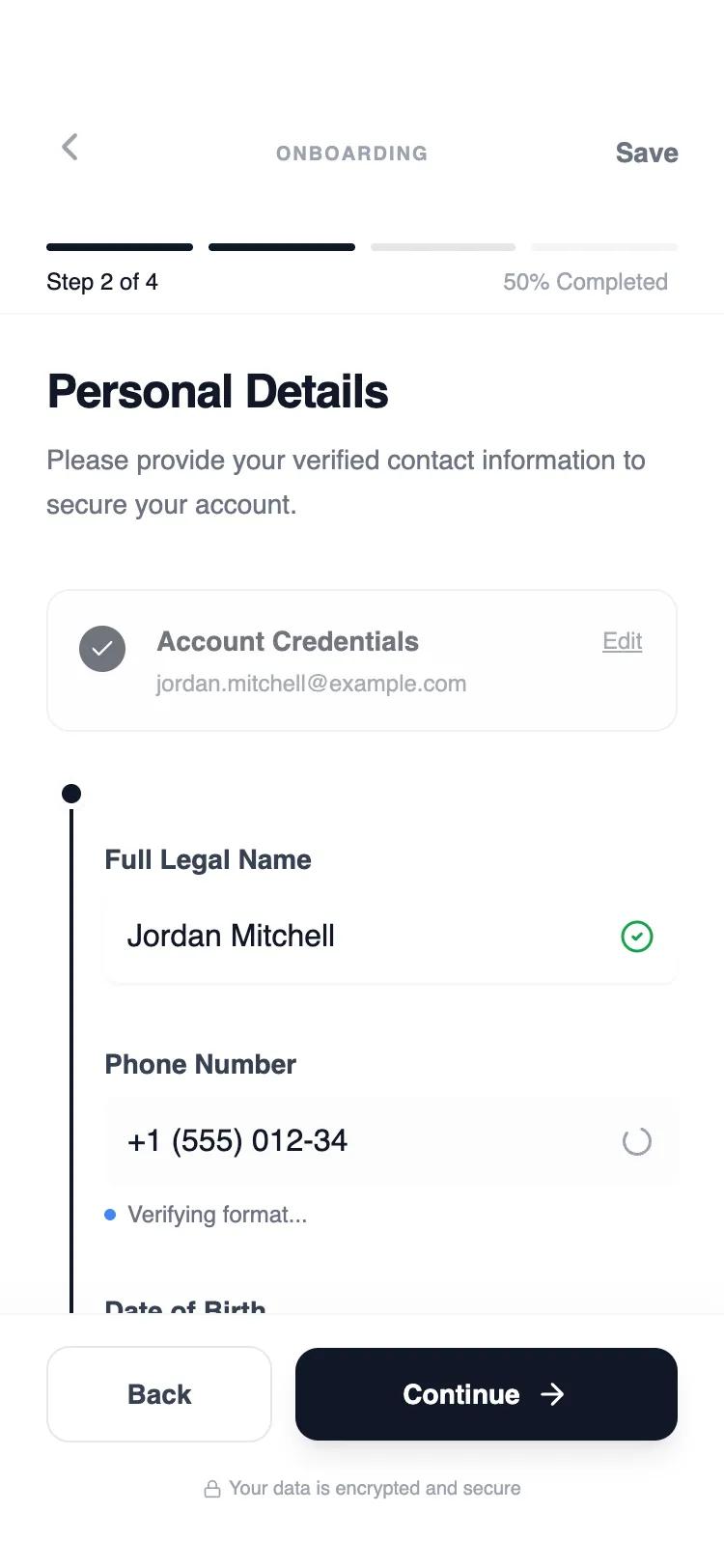
UI-компонент: Пошаговая форма для мобильных. Помогает проходить онбординг, настройки, управление контентом, сохраняя прогресс.
# Multi-step Form Flow
Here is a reference implementation:
~~~html
<!DOCTYPE html>
<html lang="en">
<head>
<meta charset="UTF-8">
<meta name="viewport" content="width=device-width, initial-scale=1.0">
<title>Mobile Multi-step Flow</title>
<script src="https://cdn.tailwindcss.com"></script>
<script src="https://code.iconify.design/iconify-icon/1.0.7/iconify-icon.min.js"></script>
<link href="https://api.fontshare.com/v2/css?f[]=general-sans@700,600,500,400&display=swap" rel="stylesheet">
<script>
tailwind.config = {
theme: {
extend: {
fontFamily: {
sans: ['General Sans', 'sans-serif'],
},
colors: {
gray: {
50: '#f9fafb',
100: '#f3f4f6',
200: '#e5e7eb',
300: '#d1d5db',
400: '#9ca3af',
500: '#6b7280',
600: '#4b5563',
700: '#374151',
800: '#1f2937',
900: '#111827',
}
},
animation: {
'fade-in': 'fadeIn 0.3s ease-out forwards',
'slide-up': 'slideUp 0.4s cubic-bezier(0, 0, 0.2, 1) forwards',
},
keyframes: {
fadeIn: {
'0%': { opacity: '0' },
'100%': { opacity: '1' },
},
slideUp: {
'0%': { opacity: '0', transform: 'translateY(10px)' },
'100%': { opacity: '1', transform: 'translateY(0)' },
}
}
}
}
}
</script>
<style>
::-webkit-scrollbar { width: 0px; background: transparent; }
input:-webkit-autofill {
-webkit-box-shadow: 0 0 0 30px #fff inset !important;
-webkit-text-fill-color: #111827 !important;
}
.step-transition {
transition: opacity 0.3s ease-in-out, transform 0.3s ease-in-out;
}
</style>
</head>
<body>
<div id="app-root" class="w-full h-screen flex flex-col bg-white font-sans text-gray-900 overflow-hidden">
<!-- Header Section -->
<header class="shrink-0 pt-14 pb-2 px-6 bg-white/95 backdrop-blur-sm z-20 border-b border-gray-100/50">
<div class="flex items-center justify-between mb-6">
<button id="nav-back-btn" class="p-2 -ml-2 text-gray-400 hover:text-gray-900 transition-colors rounded-full hover:bg-gray-50">
<iconify-icon icon="lucide:chevron-left" width="24"></iconify-icon>
</button>
<div class="flex flex-col items-center">
<span class="text-[10px] font-bold uppercase tracking-widest text-gray-400">Onboarding</span>
</div>
<button id="nav-save-btn" class="p-2 -mr-2 text-sm font-semibold text-gray-500 hover:text-gray-900 transition-colors">
Save
</button>
</div>
<!-- Progress Visualizer -->
<div id="progress-bar-container" class="flex items-center justify-between gap-2">
<div class="h-1 flex-1 bg-gray-200 rounded-full overflow-hidden"><div class="h-full w-0 bg-gray-900 transition-all duration-500"></div></div>
<div class="h-1 flex-1 bg-gray-200 rounded-full overflow-hidden"><div class="h-full w-0 bg-gray-900 transition-all duration-500"></div></div>
<div class="h-1 flex-1 bg-gray-200 rounded-full overflow-hidden"><div class="h-full w-0 bg-gray-900 transition-all duration-500"></div></div>
<div class="h-1 flex-1 bg-gray-200 rounded-full overflow-hidden"><div class="h-full w-0 bg-gray-900 transition-all duration-500"></div></div>
</div>
<div class="flex justify-between mt-2">
<span id="header-step-title" class="text-xs font-medium text-gray-900">Step 1: Security Setup</span>
<span id="header-progress-text" class="text-xs text-gray-400">0% Completed</span>
</div>
</header>
<!-- Main Content -->
<main id="step-content-container" class="flex-1 overflow-y-auto bg-white">
<!-- Dynamic Content Injected Here -->
</main>
<!-- Footer Section -->
<footer class="shrink-0 bg-white border-t border-gray-100 px-6 pt-4 pb-[34px] shadow-[0_-4px_20px_rgba(0,0,0,0.02)] z-30">
<div class="flex items-center gap-3">
<button id="btn-prev" class="flex-1 py-3.5 px-4 rounded-xl border border-gray-200 bg-white text-gray-700 text-sm font-semibold hover:bg-gray-50 active:bg-gray-100 transition-all focus:outline-none focus:ring-2 focus:ring-gray-200 disabled:opacity-30 disabled:cursor-not-allowed">
Back
</button>
<button id="btn-next" class="flex-[2] py-3.5 px-4 rounded-xl bg-gray-900 text-white text-sm font-semibold shadow-lg shadow-gray-900/10 hover:bg-gray-800 active:scale-[0.98] transition-all flex items-center justify-center gap-2 focus:outline-none focus:ring-2 focus:ring-gray-900 focus:ring-offset-2">
<span id="btn-next-text">Continue</span>
<iconify-icon id="btn-next-icon" icon="lucide:arrow-right" width="18"></iconify-icon>
</button>
</div>
<div class="mt-4 flex justify-center">
<p class="text-[10px] text-gray-400 flex items-center gap-1">
<iconify-icon icon="lucide:lock" width="10"></iconify-icon>
Your data is encrypted and secure
</p>
</div>
</footer>
</div>
<script>
const steps = [
{
id: 1,
title: "Security Setup",
headerTitle: "Step 1: Security Setup",
progress: "25%",
content: `
<div class="flex flex-col min-h-full px-6 py-6 animate-slide-up">
<h1 class="text-2xl font-bold tracking-tight text-gray-900 mb-2">Create your account</h1>
<p class="text-gray-500 text-sm mb-8 leading-relaxed">Set up your secure credentials to get started with our professional network.</p>
<div class="space-y-6">
<div class="space-y-1.5">
<label class="block text-sm font-semibold text-gray-700">Email Address</label>
<input type="email" placeholder="name@company.com" class="block w-full rounded-lg border-gray-200 bg-white py-3 px-3 text-gray-900 focus:border-gray-900 focus:ring-1 focus:ring-gray-900 sm:text-sm shadow-sm">
</div>
<div class="space-y-1.5">
<label class="block text-sm font-semibold text-gray-700">Password</label>
<div class="relative">
<input type="password" placeholder="Minimum 8 characters" class="block w-full rounded-lg border-gray-200 bg-white py-3 px-3 text-gray-900 focus:border-gray-900 focus:ring-1 focus:ring-gray-900 sm:text-sm shadow-sm">
<iconify-icon icon="lucide:eye-off" class="absolute right-3 top-3.5 text-gray-400 cursor-pointer"></iconify-icon>
</div>
</div>
</div>
</div>
`
},
{
id: 2,
title: "Identity Verification",
headerTitle: "Step 2: Identity Verification",
progress: "50%",
content: `
<div class="flex flex-col min-h-full px-6 py-6 animate-slide-up">
<h1 class="text-2xl font-bold tracking-tight text-gray-900 mb-2">Verify your identity</h1>
<p class="text-gray-500 text-sm mb-8 leading-relaxed">Next, let's confirm who you are. We use these details to prevent unauthorized access.</p>
<div class="relative pl-4 border-l-2 border-gray-900 ml-3 space-y-8 pb-8">
<div class="absolute -left-[9px] top-0 w-4 h-4 rounded-full border-[3px] border-white bg-gray-900 shadow-sm"></div>
<div class="space-y-1.5">
<label class="block text-sm font-semibold text-gray-700">Full Legal Name<span class="block text-[10px] font-normal text-gray-400 mt-0.5">As shown on ID</span></label>
<div class="relative group">
<input type="text" value="Jordan Mitchell" class="block w-full rounded-lg border-gray-200 bg-white py-3 pl-3 pr-10 text-gray-900 sm:text-sm shadow-sm">
<div class="absolute inset-y-0 right-0 flex items-center pr-3"><iconify-icon icon="lucide:check-circle-2" class="text-green-600 text-lg"></iconify-icon></div>
</div>
</div>
<div class="space-y-1.5">
<label class="block text-sm font-semibold text-gray-700">Phone Number</label>
<div class="relative">
<input type="tel" value="+1 (555) 012-34" class="block w-full rounded-lg border-gray-200 bg-gray-50/50 py-3 pl-3 pr-10 text-gray-900 sm:text-sm">
<div class="absolute inset-y-0 right-0 flex items-center pr-3"><iconify-icon icon="lucide:loader-2" class="text-gray-400 text-lg animate-spin"></iconify-icon></div>
</div>
</div>
<div class="space-y-1.5">
<label class="block text-sm font-semibold text-gray-700">Date of Birth</label>
<input type="text" placeholder="MM/DD/YYYY" class="block w-full rounded-lg border-gray-200 bg-white py-3 px-3 text-gray-900 sm:text-sm shadow-sm">
</div>
</div>
</div>
`
},
{
id: 3,
title: "Professional Profile",
headerTitle: "Step 3: Professional Profile",
progress: "75%",
content: `
<div class="flex flex-col min-h-full px-6 py-6 animate-slide-up">
<h1 class="text-2xl font-bold tracking-tight text-gray-900 mb-2">Professional Experience</h1>
<p class="text-gray-500 text-sm mb-8 leading-relaxed">Help us tailor your experience by providing your professional background.</p>
<div class="space-y-6">
<div class="space-y-1.5">
<label class="block text-sm font-semibold text-gray-700">Primary Role</label>
<select class="block w-full rounded-lg border-gray-200 bg-white py-3 px-3 text-gray-900 sm:text-sm shadow-sm appearance-none">
<option>Select an option</option>
<option>Software Engineer</option>
<option>Product Designer</option>
<option>Marketing Manager</option>
</select>
</div>
<div class="space-y-1.5">
<label class="block text-sm font-semibold text-gray-700">Years of Experience</label>
<div class="grid grid-cols-3 gap-2">
<button class="py-3 rounded-lg border border-gray-200 text-sm font-medium hover:bg-gray-50">1-3</button>
<button class="py-3 rounded-lg border border-gray-900 bg-gray-900 text-white text-sm font-medium">4-7</button>
<button class="py-3 rounded-lg border border-gray-200 text-sm font-medium hover:bg-gray-50">8+</button>
</div>
</div>
<div class="space-y-1.5">
<label class="block text-sm font-semibold text-gray-700">Portfolio Link (Optional)</label>
<input type="url" placeholder="https://..." class="block w-full rounded-lg border-gray-200 bg-white py-3 px-3 text-gray-900 sm:text-sm shadow-sm">
</div>
</div>
</div>
`
},
{
id: 4,
title: "Final Review",
headerTitle: "Step 4: Final Review",
progress: "100%",
content: `
<div class="flex flex-col min-h-full px-6 py-6 animate-slide-up">
<h1 class="text-2xl font-bold tracking-tight text-gray-900 mb-2">Review & Confirm</h1>
<p class="text-gray-500 text-sm mb-8 leading-relaxed">Please review your information before completing your registration.</p>
<div class="space-y-4">
<div class="p-4 rounded-xl bg-gray-50 border border-gray-100">
<div class="flex items-center justify-between mb-2">
<h4 class="text-xs font-bold uppercase tracking-wider text-gray-400">Security</h4>
<button class="text-xs font-semibold text-gray-900 underline">Edit</button>
</div>
<p class="text-sm text-gray-900 font-medium">jordan.m@example.com</p>
<p class="text-xs text-gray-500">Password set • MFA Enabled</p>
</div>
<div class="p-4 rounded-xl bg-gray-50 border border-gray-100">
<div class="flex items-center justify-between mb-2">
<h4 class="text-xs font-bold uppercase tracking-wider text-gray-400">Identity</h4>
<button class="text-xs font-semibold text-gray-900 underline">Edit</button>
</div>
<p class="text-sm text-gray-900 font-medium">Jordan Mitchell</p>
<p class="text-xs text-gray-500">Verified phone • +1 (555) 012-34</p>
</div>
<div class="p-4 rounded-xl bg-gray-50 border border-gray-100">
<div class="flex items-center justify-between mb-2">
<h4 class="text-xs font-bold uppercase tracking-wider text-gray-400">Professional</h4>
<button class="text-xs font-semibold text-gray-900 underline">Edit</button>
</div>
<p class="text-sm text-gray-900 font-medium">Product Designer</p>
<p class="text-xs text-gray-500">4-7 Years experience</p>
</div>
</div>
</div>
`
}
];
let currentStepIndex = 0;
const headerTitle = document.getElementById('header-step-title');
const progressText = document.getElementById('header-progress-text');
const contentContainer = document.getElementById('step-content-container');
const btnPrev = document.getElementById('btn-prev');
const btnNext = document.getElementById('btn-next');
const btnNextText = document.getElementById('btn-next-text');
const btnNextIcon = document.getElementById('btn-next-icon');
const navBackBtn = document.getElementById('nav-back-btn');
const progressSegments = document.querySelectorAll('#progress-bar-container > div > div');
function updateUI() {
const step = steps[currentStepIndex];
// Update Header
headerTitle.textContent = step.headerTitle;
progressText.textContent = `${step.progress} Completed`;
// Update Progress Bars
progressSegments.forEach((bar, idx) => {
if (idx < currentStepIndex) {
bar.style.width = '100%';
} else if (idx === currentStepIndex) {
bar.style.width = '50%'; // Intermediate state showing progress
setTimeout(() => bar.style.width = '100%', 100); // Animate to full
} else {
bar.style.width = '0%';
}
});
// Update Content
contentContainer.innerHTML = step.content;
// Update Footer
btnPrev.disabled = currentStepIndex === 0;
if (currentStepIndex === steps.length - 1) {
btnNextText.textContent = "Complete Registration";
btnNextIcon.setAttribute('icon', 'lucide:check');
} else {
btnNextText.textContent = currentStepIndex === 1 ? "Verify and Continue" : "Continue";
btnNextIcon.setAttribute('icon', 'lucide:arrow-right');
}
}
btnNext.addEventListener('click', () => {
if (currentStepIndex < steps.length - 1) {
currentStepIndex++;
updateUI();
contentContainer.scrollTo({ top: 0, behavior: 'smooth' });
} else {
// Final step action
btnNext.innerHTML = `<iconify-icon icon="lucide:loader-2" class="animate-spin" width="20"></iconify-icon>`;
setTimeout(() => {
alert("Registration Complete!");
location.reload();
}, 1500);
}
});
btnPrev.addEventListener('click', () => {
if (currentStepIndex > 0) {
currentStepIndex--;
updateUI();
}
});
navBackBtn.addEventListener('click', () => {
if (currentStepIndex > 0) {
currentStepIndex--;
updateUI();
}
});
// Initialize
updateUI();
</script>
</body>
</html>
~~~