Загрузка...
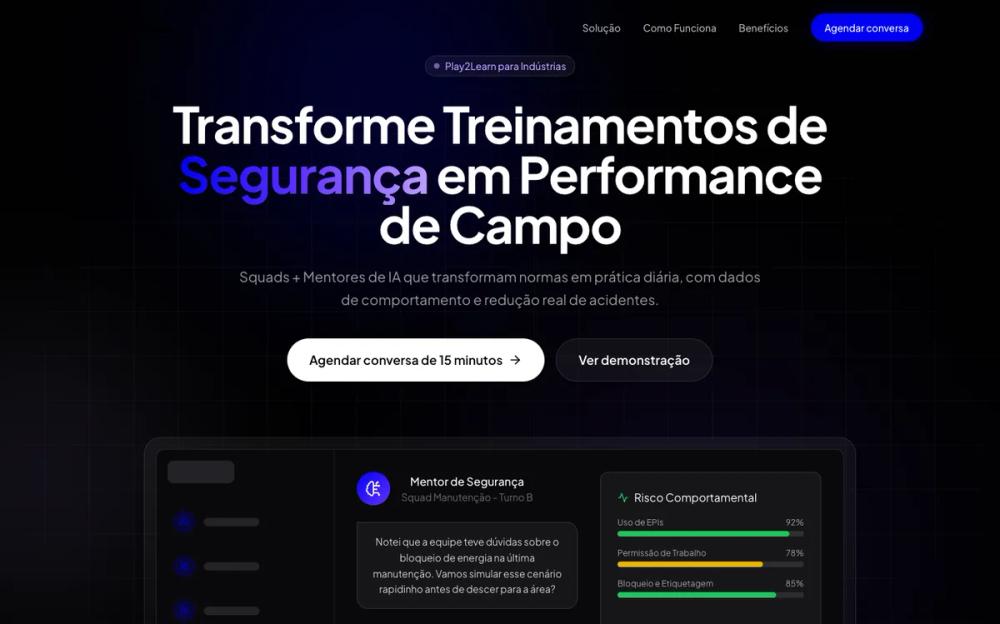
Лендинг Play2Learn: обучение безопасности, операциям и онбордингу. Темный дизайн, симуляции, четкое ценностное предложение для бизнеса.
# Play2LearnLandingPage
You are given a task to integrate an existing React component in the codebase
~~~/README.md
# Play2Learn Landing Page Component
A high-conversion landing page for Play2Learn's Industry vertical, focused on safety training, operations, and onboarding.
## Features
- **Modern Dark Theme**: Uses the brand's dark aesthetic with neon accents (#0000ee, #6334ff).
- **Responsive Design**: Fully responsive for mobile, tablet, and desktop.
- **Scroll Animations**: Engaging entry animations using Framer Motion.
- **Interactive Elements**: Hover effects, mocked-up UI components, and smooth scroll.
- **Sections**:
- Hero with value proposition
- Problem identification
- Solution (Squads + Mentors)
- Step-by-step methodology
- Benefits grid
- Social proof
- Target audience segment
- Strong Call to Action (CTA)
## Usage
```tsx
import { Play2LearnLandingPage } from '@/sd-components/2d2a13cb-26eb-48ee-b2b8-b2f83dbacb5d';
export default function Page() {
return <Play2LearnLandingPage />;
}
```
## Props
This component currently accepts no props as it is a full-page layout, but can be easily refactored to accept content via props.
~~~
~~~/src/App.tsx
import React from 'react';
import Play2LearnLandingPage from './Component';
export default function App() {
return (
<Play2LearnLandingPage />
);
}
~~~
~~~/package.json
{
"name": "play2learn-landing-page",
"description": "Landing page for Play2Learn Industry vertical",
"dependencies": {
"lucide-react": "^0.300.0",
"framer-motion": "^10.16.4",
"clsx": "^2.1.0",
"tailwind-merge": "^2.2.0",
"react-router-dom": "^6.21.1"
}
}
~~~
~~~/src/Component.tsx
import React, { useState, useEffect } from 'react';
import { motion, AnimatePresence, useScroll, useTransform } from 'framer-motion';
import {
Shield,
Users,
BrainCircuit,
Activity,
BarChart3,
Clock,
CheckCircle2,
AlertTriangle,
Menu,
X,
ChevronRight,
Zap,
HardHat,
Factory,
ClipboardCheck,
Smartphone,
Trophy,
ArrowRight
} from 'lucide-react';
import { clsx, type ClassValue } from 'clsx';
import { twMerge } from 'tailwind-merge';
// Utility for class merging
function cn(...inputs: ClassValue[]) {
return twMerge(clsx(inputs));
}
// --- Components ---
const Navbar = () => {
const [isScrolled, setIsScrolled] = useState(false);
const [isMobileMenuOpen, setIsMobileMenuOpen] = useState(false);
useEffect(() => {
const handleScroll = () => {
setIsScrolled(window.scrollY > 20);
};
window.addEventListener('scroll', handleScroll);
return () => window.removeEventListener('scroll', handleScroll);
}, []);
return (
<nav className={cn(
"fixed top-0 left-0 right-0 z-50 transition-all duration-300 border-b border-transparent",
isScrolled ? "bg-background/80 backdrop-blur-md border-white/10" : "bg-transparent"
)}>
<div className="max-w-7xl mx-auto px-4 sm:px-6 lg:px-8">
<div className="flex items-center justify-between h-20">
<div className="flex-shrink-0 flex items-center gap-2">
<img
src="https://framerusercontent.com/images/3vzS5kugtW8u3ZiY5G5Psz2Jpnw.svg"
alt="Play2Learn Logo"
className="h-8 w-auto invert brightness-0 filter"
style={{ filter: 'invert(1) brightness(2)' }} // Ensure logo is white
/>
</div>
<div className="hidden md:block">
<div className="ml-10 flex items-baseline space-x-8">
<a href="#solucao" className="text-sm font-medium text-white/70 hover:text-white transition-colors">Solução</a>
<a href="#como-funciona" className="text-sm font-medium text-white/70 hover:text-white transition-colors">Como Funciona</a>
<a href="#beneficios" className="text-sm font-medium text-white/70 hover:text-white transition-colors">Benefícios</a>
<button className="bg-primary hover:bg-primary/90 text-white px-5 py-2.5 rounded-full text-sm font-medium transition-all shadow-[0_0_20px_rgba(0,0,238,0.3)] hover:shadow-[0_0_30px_rgba(0,0,238,0.5)]">
Agendar conversa
</button>
</div>
</div>
<div className="md:hidden">
<button
onClick={() => setIsMobileMenuOpen(!isMobileMenuOpen)}
className="text-white p-2"
>
{isMobileMenuOpen ? <X size={24} /> : <Menu size={24} />}
</button>
</div>
</div>
</div>
<AnimatePresence>
{isMobileMenuOpen && (
<motion.div
initial={{ opacity: 0, height: 0 }}
animate={{ opacity: 1, height: 'auto' }}
exit={{ opacity: 0, height: 0 }}
className="md:hidden bg-background border-b border-white/10 overflow-hidden"
>
<div className="px-4 pt-2 pb-6 space-y-4">
<a href="#solucao" className="block text-base font-medium text-white/70 hover:text-white" onClick={() => setIsMobileMenuOpen(false)}>Solução</a>
<a href="#como-funciona" className="block text-base font-medium text-white/70 hover:text-white" onClick={() => setIsMobileMenuOpen(false)}>Como Funciona</a>
<a href="#beneficios" className="block text-base font-medium text-white/70 hover:text-white" onClick={() => setIsMobileMenuOpen(false)}>Benefícios</a>
<button className="w-full mt-4 bg-primary hover:bg-primary/90 text-white px-5 py-3 rounded-lg text-base font-medium transition-all">
Agendar conversa
</button>
</div>
</motion.div>
)}
</AnimatePresence>
</nav>
);
};
const Hero = () => {
return (
<section className="relative min-h-screen flex items-center pt-20 overflow-hidden">
{/* Background Effects */}
<div className="absolute top-0 left-0 w-full h-full overflow-hidden z-0">
<div className="absolute top-[-10%] left-[20%] w-[500px] h-[500px] bg-primary/20 rounded-full blur-[120px]" />
<div className="absolute bottom-[10%] right-[10%] w-[600px] h-[600px] bg-secondary/10 rounded-full blur-[150px]" />
<div className="absolute top-[40%] left-[-10%] w-[400px] h-[400px] bg-accent/10 rounded-full blur-[100px]" />
{/* Grid Pattern */}
<div className="absolute inset-0 bg-[linear-gradient(rgba(255,255,255,0.03)_1px,transparent_1px),linear-gradient(90deg,rgba(255,255,255,0.03)_1px,transparent_1px)] bg-[size:4rem_4rem] [mask-image:radial-gradient(ellipse_60%_50%_at_50%_50%,#000_70%,transparent_100%)]" />
</div>
<div className="relative z-10 max-w-7xl mx-auto px-4 sm:px-6 lg:px-8 flex flex-col items-center text-center">
<motion.div
initial={{ opacity: 0, y: 20 }}
animate={{ opacity: 1, y: 0 }}
transition={{ duration: 0.6 }}
className="inline-flex items-center gap-2 px-3 py-1 rounded-full bg-white/5 border border-white/10 text-accent text-sm font-medium mb-8"
>
<span className="flex h-2 w-2 rounded-full bg-accent animate-pulse"></span>
Play2Learn para Indústrias
</motion.div>
<motion.h1
initial={{ opacity: 0, y: 20 }}
animate={{ opacity: 1, y: 0 }}
transition={{ duration: 0.6, delay: 0.1 }}
className="text-5xl md:text-7xl font-bold tracking-tight text-white mb-6 max-w-5xl leading-[1.1]"
>
Transforme Treinamentos de <span className="text-transparent bg-clip-text bg-gradient-to-r from-primary via-secondary to-accent">Segurança</span> em Performance de Campo
</motion.h1>
<motion.p
initial={{ opacity: 0, y: 20 }}
animate={{ opacity: 1, y: 0 }}
transition={{ duration: 0.6, delay: 0.2 }}
className="text-xl text-white/60 max-w-3xl mb-10 leading-relaxed"
>
Squads + Mentores de IA que transformam normas em prática diária, com dados de comportamento e redução real de acidentes.
</motion.p>
<motion.div
initial={{ opacity: 0, y: 20 }}
animate={{ opacity: 1, y: 0 }}
transition={{ duration: 0.6, delay: 0.3 }}
className="flex flex-col sm:flex-row gap-4 w-full justify-center"
>
<button className="bg-white text-black px-8 py-4 rounded-full text-lg font-semibold hover:bg-gray-200 transition-all flex items-center justify-center gap-2">
Agendar conversa de 15 minutos
<ArrowRight size={20} />
</button>
<button className="bg-white/5 border border-white/10 text-white px-8 py-4 rounded-full text-lg font-semibold hover:bg-white/10 transition-all backdrop-blur-sm">
Ver demonstração
</button>
</motion.div>
{/* Floating UI Elements Mockup */}
<motion.div
initial={{ opacity: 0, y: 40 }}
animate={{ opacity: 1, y: 0 }}
transition={{ duration: 0.8, delay: 0.5 }}
className="mt-20 relative w-full max-w-5xl aspect-[16/9] bg-gradient-to-b from-white/5 to-transparent rounded-t-3xl border-t border-x border-white/10 p-4 shadow-2xl"
>
<div className="absolute inset-0 bg-gradient-to-t from-[#010101] via-transparent to-transparent z-20" />
<div className="relative z-10 w-full h-full rounded-xl overflow-hidden bg-[#0A090D] border border-white/10 flex">
{/* Sidebar */}
<div className="w-64 border-r border-white/5 p-4 hidden md:flex flex-col gap-4">
<div className="h-8 w-24 bg-white/10 rounded-md mb-4"/>
{[1,2,3,4].map(i => (
<div key={i} className="flex items-center gap-3 p-2 rounded-lg hover:bg-white/5 transition-colors">
<div className="w-8 h-8 rounded-full bg-primary/20 flex items-center justify-center">
<Users size={14} className="text-primary"/>
</div>
<div className="h-3 w-20 bg-white/10 rounded-full"/>
</div>
))}
</div>
{/* Main Content */}
<div className="flex-1 p-8 grid grid-cols-1 md:grid-cols-2 gap-8">
<div className="space-y-6">
<div className="flex items-center gap-4">
<div className="w-12 h-12 rounded-full bg-gradient-to-br from-primary to-secondary flex items-center justify-center text-white">
<BrainCircuit size={24} />
</div>
<div>
<h3 className="text-white font-medium">Mentor de Segurança</h3>
<p className="text-white/40 text-sm">Squad Manutenção - Turno B</p>
</div>
</div>
<div className="bg-white/5 border border-white/10 rounded-2xl p-4 rounded-tl-none">
<p className="text-white/80 text-sm leading-relaxed">
Notei que a equipe teve dúvidas sobre o bloqueio de energia na última manutenção. Vamos simular esse cenário rapidinho antes de descer para a área?
</p>
</div>
<div className="flex gap-2">
<div className="flex-1 bg-primary/10 border border-primary/20 hover:bg-primary/20 cursor-pointer rounded-xl p-3 transition-colors">
<p className="text-primary text-sm font-medium text-center">Simular Bloqueio</p>
</div>
<div className="flex-1 bg-white/5 border border-white/10 hover:bg-white/10 cursor-pointer rounded-xl p-3 transition-colors">
<p className="text-white text-sm font-medium text-center">Revisar POP</p>
</div>
</div>
</div>
<div className="bg-white/5 rounded-xl border border-white/10 p-6">
<h4 className="text-white mb-4 flex items-center gap-2">
<Activity size={16} className="text-green-500" />
Risco Comportamental
</h4>
<div className="space-y-4">
{[
{ label: 'Uso de EPIs', val: 92, color: 'bg-green-500' },
{ label: 'Permissão de Trabalho', val: 78, color: 'bg-yellow-500' },
{ label: 'Bloqueio e Etiquetagem', val: 85, color: 'bg-green-500' }
].map((item, idx) => (
<div key={idx}>
<div className="flex justify-between text-xs text-white/60 mb-1">
<span>{item.label}</span>
<span>{item.val}%</span>
</div>
<div className="h-2 bg-white/10 rounded-full overflow-hidden">
<motion.div
initial={{ width: 0 }}
animate={{ width: `${item.val}%` }}
transition={{ duration: 1, delay: 1 + idx * 0.2 }}
className={`h-full ${item.color} rounded-full`}
/>
</div>
</div>
))}
</div>
</div>
</div>
</div>
</motion.div>
</div>
</section>
);
};
const Problem = () => {
const problems = [
{
icon: <CheckCircle2 className="text-red-400" size={32} />,
title: "Treino 'Check na Planilha'",
desc: "O colaborador assiste, assina a lista, mas na prática segue o atalho. Treinamento burocrático que não muda hábito."
},
{
icon: <AlertTriangle className="text-orange-400" size={32} />,
title: "Normas longe da Realidade",
desc: "Normas, PTs e POPs vivem em PDFs e pastas, longe da decisão do operador na hora H quando o risco acontece."
},
{
icon: <BarChart3 className="text-blue-400" size={32} />,
title: "Gestão às Cegas",
desc: "SST só tem dados estatísticos depois do acidente. Não existe visibilidade de comportamento preventivo por turno."
},
{
icon: <Clock className="text-purple-400" size={32} />,
title: "Reciclagens Caras",
desc: "Parar linha e juntar turma é caro. Repetir o mesmo conteúdo para todos é ineficiente e chato."
}
];
return (
<section className="py-24 bg-[#050505] relative border-t border-white/5">
<div className="max-w-7xl mx-auto px-4 sm:px-6 lg:px-8">
<div className="text-center mb-16">
<h2 className="text-3xl md:text-5xl font-bold text-white mb-6">Por que os treinamentos atuais <span className="text-red-500">não bastam</span></h2>
<p className="text-white/60 text-lg max-w-3xl mx-auto">
Não existe um "simulador de campo" rápido, que faça o operador praticar antes de entrar na área.
</p>
</div>
<div className="grid grid-cols-1 md:grid-cols-2 lg:grid-cols-4 gap-6">
{problems.map((problem, index) => (
<motion.div
key={index}
initial={{ opacity: 0, y: 20 }}
whileInView={{ opacity: 1, y: 0 }}
viewport={{ once: true }}
transition={{ delay: index * 0.1 }}
className="bg-white/5 border border-white/10 rounded-2xl p-6 hover:bg-white/10 transition-colors group"
>
<div className="bg-white/5 w-16 h-16 rounded-xl flex items-center justify-center mb-6 group-hover:scale-110 transition-transform">
{problem.icon}
</div>
<h3 className="text-xl font-semibold text-white mb-3">{problem.title}</h3>
<p className="text-white/60 leading-relaxed">
{problem.desc}
</p>
</motion.div>
))}
</div>
</div>
</section>
);
};
const Solution = () => {
return (
<section id="solucao" className="py-24 relative overflow-hidden">
<div className="absolute inset-0 bg-gradient-to-b from-[#010101] to-[#0A090D]" />
<div className="absolute top-[20%] right-[-10%] w-[500px] h-[500px] bg-primary/10 rounded-full blur-[120px]" />
<div className="relative z-10 max-w-7xl mx-auto px-4 sm:px-6 lg:px-8">
<div className="mb-20">
<motion.span
initial={{ opacity: 0 }}
whileInView={{ opacity: 1 }}
className="text-primary font-semibold tracking-wider text-sm uppercase mb-2 block"
>
A Solução
</motion.span>
<h2 className="text-4xl md:text-6xl font-bold text-white mb-6">
Squads + Mentores
</h2>
<p className="text-xl text-white/60 max-w-2xl">
A nova camada de treinamento de segurança que vive onde o risco acontece: na decisão do time.
</p>
</div>
{/* Feature 1: Squads */}
<div className="grid grid-cols-1 lg:grid-cols-2 gap-16 items-center mb-32">
<motion.div
initial={{ opacity: 0, x: -50 }}
whileInView={{ opacity: 1, x: 0 }}
viewport={{ once: true }}
className="order-2 lg:order-1"
>
<div className="flex items-center gap-3 mb-6">
<div className="p-2 bg-secondary/20 rounded-lg">
<Users className="text-secondary" size={24} />
</div>
<h3 className="text-2xl font-bold text-white">Squads Reais</h3>
</div>
<p className="text-white/70 text-lg mb-6 leading-relaxed">
Com a Play2Learn, você cria Squads que espelham sua operação. Em vez de listas genéricas, organize o treino por quem trabalha junto.
</p>
<ul className="space-y-4">
{[
"Treinamentos Quiz & Roleplay de 5–10 min",
"Materiais e normas da própria planta anexados",
"Focado em Manutenção, Produção, Logística"
].map((item, i) => (
<li key={i} className="flex items-center gap-3 text-white/80">
<CheckCircle2 className="text-green-500 shrink-0" size={20} />
<span>{item}</span>
</li>
))}
</ul>
</motion.div>
<motion.div
initial={{ opacity: 0, x: 50 }}
whileInView={{ opacity: 1, x: 0 }}
viewport={{ once: true }}
className="order-1 lg:order-2 relative"
>
<div className="absolute inset-0 bg-gradient-to-r from-secondary/20 to-accent/20 blur-3xl -z-10" />
<div className="bg-[#0f0e13] border border-white/10 rounded-2xl p-6 shadow-2xl">
<div className="flex justify-between items-center mb-6">
<h4 className="text-white font-semibold">Meus Squads</h4>
<div className="px-3 py-1 bg-green-500/10 text-green-500 text-xs rounded-full">Ativos</div>
</div>
<div className="space-y-3">
{[
{ name: "Manutenção Elétrica - Turno A", members: 12, score: 94, icon: Zap },
{ name: "Operação Linha 04", members: 28, score: 82, icon: Factory },
{ name: "Logística & Expedição", members: 15, score: 88, icon: ClipboardCheck },
{ name: "Terceiros - Limpeza Industrial", members: 8, score: 76, icon: HardHat },
].map((squad, i) => (
<div key={i} className="flex items-center justify-between p-4 bg-white/5 rounded-xl hover:bg-white/10 transition-colors cursor-pointer border border-transparent hover:border-white/10">
<div className="flex items-center gap-4">
<div className="w-10 h-10 rounded-full bg-white/10 flex items-center justify-center text-white">
<squad.icon size={18} />
</div>
<div>
<p className="text-white font-medium">{squad.name}</p>
<p className="text-white/40 text-xs">{squad.members} membros</p>
</div>
</div>
<div className="text-right">
<p className={`font-bold ${squad.score > 90 ? 'text-green-400' : squad.score > 80 ? 'text-blue-400' : 'text-yellow-400'}`}>{squad.score}%</p>
<p className="text-white/30 text-xs">Score</p>
</div>
</div>
))}
</div>
</div>
</motion.div>
</div>
{/* Feature 2: Mentors */}
<div className="grid grid-cols-1 lg:grid-cols-2 gap-16 items-center">
<motion.div
initial={{ opacity: 0, x: -50 }}
whileInView={{ opacity: 1, x: 0 }}
viewport={{ once: true }}
className="relative"
>
<div className="absolute inset-0 bg-gradient-to-l from-primary/20 to-purple-500/20 blur-3xl -z-10" />
{/* Chat Interface Mockup */}
<div className="bg-[#0f0e13] border border-white/10 rounded-2xl shadow-2xl overflow-hidden max-w-md mx-auto lg:mx-0">
<div className="bg-white/5 p-4 border-b border-white/10 flex items-center gap-3">
<div className="relative">
<div className="w-10 h-10 rounded-full bg-gradient-to-tr from-primary to-accent flex items-center justify-center">
<BrainCircuit size={20} className="text-white" />
</div>
<div className="absolute bottom-0 right-0 w-3 h-3 bg-green-500 border-2 border-[#0f0e13] rounded-full"></div>
</div>
<div>
<h4 className="text-white font-medium text-sm">Mentor SST</h4>
<p className="text-white/40 text-xs">Expert em NR-10 e NR-35</p>
</div>
</div>
<div className="p-4 space-y-4 h-[300px] overflow-y-auto bg-black/20">
<div className="flex gap-3">
<div className="w-8 h-8 rounded-full bg-gradient-to-tr from-primary to-accent shrink-0 flex items-center justify-center text-xs text-white">AI</div>
<div className="bg-white/10 rounded-2xl rounded-tl-none p-3 text-sm text-white/80">
Olá Carlos! Antes de iniciar a manutenção no painel, vamos revisar os 5 passos do bloqueio?
</div>
</div>
<div className="flex gap-3 flex-row-reverse">
<div className="w-8 h-8 rounded-full bg-gray-600 shrink-0 flex items-center justify-center text-xs text-white">C</div>
<div className="bg-primary/20 border border-primary/20 rounded-2xl rounded-tr-none p-3 text-sm text-white/90">
Claro, já estou com o cartão de bloqueio aqui.
</div>
</div>
<div className="flex gap-3">
<div className="w-8 h-8 rounded-full bg-gradient-to-tr from-primary to-accent shrink-0 flex items-center justify-center text-xs text-white">AI</div>
<div className="bg-white/10 rounded-2xl rounded-tl-none p-3 text-sm text-white/80 space-y-2">
<p>Ótimo. Pergunta rápida:</p>
<p className="font-semibold text-white">Se você encontrar um dispositivo já bloqueado por outro colega que não está na área, o que deve fazer?</p>
<div className="grid grid-cols-1 gap-2 mt-2">
<button className="bg-white/5 hover:bg-white/10 border border-white/10 p-2 rounded text-left text-xs transition-colors">A) Remover o bloqueio dele e colocar o meu</button>
<button className="bg-white/5 hover:bg-white/10 border border-white/10 p-2 rounded text-left text-xs transition-colors">B) Aplicar meu bloqueio junto ao dele (multi-lock)</button>
</div>
</div>
</div>
</div>
<div className="p-3 border-t border-white/10 bg-white/5">
<div className="h-10 bg-black/40 rounded-lg border border-white/5"></div>
</div>
</div>
</motion.div>
<motion.div
initial={{ opacity: 0, x: 50 }}
whileInView={{ opacity: 1, x: 0 }}
viewport={{ once: true }}
>
<div className="flex items-center gap-3 mb-6">
<div className="p-2 bg-primary/20 rounded-lg">
<BrainCircuit className="text-primary" size={24} />
</div>
<h3 className="text-2xl font-bold text-white">Mentor por Squad</h3>
</div>
<p className="text-white/70 text-lg mb-6 leading-relaxed">
Cada Squad ganha um agente de IA configurado com a sua linguagem, normas e prioridades. O "Expert de bolso".
</p>
<ul className="space-y-6">
{[
{
title: "Conversão Automática",
desc: "Transforma seus POPs e NRs em jogos práticos sem trabalho manual."
},
{
title: "Simulação Real",
desc: "Faz perguntas situacionais ('está usando todos os EPIs?') e dá feedback imediato."
},
{
title: "Insights de Comportamento",
desc: "Descobre onde o turno erra mais e quais normas são menos compreendidas."
}
].map((item, i) => (
<li key={i} className="flex gap-4">
<div className="w-1.5 h-1.5 rounded-full bg-primary mt-2.5 shrink-0" />
<div>
<strong className="block text-white mb-1">{item.title}</strong>
<span className="text-white/60 text-sm">{item.desc}</span>
</div>
</li>
))}
</ul>
</motion.div>
</div>
</div>
</section>
);
};
const Steps = () => {
const steps = [
{ num: "01", title: "Escolha a Squad", desc: "Defina a área de maior dor (ex: manutenção, linha crítica)." },
{ num: "02", title: "Suba os Materiais", desc: "POPs, PTs, fotos, vídeos. Nossa IA processa tudo." },
{ num: "03", title: "Configure o Mentor", desc: "Defina o papel (ex: 'Técnico Sênior') e o tom de voz." },
{ num: "04", title: "Crie Treinamentos", desc: "Geramos 2-3 jogos de Roleplay adaptados à sua realidade." },
{ num: "05", title: "Rode o Piloto", desc: "Libere para os colaboradores e acompanhe os dados reais." },
];
return (
<section id="como-funciona" className="py-24 bg-[#050505] border-y border-white/5">
<div className="max-w-7xl mx-auto px-4 sm:px-6 lg:px-8">
<div className="text-center mb-16">
<h2 className="text-3xl md:text-5xl font-bold text-white mb-6">Como funciona</h2>
<p className="text-white/60">Do treinamento ao dado em 5 passos simples</p>
</div>
<div className="relative">
{/* Connecting Line (Desktop) */}
<div className="hidden md:block absolute top-8 left-0 w-full h-0.5 bg-white/10" />
<div className="grid grid-cols-1 md:grid-cols-5 gap-8">
{steps.map((step, i) => (
<motion.div
key={i}
initial={{ opacity: 0, y: 20 }}
whileInView={{ opacity: 1, y: 0 }}
viewport={{ once: true }}
transition={{ delay: i * 0.1 }}
className="relative flex flex-col items-center text-center group"
>
<div className="w-16 h-16 rounded-full bg-[#0A090D] border border-white/20 flex items-center justify-center text-xl font-bold text-white mb-6 relative z-10 group-hover:border-primary group-hover:bg-primary group-hover:text-white transition-all shadow-[0_0_0_8px_rgba(5,5,5,1)]">
{step.num}
</div>
<h3 className="text-lg font-semibold text-white mb-2">{step.title}</h3>
<p className="text-sm text-white/50">{step.desc}</p>
</motion.div>
))}
</div>
</div>
<div className="mt-16 text-center">
<button className="text-primary hover:text-white transition-colors flex items-center justify-center gap-2 mx-auto text-sm font-medium border-b border-primary/20 pb-1 hover:border-white">
Quero ver um exemplo de jogo de segurança <ChevronRight size={14} />
</button>
</div>
</div>
</section>
);
};
const Benefits = () => {
const benefits = [
{
title: "Redução de Acidentes",
desc: "Treinos frequentes e contextualizados reduzem decisões de risco e improvisos em campo.",
gradient: "from-red-500/20 to-orange-500/20"
},
{
title: "Mais Tempo Produtivo",
desc: "Jogos de 5–10 min no início do turno substituem horas de sala e deslocamento.",
gradient: "from-green-500/20 to-emerald-500/20"
},
{
title: "Visibilidade Real",
desc: "Dashboards mostram quais times estão aderentes e quais precisam de intervenção.",
gradient: "from-blue-500/20 to-indigo-500/20"
},
{
title: "Auditoria Pronta",
desc: "Evidências de compreensão e treinamento para auditorias e certificações.",
gradient: "from-purple-500/20 to-pink-500/20"
}
];
return (
<section id="beneficios" className="py-24 relative">
<div className="max-w-7xl mx-auto px-4 sm:px-6 lg:px-8">
<div className="mb-16">
<h2 className="text-3xl md:text-5xl font-bold text-white mb-6">Benefícios para a Indústria</h2>
</div>
<div className="grid grid-cols-1 md:grid-cols-2 gap-6">
{benefits.map((benefit, i) => (
<motion.div
key={i}
initial={{ opacity: 0, scale: 0.95 }}
whileInView={{ opacity: 1, scale: 1 }}
viewport={{ once: true }}
className="group relative overflow-hidden rounded-2xl bg-white/5 border border-white/10 p-8 hover:bg-white/10 transition-colors"
>
<div className={`absolute top-0 right-0 w-64 h-64 bg-gradient-to-br ${benefit.gradient} blur-[100px] opacity-0 group-hover:opacity-100 transition-opacity`} />
<div className="relative z-10">
<h3 className="text-2xl font-bold text-white mb-4">{benefit.title}</h3>
<p className="text-white/60 text-lg leading-relaxed">{benefit.desc}</p>
</div>
</motion.div>
))}
</div>
</div>
</section>
);
};
const Testimonial = () => {
return (
<section className="py-24 border-y border-white/5 bg-[#050505]">
<div className="max-w-4xl mx-auto px-4 text-center">
<Trophy className="text-yellow-500 mx-auto mb-8" size={48} />
<blockquote className="text-2xl md:text-3xl font-medium text-white mb-8 leading-relaxed">
"Depois de 60 dias usando jogos de EPI e PT com a Play2Learn, tivemos uma queda percebida nos desvios de rotina e finalmente conseguimos priorizar ações em cima de dados, não só de percepções."
</blockquote>
<div className="flex flex-col items-center">
<div className="w-12 h-12 bg-white/20 rounded-full mb-3" />
<cite className="not-italic font-semibold text-white">Gerente de SST</cite>
<span className="text-white/40 text-sm">Indústria Multinacional Automotiva</span>
</div>
<div className="mt-16 flex flex-wrap justify-center gap-12 opacity-40 grayscale">
{/* Placeholder Logos */}
{[1,2,3,4].map(i => (
<div key={i} className="h-8 w-32 bg-white/20 rounded animate-pulse" />
))}
</div>
</div>
</section>
);
};
const TargetAudience = () => {
const targets = [
"Diretores e gerentes de Segurança do Trabalho e Meio Ambiente",
"Gerentes de Operações, Produção e Manutenção",
"RH / T&D focado em indústria",
"Empresas com múltiplas plantas e terceirizados"
];
return (
<section className="py-24 bg-gradient-to-b from-[#010101] to-primary/10">
<div className="max-w-7xl mx-auto px-4 sm:px-6 lg:px-8">
<div className="bg-[#0A090D] border border-white/10 rounded-3xl p-8 md:p-16 flex flex-col md:flex-row items-center gap-12">
<div className="flex-1">
<h2 className="text-3xl md:text-4xl font-bold text-white mb-8">Para quem é</h2>
<div className="space-y-4">
{targets.map((target, i) => (
<motion.div
key={i}
initial={{ opacity: 0, x: -20 }}
whileInView={{ opacity: 1, x: 0 }}
viewport={{ once: true }}
transition={{ delay: i * 0.1 }}
className="flex items-center gap-4 p-4 rounded-xl bg-white/5 border border-white/5"
>
<CheckCircle2 className="text-primary shrink-0" size={24} />
<span className="text-white font-medium">{target}</span>
</motion.div>
))}
</div>
</div>
<div className="flex-1 text-center md:text-left">
<h3 className="text-2xl font-bold text-white mb-4">Próximo passo simples</h3>
<p className="text-white/60 mb-8 text-lg">
Em 15 minutos mostramos um fluxo completo – da Squad ao dashboard – e desenhamos juntos um piloto de segurança para a sua operação.
</p>
<button className="w-full md:w-auto bg-white text-black px-8 py-4 rounded-full text-lg font-bold hover:bg-gray-200 transition-all shadow-[0_0_30px_rgba(255,255,255,0.2)]">
Agendar conversa de 15 minutos
</button>
</div>
</div>
</div>
</section>
);
};
const Footer = () => {
return (
<footer className="bg-black py-12 border-t border-white/10">
<div className="max-w-7xl mx-auto px-4 sm:px-6 lg:px-8 flex flex-col md:flex-row justify-between items-center gap-8">
<div className="flex items-center gap-2">
<img
src="https://framerusercontent.com/images/3vzS5kugtW8u3ZiY5G5Psz2Jpnw.svg"
alt="Play2Learn Logo"
className="h-6 w-auto invert brightness-0 filter"
style={{ filter: 'invert(1) brightness(2)' }}
/>
<span className="text-white/40 text-sm ml-2">Indústria</span>
</div>
<div className="text-white/40 text-sm">
© {new Date().getFullYear()} Play2Learn. Todos os direitos reservados.
</div>
</div>
</footer>
);
};
export function Play2LearnLandingPage() {
return (
<div className="bg-[#010101] min-h-screen text-white font-sans selection:bg-primary/30">
<Navbar />
<Hero />
<Problem />
<Solution />
<Steps />
<Benefits />
<Testimonial />
<TargetAudience />
<Footer />
</div>
);
}
export default Play2LearnLandingPage;
~~~
Implementation Guidelines
1. Analyze the component structure, styling, animation implementations
2. Review the component's arguments and state
3. Think through what is the best place to adopt this component/style into the design we are doing
4. Then adopt the component/design to our current system
Help me integrate this into my design