
Все промпты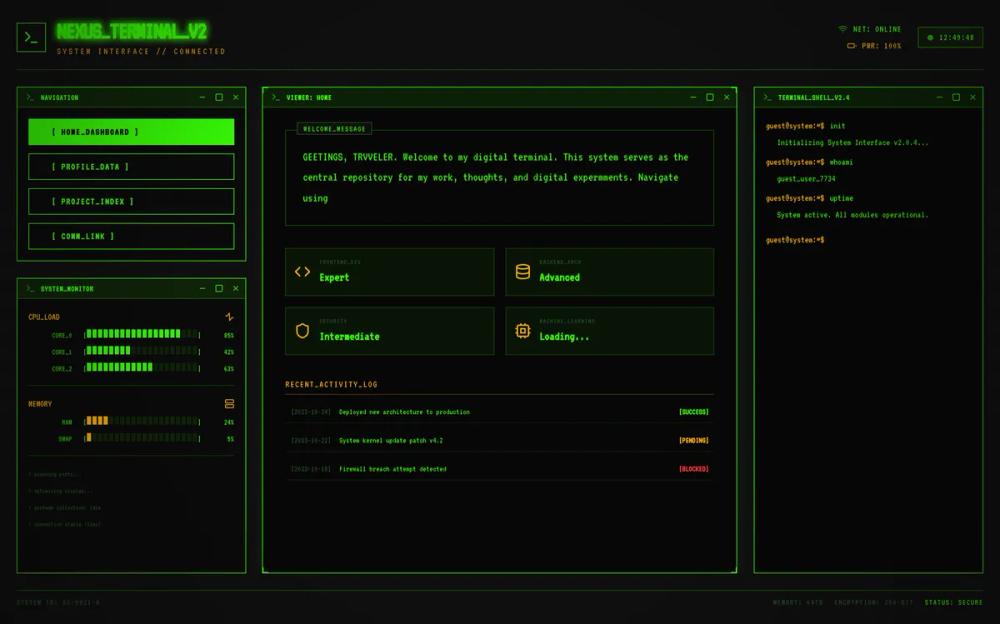 Все промпты
style
Terminal
Стиль Terminal: аутентичная эстетика командной строки для ваших UI-проектов. Создает ощущение мощности и минимализма.
Автор: Zhou JasonЖивое превью
Prompt
# Terminal

<design-system>

# Design Philosophy

The **Terminal CLI** aesthetic pays homage to the raw power of the command line. It strips away the "user interface" layers to reveal the "system" underneath. It is **brutally functional, high-contrast, and authentically retro**. It feels like hacking into a mainframe or configuring a server.

The vibe is **Cyber-Industrial, Hacker, and System-Level**. It is not "Matrix" rain (too cliché); it is a clean, usable ZSH/BASH shell environment.

**Key visual signatures:**

- **Monospace Supremacy**: Every single character, from the largest headline to the smallest footer link, is monospaced.

- **The Cursor**: The blinking block or underscore cursor `_` is the heartbeat of the interface.

- **Shell Metaphors**: Use prompt characters `>`, `$`, `~`), command flags `--help`), and status codes `[OK]`, `[ERR]`).

- **Scanlines (Subtle)**: A very faint CRT scanline effect to give it depth without ruining readability.

# Design Token System

## Colors (Dark Mode Only)

The palette mimics a phosphor monitor. High contrast is non-negotiable.

- **Background**: `#0a0a0a` (Deep black, but not pure OLED black to allow for scanlines)

- **Foreground**: `#33ff00` (Classic Terminal Green) or `#ffb000` (Amber) - *Let's go with Green for this implementation as the primary, with Amber as secondary.*

~~~
\*   `primary`: `#33ff00` (Bright Neon Green)

\*   `secondary`: `#ffb000` (Amber/Orange for warnings or accents)

\*   `muted`: `#1f521f` (Dimmed green for borders/inactive text)

\*   `accent`: `#33ff00` (Same as primary, used for cursors/active states)

\*   `error`: `#ff3333` (Bright Red)

\*   `border`: `#1f521f` (Dimmed green)
~~~

## Typography

- **Font**: `JetBrains Mono`, `Fira Code`, or `VT323`.

- **Style**: **ALL CAPS** for headers. Lowercase for "code" or body text is acceptable, but consistency is key.

- **Scale**: Strict modular scale. Headers shouldn't be "smooth"; they should snap to grid sizes.

## Radius & Borders

- **Radius**: `0px`. Absolutely no rounded corners.

- **Borders**: `1px` solid or dashed. Borders are crucial for defining "windows" or "panes".

## Shadows & Effects

- **Shadows**: No drop shadows.

- **Text Shadow**: A subtle "glow" for the primary text to mimic phosphor persistence.

~~~
\*   `text-shadow: 0 0 5px rgba(51, 255, 0, 0.5)`
~~~

- **CRT Overlay**: A pointer-events-none overlay with scanlines.

# Component Stylings

## Buttons

- **Structure**: Text enclosed in brackets `[ INITIATE ]` or a solid block of color with inverted text.

- **Hover**: The background fills with the primary color, text becomes black (inverted video).

- **Active**: A "pressed" state might shift the text 1px down or blink rapidly.

## Cards (Windows/Panes)

- **Structure**: A black box with a 1px green border.

- **Header**: A "title bar" at the top: `+--- SYSTEM STATUS ---+` or a solid inverted bar.

- **Content**: Padded monospaced text inside.

## Inputs

- **Style**: No box. Just a prompt `user@acme:~$` followed by the input field.

- **Cursor**: A blinking block `█` at the caret position.

- **Focus**: No ring, just the blinking cursor.

# Layout Strategy

The layout should feel like a grid of terminal windows `tmux` or `vim` splits).

- **Strict Grid**: Content is aligned to a rigid character grid.

- **Separators**: Use ASCII characters for dividers: `----------------` or `================` or `//`.

# Non-Genericness (The Bold Factor)

- **ASCII Art**: Use ASCII art for the logo or key graphic elements.

- **Typewriter Effect**: Headlines should appear character-by-character.

- **Raw Data Visualization**: Stats shouldn't be pie charts; they should be progress bars `[||||||||||.....]`.

# Effects & Animation

- **Blink**: Utilities for `animate-blink` (standard cursor blinking).

- **Glitch**: Occasional subtle text offsets on hover.

- **Typing**: `typing-demo` animation for the hero text.

# Iconography

- **Lucide Icons**: Use them, but style them to look pixelated or low-fi if possible, or strict `stroke-width-2`.

- **Color**: Icons are always the primary terminal color.

# Responsive Strategy

- **Mobile**: The "windows" stack vertically. The text size remains legible (monospaced fonts can be wide, so watch for overflow). Wrap long lines with a `\` indicator.

# Accessibility

- **Contrast**: The bright green on black exceeds AA requirements.

- **Focus**: High visibility is inherent to this style (inverted colors).

</design-system>