
Все промпты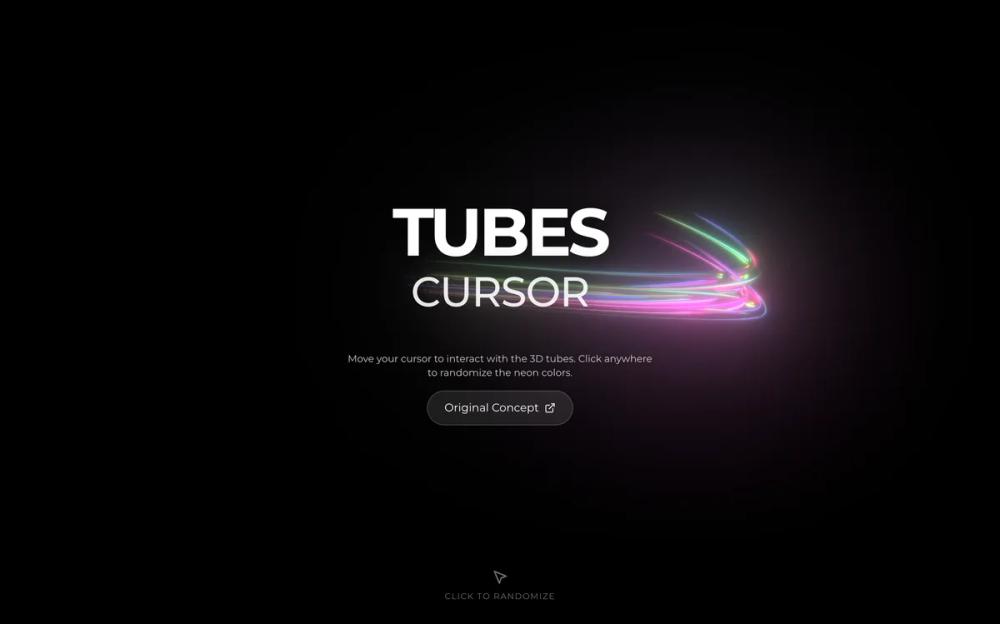 Все промпты
animationbackground
Tubes Interactive Background
Интерактивный 3D фон с неоновыми трубками, реагирующими на курсор. Анимация, рандомизация цветов при клике. Идеально для hero-секций.
Автор: Zhou JasonЖивое превью
Prompt
# Tubes Interactive Background

This is a reference implementation of an interactive 3D background

~~~/README.md
# Tubes Interactive Background

A high-performance 3D interactive background featuring neon tubes that follow the user's cursor. Built with `threejs-components`.

## Features
- 🖱️ **Interactive Cursor**: Tubes follow mouse movement in 3D space
- 🎨 **Dynamic Colors**: Click to randomize tube and light colors instantly
- ⚡ **High Performance**: Optimized WebGL rendering
- 📱 **Responsive**: Adapts to container size

## Dependencies
- `three`
- `framer-motion` (optional, for overlay animations)

## Usage

```tsx
import { TubesBackground } from '@/sd-components/070b9477-5ebf-41b4-ab04-9b4d4975e984';

function MyPage() {
  return (
    <div style={{ height: '100vh' }}>
      <TubesBackground>
        {/* Your content overlay goes here */}
        <h1>Hello World</h1>
      </TubesBackground>
    </div>
  );
}
```

## Props

| Prop | Type | Default | Description |
|------|------|---------|-------------|
| `children` | `ReactNode` | `undefined` | Content to overlay on top of the canvas |
| `className` | `string` | `undefined` | Additional CSS classes for the container |
| `enableClickInteraction` | `boolean` | `true` | Whether clicking randomizes colors |

## Credits
Original concept and implementation by [Kevin Levron](https://www.framer.com/@kevin-levron/).
Based on `threejs-components` library.
~~~

~~~/src/App.tsx
import React from 'react';
import { TubesBackground } from './Component';
import { ExternalLink, MousePointer2 } from 'lucide-react';

export default function App() {
  return (
    <div className="w-full h-screen font-sans">
      <TubesBackground>
        <div className="flex flex-col items-center justify-center w-full h-full gap-6 text-center px-4">
          <div className="space-y-2 pointer-events-auto cursor-default">
            <h1 className="text-6xl md:text-8xl font-bold uppercase tracking-tighter text-white drop-shadow-[0_0_20px_rgba(0,0,0,1)] select-none">
              Tubes
            </h1>
            <h2 className="text-4xl md:text-6xl font-medium uppercase tracking-tight text-white/90 drop-shadow-[0_0_20px_rgba(0,0,0,1)] select-none">
              Cursor
            </h2>
          </div>

          <div className="mt-8 flex flex-col items-center gap-4 pointer-events-auto">
            <p className="text-white/80 text-sm max-w-md drop-shadow-md">
              Move your cursor to interact with the 3D tubes. Click anywhere to randomize the neon colors.
            </p>

            <a
              href="https://www.framer.com/@kevin-levron/"
              target="_blank"
              rel="noreferrer"
              className="flex items-center gap-2 px-6 py-3 bg-white/10 hover:bg-white/20 backdrop-blur-md border border-white/20 rounded-full text-white transition-all duration-300 group"
            >
              <span>Original Concept</span>
              <ExternalLink className="w-4 h-4 group-hover:translate-x-0.5 group-hover:-translate-y-0.5 transition-transform" />
            </a>
          </div>

          <div className="absolute bottom-8 flex flex-col items-center gap-2 text-white/50 animate-pulse pointer-events-none">
            <MousePointer2 className="w-6 h-6" />
            <span className="text-xs uppercase tracking-widest">Click to randomize</span>
          </div>
        </div>
      </TubesBackground>
    </div>
  );
}
~~~

~~~/package.json
{
  "name": "tubes-interactive-background",
  "description": "Interactive neon tubes 3D cursor effect background",
  "dependencies": {
    "three": "^0.160.0",
    "framer-motion": "^11.0.0",
    "lucide-react": "^0.300.0",
    "clsx": "^2.1.0",
    "tailwind-merge": "^2.2.0"
  }
}
~~~

~~~/src/Component.tsx
import React, { useEffect, useRef, useState } from 'react';
import { motion, AnimatePresence } from 'framer-motion';
import { cn } from './utils'; // We'll define this or use inline

// Helper for random colors
const randomColors = (count: number) => {
  return new Array(count)
    .fill(0)
    .map(() => "#" + Math.floor(Math.random() * 16777215).toString(16).padStart(6, '0'));
};

interface TubesBackgroundProps {
  children?: React.ReactNode;
  className?: string;
  enableClickInteraction?: boolean;
}

export function TubesBackground({
  children,
  className,
  enableClickInteraction = true
}: TubesBackgroundProps) {
  const canvasRef = useRef<HTMLCanvasElement>(null);
  const [isLoaded, setIsLoaded] = useState(false);
  const tubesRef = useRef<any>(null);

  useEffect(() => {
    let mounted = true;
    let cleanup: (() => void) | undefined;

    const initTubes = async () => {
      if (!canvasRef.current) return;

      try {
        // We use the specific build from the CDN as it contains the exact effect requested
        // Using native dynamic import which works in modern browsers
        // @ts-ignore
        const module = await import('https://cdn.jsdelivr.net/npm/threejs-components@0.0.19/build/cursors/tubes1.min.js');
        const TubesCursor = module.default;

        if (!mounted) return;

        const app = TubesCursor(canvasRef.current, {
          tubes: {
            colors: ["#f967fb", "#53bc28", "#6958d5"],
            lights: {
              intensity: 200,
              colors: ["#83f36e", "#fe8a2e", "#ff008a", "#60aed5"]
            }
          }
        });

        tubesRef.current = app;
        setIsLoaded(true);

        // Handle resize if the library doesn't automatically
        const handleResize = () => {
          // The library might handle it, but typically we ensure canvas matches container
          // For this specific lib, it likely attaches to window resize or we might need to manually resize
        };

        window.addEventListener('resize', handleResize);

        cleanup = () => {
          window.removeEventListener('resize', handleResize);
          // If the library has a destroy method, call it
          // app.destroy?.();
          // Based on typical threejs-components, it might not have an explicit destroy exposed easily
          // but we should at least nullify the ref
        };

      } catch (error) {
        console.error("Failed to load TubesCursor:", error);
      }
    };

    initTubes();

    return () => {
      mounted = false;
      if (cleanup) cleanup();
    };
  }, []);

  const handleClick = () => {
    if (!enableClickInteraction || !tubesRef.current) return;

    const colors = randomColors(3);
    const lightsColors = randomColors(4);

    tubesRef.current.tubes.setColors(colors);
    tubesRef.current.tubes.setLightsColors(lightsColors);
  };

  return (
    <div
      className={cn("relative w-full h-full min-h-[400px] overflow-hidden bg-background", className)}
      onClick={handleClick}
    >
      <canvas
        ref={canvasRef}
        className="absolute inset-0 w-full h-full block"
        style={{ touchAction: 'none' }}
      />

      {/* Content Overlay */}
      <div className="relative z-10 w-full h-full pointer-events-none">
        {children}
      </div>
    </div>
  );
}

// Default export
export default TubesBackground;

// Utility for class merging
function cn(...inputs: (string | undefined | null | false)[]) {
  return inputs.filter(Boolean).join(" ");
}
~~~

Implementation Guidelines

1. Analyze the component structure, styling, animation implementations
2. Review the component's arguments and state
3. Think through what is the best place to adopt this component/style into the design we are doing
4. Then adopt the component/design to our current system

Help me integrate this into my design